HOME Apps - Introduction
Lawo's HOME Apps are software applications which provide video, audio and ancillary processing. They run on standard network servers that can be on-premise, in private data centers or in the public cloud.
The image below shows a typical network where apps are combined with existing hardware devices (for signal interfacing and control).
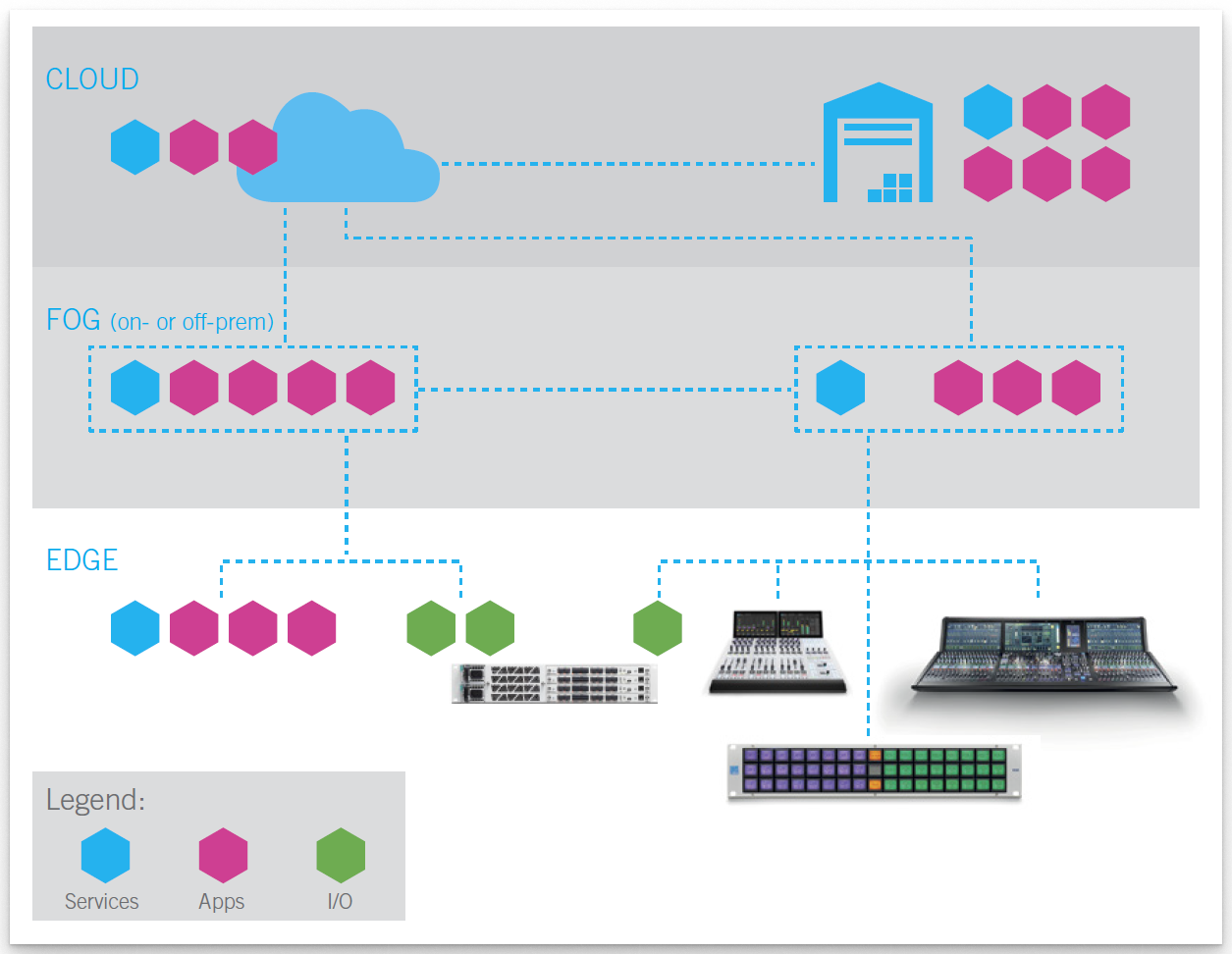
At-a-Glance
- HOME Apps are software applications which provide video, audio and ancillary processing
- They are native to HOME and provide specific (single-purpose) functionality.
- The architecture is cloud-native and uses containers that can run on CPU or CPU & GPU.
- Redundancy can be achieved by configuring redundancy group(s) that contain two or more app servers (e.g. main and backup).
- The overall usage is based on licenses where customers can choose between permanent and flexible licensing models.
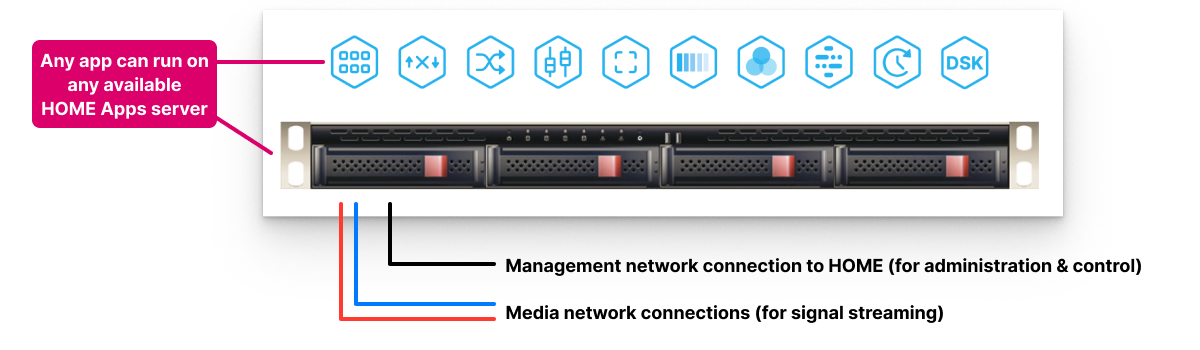
- All I/O signals are streamed via the media network. The physical connections are made via the app server's media network interface cards (NICs). The IP senders and receivers are defined when you create the app (in HOME).
- For signal streaming and control, HOME Apps support all widely-used IP protocols: SMPTE ST2110, NDI®, SRT, JPEG XS, .H264, .H265, AES67.
- Stream redundancy (essential for ST2022-7) can be configured by enabling the Stream Redundancy option for the app server(s) to support dual-redundant streams.
- For external control, parameters can be accessed (over NATs) via the HOME API.
What you will need
To run HOME Apps you will need a HOME system (Lawo's IP management platform) plus at least one HOME Apps server. The HOME system handles the management and control of all apps, while the app server(s) deliver the processing. If HOME Apps is installed as a 'converged' system, then the HOME (management) and HOME Apps (processing) run on the same network server.
Processing Capacity
The processing can run on any available app server on the network, and apps can be started and stopped at any time. This allows users to run an app for the duration of a production and then stop the app once the production is finished. The available server capacity (and licenses) can then be used to start a different app instance or, in the case of Lawo Flex credits, any other licensed resource in HOME.
App Usage / Licensing
Firstly, each app requires a selection of licenses: to run the basic functionality (of the app), configure its I/O (signal streams) and enable any optional features. Secondly, a HOME Pass is required for the configuration and control (of the app) from HOME.
In most cases, the individual licenses are supported by the Lawo Flex licensing model. This means that each app can be licensed using perpetual licenses (of a certain type), an equivalent amount of credits (assigned from a Lawo Flex subscription), or a mixture of both: perpetual licenses + credits. The allocations are made automatically, by HOME, when the user starts an app. By default, HOME allocates all available perpetual licenses first, and then tops up using credits. If you wish to use only perpetual licenses, or only credits, then this can be done by changing the License Type of the app.
When an app is stopped, its perpetual licenses and credits are released back into the pool of available licenses (in HOME). Users can check what's available, for the entire HOME system, from the 'Licenses' page and Perpetual or Credits tab.
Please note: While perpetual licenses are valid for apps (or app features) of the same type, credits can be used for any licensed resource that is managed by HOME and supported by Lawo Flex. In addition, credits can be removed (from HOME) and returned to the original subscription (in the customer's Lawo Flex account), a process known as a revoke. This makes it possible to transfer credits between HOME systems when, for example, an OB van or studio is not in use.
Connecting I/O Signals
The I/O signals for all HOME Apps are streamed via the media network and so, once an app is configured and running, its streaming connections can be managed from HOME's 'Stream Routing' page.
For most HOME Apps, the IP senders and receivers are pre-defined according to the configuration of the app. i.e. the number and type of I/O. You can check the current configuration from the 'Device → Senders' or 'Device → Receivers' page (as described here). As part of the app configuration, users can choose the stream transport type, video resolution, number of audio channels, etc. This allows the IP senders and receivers to be tailored to the application and network (to help manage the bandwidth of the switches and NICs).
Connections can be made by selecting a source and a destination, and then pressing Connect. This sets up a streaming connection that will be automatically re-instated if, for example, the sending device restarts.
Once a connection is made, signals are streamed via the media Network Interface Cards (NICs) of the current app server. To achieve dual-redundant streaming, compatible with SMPTE ST2022-7, the NICs must be configured in pairs to support the primary and secondary streams. This is achieved by switching on the Stream Redundancy option in the app server configuration. Note that this option is configured at an app server level, meaning that the senders and receivers of all apps running on that server are either all dual-redundant OR all non-redundant. It is not possible to configure Stream Redundancy per app or per stream.
If audio streams are configured, then the 'I/O Routing' maps the audio channels being received by the app's receivers to the audio channels transmitted by the app's senders. By default, the audio channels are mapped on a 1:1 basis. The I/O Routing can be edited if you wish to change the default assignments.
External Control
The depth of integration is dependent on the external system's implementation of the HOME API.
Software Releases

- The HOME version can be checked by clicking on the LAWO logo (at the top left of the HOME UI).
- The app version is shown in the Software Version field (in the 'Device → General' settings). This is the same for all apps contained in the release bundle, and so you only need to check one of the apps.
- To check the compatibility, please refer to the respective release notes for the HOME Apps release.
During the installation of HOME Apps, there are a number of configuration decisions to be made. This means that, at the current time, each new HOME Apps release must be installed by the Lawo engineering team. To schedule an installation or upgrade, please contact Lawo Support. You can find information about the latest release here.
Current Apps
The current release bundle supports the following apps. The links below will take you to the individual app chapters. If you are new to the system, then it is recommended to read the Getting Started and General Operation topics first.
Video Processing Apps
- HOME Color Corrector
- HOME Downstream Keyer (DSK)
- HOME Multiviewer (MV) - RESTRICTED
- HOME Stream Transcoder
- HOME UDX Converter
Audio Processing Apps
Ancillary & Utility Apps
- HOME Delay Inserter
- HOME Graphic Inserter
- HOME Test Pattern Generator (TPG)
- HOME Timecode Generator (TCG)
Ordering Information
HOME Apps are ordered in the usual manner from your local Lawo sales representative.
If you wish to use perpetual licenses to run HOME Apps, then these can be ordered using the part numbers listed in the Available License Options table. In each case, the licenses are only required when the user starts an app. Licenses are not required for apps that are configured but inactive.
If you wish to trial apps of different types, then this can be done by using credits that are not in use (during downtime) to 'temporarily' license the apps. This makes it possible to try out new workflows before committing to an order of perpetual licenses or new Lawo Flex subscription. More information about using Lawo Flex credits is provided in HOME Apps - Managing Credits.