The '
Device → Receivers' page displays information relating to the Video, Audio and Metadata receivers provided by the app.
From here you can check information about a receiver, and select a receiver to access its more advanced options: I/O Routing (for the audio streams), the stream configuration parameters and SDP data.
Available Receivers (RX)
For a HOME DSK, the available receivers (RX) correspond to the app's inputs as follows:
- RX 1 = Background A
- RX 2 = Background B
- RX 3 = Key 1
- RX 4 = Fill 1
- RX 5 = Key 2
- RX 6 = Fill 2
- RX 7 = Key 3
- RX 8 = Fill 3
When considering the app's configuration, the Number of Keyers option determines how many Key and Fill receivers are provisioned; the Video/Audio Transport options (for the 'Inputs') determine the number and type of flows.
Note that the Keyers do not support audio and so there is a difference between the stream (essence) types that can be received:
- Background A and Background B - Video (only), or Video and Audio.
- Key n and Fill n - Video (only).
Once an app is configured and running, the receiver details can be checked from the Receivers page: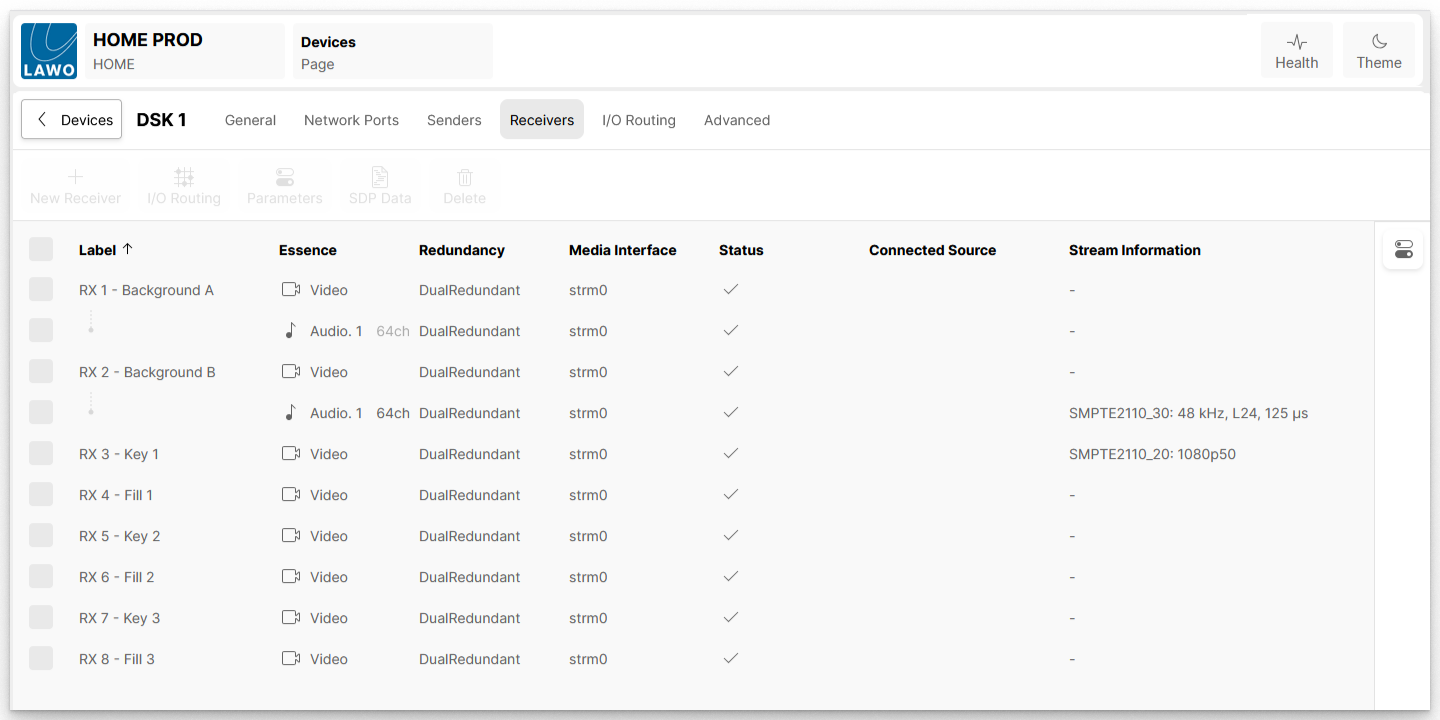
The informational fields show the Label of each receiver, its essence type (Video or Audio) and other information such as whether dual-redundant streaming is supported. If the receiver is connected, then information about the Connected Source and its Stream Information is also shown. The fields have the same meaning for all app types, and are described in HOME Apps - Senders and Receivers.
Receiver Operations
Once a receiver is selected, the user can access and edit its more advanced options. For example, to adjust the I/O Routing (for the audio streams), the receiver's streaming parameters and SDP data:
Advanced page parameters
Further controls are available via the Advanced parameters page. See HOME DSK - Advanced -> Receivers.