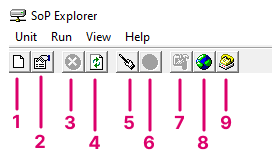
| 1 | create new unit | Add a new unit to SoP Explorer. |
| 2 | show/edit current unit's properties | Open the 'Unit Properties' dialog box for the selected system. |
| 3 | cancel all operations | Cancel all operations. For example, to cancel a software update. |
| 4 | refresh all units | Refresh the status of all units. For example, after performing an update. |
| 5 | software update wizard | Start the 'Software Update Wizard'. |
| 6 | update selected software module | Open the 'Software Update' dialog box for the selected software module. This option becomes available once a module is selected. |
| 7 | run configuration tool | Open the ON-AIR Designer configuration for the selected unit. The configuration file path is defined in the 'Unit Properties'. This option becomes available once a configuration file is defined. |
| 8 | run web browser | Open a Web UI session for the selected unit. |
| 9 | run telnet application | Open a Telnet session for the selected unit. |