HOME Timecode Generator - App Configuration
The choices made here will determine the resources required to run the app: I/O bandwidth, CPU resources, etc.
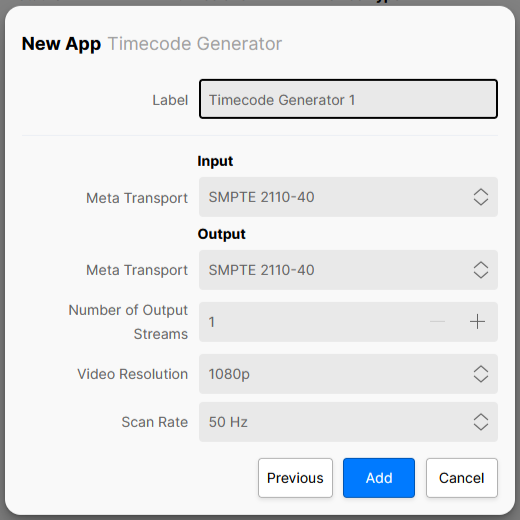
These initial configuration options appear in the 'New App' dialog. To streamline the process, a set of default values are entered and so, in most cases, all you need to provide is a label for the app.
The parameters can be edited later for a single app via the 'Edit App' dialog (in the General settings page), or for multiple apps using 'Edit Apps'. Note that this is only possible once the app is stopped. Further 'runtime controls' are available in the app's other settings pages: Senders, Receivers, etc.
Please note:
- The initial configuration cannot be edited while an app is running and so, to make any changes, you will need to first stop the app.
- Some of the menu items are dependent on previous settings. For example, the Video Compression ratio control is only displayed once the Video Transport is set to JPEG-XS. If a different video transport type is selected, then the Video Compression control is hidden.
- Some of the parameters can also be edited during runtime from the app's settings pages. In this instance, the initial configuration values are overwritten by the runtime controls as the latest (runtime) value always wins. An example is described here.
Using the Controls
For a HOME Timecode Generator, the options in the app configuration define whether the app's input receiver is provisioned and the number of output (timecode generator) streams.
A HOME Timecode Generator can be configured to provide up to 8 output senders (TX 1 to 8), where each sender transmits a SMPTE 2110-40 (Metadata) stream. If SMPTE 2110-40 is also set for the app's input receiver (RX 1), then the connected Metadata can be used as a time source for the TCG.
- Use the 'Input' Meta Transport option to determine whether the input receiver is provisioned or not.
- Use the Number of Output Streams option to define the number of the output senders (from 1 to 8).
- Note that the 'Output' Meta Transport option is always set to SMPTE 2110-40 and cannot be changed.
- The 'Output' Video Resolution and Scan Rate become important if video streams are to be associated with the generated 2110-40 (Meta) streams.
- Note that this app supports Meta streams only; there are no Video or Audio streams.
Once the app is configured and running, the timecode generator (for each output) can be adjusted, independently, using the app's Advanced → Timecode Generator controls.
Control Descriptions
The rest of this topic describes all possible options for the app configuration controls.
| Control | Description |
|---|---|
| Label | A text field allowing the user to name the app being created. All app names in a system must be unique. |
Input | |
| Meta Transport | Enables the app's ST 2110-40 receiver, allowing ANC metadata to be received. The options are:
The choice made will affect the amount of resources required by the app. |
Output | |
| Meta Transport | Enables the app's ST 2110-40 sender, allowing ANC metadata to be sent. The options are:
The choice made will affect the amount of resources required by the app. |
| Number of Output Streams | Defines the number of 2110-40 senders to be provisioned. The value can be set from 1 to 8. The choice made will affect the amount of resources required by the app. |
| Video Resolution | Defines the video resolution (carried by the 2110-40 stream):
2110-40 Metadata can be passed through a gateway device such as .edge, combined with video and audio, and converted into an SDI signal. The position (line number) that the ANC data is inserted into differs depending on the video format. It is therefore important to set this control to match the format of the video stream that will be associated with the 2110-40 stream. |
| Scan Rate | Defines the video frame rate (carried by the 2110-40 stream):
It is important to set this control to match the format of the video stream that will be associated with the 2110-40 stream. The selected value also controls how the timecode generator counts - i.e. the number of frames in second. |