HOME Stream Transcoder - App Configuration
The choices made here will determine the resources required to run the app: I/O bandwidth, CPU resources, etc.
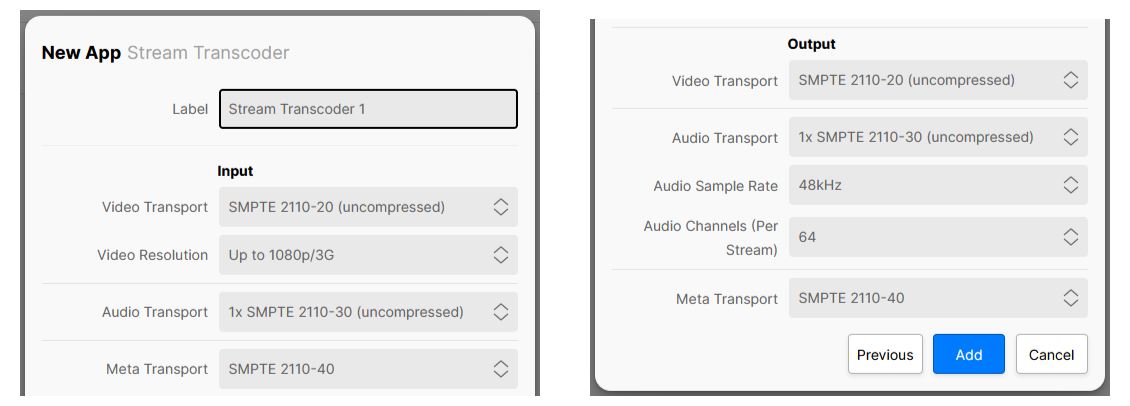
These initial configuration options appear in the 'New App' dialog. To streamline the process, a set of default values are entered and so, in most cases, all you need to provide is a label for the app.
The parameters can be edited later for a single app via the 'Edit App' dialog (in the General settings page), or for multiple apps using 'Edit Apps'. Note that this is only possible once the app is stopped. Further 'runtime controls' are available in the app's other settings pages: Senders, Receivers, etc.
Please note:
- The initial configuration cannot be edited while an app is running and so, to make any changes, you will need to first stop the app.
- Some of the menu items are dependent on previous settings. For example, the Video Compression ratio control is only displayed once the Video Transport is set to JPEG-XS. If a different video transport type is selected, then the Video Compression control is hidden.
- Some of the parameters can also be edited during runtime from the app's settings pages. In this instance, the initial configuration values are overwritten by the runtime controls as the latest (runtime) value always wins. An example is described here.
Using the Controls
For a HOME Stream Transcoder, the options in the app configuration define the app's input and output streams.
A HOME Stream Transcoder allows users to convert incoming video streams, of a given format, to a supported output format. For example, to convert from ST 2110-20/30/40 to SRT.
This app provides a single input (RX 1) and a single output (TX 1) that are configured separately, and support the following streams: Video (only); Video and Audio; Video and Meta; or Video, Audio and Meta.
- Use the 'Input' Video/Audio/Meta Transport options to define the stream type/flows that can be received.
- Use the 'Output' Video/Audio/Meta Transport options to set the stream type/flows of the outgoing streams.
- The Audio/Meta Transport options can be set to Disabled (if audio and/or meta are not required).
Control Descriptions
The rest of this topic describes all possible options for the app configuration controls.
| Control | Description |
|---|---|
| Label | A text field allowing the user to name the app being created. All app names in a system must be unique. |
Input | |
| Video Transport | Sets the type of input video transport, over which the app will receive video streams:
This control will affect all of the app's video receivers. The choice made will affect the amount of resources required by the app and will also require the appropriate software licenses. See HOME Apps - Available License Options. |
| Video Resolution | Defines the maximum resolution of video streams which can be routed into the app's video receivers:
This control will affect all of the app's video receivers. The choice made will affect the amount of resources required by the app. |
| Video Compression | This control appears when the Input Video Transport is set to an option which supports SMPTE 2110-22 (JPEG-XS). The selection made affects which JPEG-XS sources can be routed to the receiver based on the source’s compression ratio. For example: with ‘At least 8:1’ selected, sources with a compression ratio of 8:1 or more (9:1, 10:1, 11:1 etc) may be routed to the receiver, sources with lower compression ratios will be rejected. The available options are :
The option chosen may affect the input bandwidth provisioned for the app. |
| Audio Transport | When the Input Video Transport is set to SMPTE 2110-20 (uncompressed) or SMPTE 2110-22 (JPEG-XS) Defines the maximum number of audio streams that can be received by the app's input. This, in turn, defines the maximum number of audio channels that can be received from those streams. The options are:
If an audio stream which contains more channels than the maximum is routed to a receiver, then the additional channels are ignored. When the Input Video Transport is set to NDI / NDI HX2 Defines whether the app's input should receive audio or not:
When the Input Video Transport is set to SRT Defines whether the app's input should receive audio or not:
|
| Meta Transport | Not visible when the Input Video Transport is set to NDI or SRT. When the Input Video Transport is set to SMPTE 2110-20 (uncompressed) or SMPTE 2110-22 (JPEG-XS) Enables the app's ST 2110-40 receiver, allowing ANC metadata to be received. The options are:
The choice made will affect the amount of resources required by the app. |
Output | |
Video Transport | Defines the output stream transport type of the app's video sender:
The choice made will affect the amount of resources required by the app and will also require the appropriate software licenses. See HOME Apps - Available License Options. If the Output Video Transport is set to WebRTC, then further configuration controls are provided via the app's Advanced → WebRTC menu. See HOME Stream Transcoder - Advanced -> WebRTC. |
Video Compression | Not visible when the Output Video Transport is set to SMPTE 2110-20 (uncompressed) or NDI. When the Output Video Transport is set to SMPTE 2110-22 (JPEG-XS) When the app starts, an amount of output bandwidth is allocated (for the app) on the network interface. JPEG-XS allows the user to dynamically change the compression ratio while the app is running. This control can be used to prevent the app from over-allocating bandwidth unnecessarily. The available options are:
The choice made will affect the amount of resources required by the app and will also determine the list of actual compression ratios available. When the Output Video Transport is set to NDI HX2, SRT or WebRTC Provides a basic level of control of the compression ratio implemented by the chosen transport stream. The available options are:
Important: More advanced controls can be found in the app's 'Advanced → Senders → TX n' menu. Once used, the Advanced (runtime) controls will override this value. |
| Audio Transport | When the Output Video Transport is set to SMPTE 2110-20 (uncompressed) or SMPTE 2110-22 (JPEG-XS) Defines the number of audio streams provided by the app's output. This, in turn, defines the maximum number of audio channels supported by those streams. The options are:
Defines whether the app's output should send audio or not:
When the Output Video Transport is set to SRT Defines whether the app's output should send audio or not:
When the Output Video Transport is set to WebRTC Defines whether the app's output should send audio or not:
|
| Audio Sample Rate | Only visible when an Output Audio Transport is set. Defines the audio sample rate of the app's output. In the current release, the app supports 48 kHz only. |
| Audio Channels (Per Stream) | Defines the initial number of audio channels available per stream, provided by the app's output:
|
| Meta Transport | Not visible when the Output Video Transport is set to NDI, SRT or WebRTC. When the Output Video Transport is set to SMPTE 2110-20 (uncompressed) or SMPTE 2110-22 (JPEG-XS) Enables the app's ST 2110-40 sender, allowing ANC metadata to be sent. The options are:
The choice made will affect the amount of resources required by the app. Any meta data arriving on the SMPTE 2110-40 receiver will automatically be delayed before being present on the SMPTE 2110-40 metadata output, to compensate for any video processing delay. This ensures that the metadata stream remains synchronous to the video stream. |