HOME Graphic Inserter - App Configuration
The choices made here will determine the resources required to run the app: I/O bandwidth, CPU resources, etc.
These initial configuration options appear in the 'New App' dialog. To streamline the process, a set of default values are entered and so, in most cases, all you need to provide is a label for the app.
The parameters can be edited later for a single app via the 'Edit App' dialog (in the General settings page), or for multiple apps using 'Edit Apps'. Note that this is only possible once the app is stopped. Further 'runtime controls' are available in the app's other settings pages: Senders, Receivers, etc.
Please note:
- The initial configuration cannot be edited while an app is running and so, to make any changes, you will need to first stop the app.
- Some of the menu items are dependent on previous settings. For example, the Video Compression ratio control is only displayed once the Video Transport is set to JPEG-XS. If a different video transport type is selected, then the Video Compression control is hidden.
- Some of the parameters can also be edited during runtime from the app's settings pages. In this instance, the initial configuration values are overwritten by the runtime controls as the latest (runtime) value always wins. An example is described here.
Using the Controls
A HOME Graphic Inserter can be used to create an outgoing video stream from a HTML5 input source.
- Start by entering the URL of the webpage to be converted into the 'Input' URL field.
- Then use the 'Output' options to define the output video stream: transport type, resolution, etc.
Note that this app supports a single Video output sender only (TX 1); there are no input receivers or Audio/Meta streams.
Control Descriptions
The rest of this topic describes all possible options for the app configuration controls.
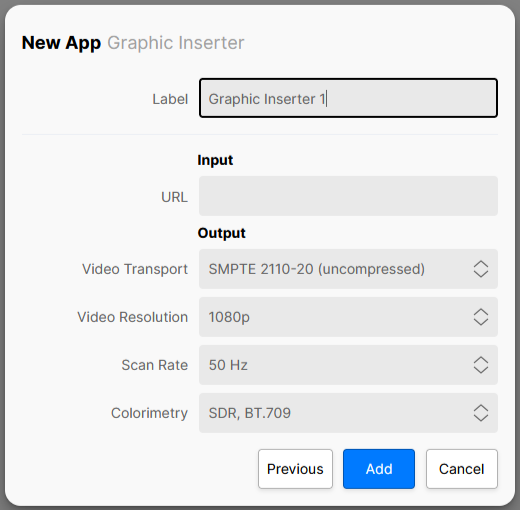
| Control | Description |
|---|---|
| Label | A text field allowing the user to name the app being created. All app names in a system must be unique. |
Input | |
| URL | Enter the URL address (e.g. www.lawo.com) of the webpage which is to be converted to a video stream. |
Output | |
Video Transport | Defines the output stream transport type of the app's video sender:
The choice made will affect the amount of resources required by the app and will also require the appropriate software licenses. See HOME Apps - Available License Options. If the Output Video Transport is set to WebRTC, then further configuration controls are provided via the app's Advanced → WebRTC menu. See HOME Graphic Inserter - Advanced -> WebRTC. |
Video Compression | Not visible when the Output Video Transport is set to SMPTE 2110-20 (uncompressed) or NDI. When the Output Video Transport is set to SMPTE 2110-22 (JPEG-XS) When the app starts, an amount of output bandwidth is allocated (for the app) on the network interface. JPEG-XS allows the user to dynamically change the compression ratio while the app is running. This control can be used to prevent the app from over-allocating bandwidth unnecessarily. The available options are:
The choice made will affect the amount of resources required by the app and will also determine the list of actual compression ratios available. When the Output Video Transport is set to NDI HX2, SRT or WebRTC Provides a basic level of control of the compression ratio implemented by the chosen transport stream. The available options are:
Important: More advanced controls can be found in the app's 'Advanced → Senders → TX n' menu. Once used, the Advanced (runtime) controls will override this value. |
| Video Resolution | Sets the frame-size (resolution) and scan type (interlaced or progressive) of the video output; available options are:
Please note: No resizing of the HTLM5 source is performed by the Graphic Inserter app. The format of the HTML5 page (height and width) must match the Output Video Resolution (defined here) to avoid unexpected results. e.g.
|
| Scan Rate | Sets the frame rate (FPS) of the video output; available options are:
|
| Colorimetry | Selects the colorimetry of the video output; available options are:
Please note: No colorimetry conversion is applied by the Graphic Inserter app. This control is used to inform downstream devices of the colorimetry parameters of the stream produced by the Graphic Inserter app. It should be set to match the colorimetry of the HTML5 source. |