CarePlus SLA - Features and Additions
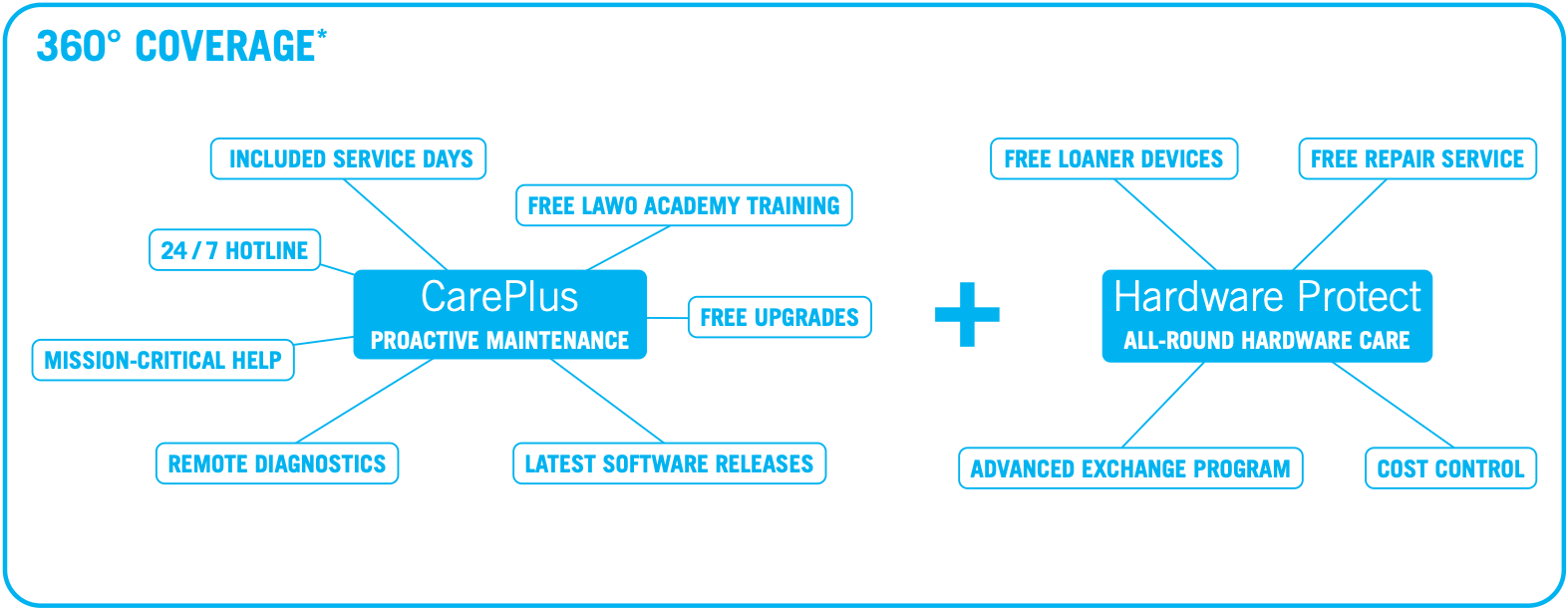
This topic provides more information about the SLA features.
Response Times
| Severity | Response Time |
|---|---|
| 1 - Critical | 1 business day |
| 2 - High | 1 business day |
| 3 - Medium | 2 business days |
| 4 - Low | 3 business days |
| Severity | Response Time |
|---|---|
| 1 - Critical | 1 hour* |
| 2 - High | 1 hour* |
| 3 - Medium | 1 business days |
| 4 - Low | 2 business days |

* To ensure the fastest possible response, Severity 1 and Severity 2 incidents must be reported via our 24/7 hotline. Only incidents reported through the hotline are eligible for the response times defined in the applicable service level agreement. Incidents submitted through other channels will be processed as medium-severity incidents (Severity 3).
24/7 Hotline
Available to Lawo CarePlus Max customers. Regardless of Timezone, your Lawo CarePlus Max SLA provides access to a best in class incident management system. This allows you to reach out to our global customer support team 7 days a week, 24 hours a day for Severity 1 & 2 issues.
The phone number for your region can be found here. Please have your 24/7 PIN available when calling. You can find the PIN in the SLA Details section of the Lawo Customer Service Portal or on your SLA delivery note.
Software Updates, Upgrades, Patches, Bug Fixes
Whether you are an Advanced, Max or Flex subscription customer, you are entitled to GA (generally available) software updates, patches & bug fixes for all your covered equipment.
Flex Subscription Ready
A CarePlus Advanced or Max plan makes your infrastructure FLEX Subscription-ready, enabling you to leverage Lawo’s software functionality on a highly FLEXible basis — instantly.
Further Details about Lawo Flex can be found here.
Included Service Days
CarePlus Max includes a number of Lawo Professional Services days, calculated based on the customer's product sales volume.
Included service days can be used for:
- Configuration
- On-site maintenance
- Remote maintenance
- Consulting
- Other relevant service activities
Please note
Service Days included in the SLA do not cover travel or accommodation expenses and apply only to the system covered by the respective SLA plan. Any system expansion, addition of hardware, or extension of the covered environment requires separate SLA coverage.
To request the usage of an included Service day please create a service request ticket and select the product category SLA → Included Service Day request
Lawo Academy and SLA Onboarding
Lawo CarePlus includes access to the Lawo Academy, providing customers with flexible learning opportunities to help build and maintain expertise across their Lawo solutions. Through a comprehensive library of self-paced online training courses, users can acquire product knowledge, deepen their technical understanding, and stay up to date with the latest features and best practices.
Customers subscribed to CarePlus Advanced receive a number of self-guided training seats determined by the value of their SLA agreement. These seats can be assigned to individual users and provide access to the available self-paced training content within the Lawo Academy. Details on how to requests these seats are on the delivery note of the SLA. The current Academy offering is available here.
Customers subscribed to CarePlus Max benefit from unlimited self-guided training seats, allowing an unrestricted number of users within the covered organization to access the available online training courses. This ensures that knowledge can be shared across teams and that all relevant personnel can benefit from the available learning resources. Details on how to requests these seats are on the delivery note of the SLA.
In addition to the included self-guided training seats, all CarePlus customers receive access to the SLA Onboarding Course. This course provides an introduction to the available SLA services, support channels, escalation procedures, and key service processes, helping customers make full use of their CarePlus coverage from the very beginning.
Requesting Academy Access
To activate the included SLA Onboarding Course and any self-guided training seats available under your CarePlus agreement, please submit a request through the Lawo Academy Helpdesk.
Whenever possible, use your corporate email address and include the following information:
Lawo SLA order ID associated with your CarePlus agreement
Customer or organization name
Number of SLA onboarding seats required
Once access has been granted, participants can complete the self-paced SLA Onboarding Course through the Lawo Academy Portal.
SLA Onboarding Meeting – CarePlus Max
As an additional benefit, CarePlus Max customers are entitled to a dedicated SLA Onboarding Meeting with a Lawo representative. This session offers the opportunity to review SLA-related processes in detail, discuss available service offerings, and clarify any questions regarding support procedures, escalation paths, and service delivery.
We recommend completing or reviewing the self-paced SLA Onboarding Course before the meeting, allowing the discussion to focus on customer-specific questions and requirements.
To request an SLA Onboarding Meeting, please create a Service Request Ticket and select the product category SLA → SLA Onboarding.
Additional information about the Lawo Academy and its training offerings can be found in the Lawo Academy documentation.
Hardware features
Free repair Service
Customers with an active Hardware Protect plan benefit from comprehensive repair coverage for eligible hardware failures, including all labor and materials required to return the device to full operational condition. This reduces the risk of unexpected repair expenses and helps ensure predictable maintenance costs throughout the coverage period.
Coverage applies to hardware defects and component failures but excludes damage caused by improper handling, misuse, accidents, unauthorized modifications, operation outside specified environmental conditions, or other customer-induced causes.
Loan devices
Hardware Protect customers are entitled to free loan devices during the repair period, helping to maintain system availability and minimize operational disruptions.
If a loan device is required, simply select the corresponding option in the RMA request form when creating your service ticket. Subject to availability, Lawo will provide a suitable loan unit to bridge the repair period and help keep your system operational until the repaired device is returned.
Advance exchange
As an alternative to a standard repair with a loaner device, customers may make use of the included Advance Exchange Program. A replacement unit is shipped prior to the return of the defective device, ensuring the fastest possible recovery and minimizing downtime in business-critical environments. Once the replacement unit has been received, the original device can be returned to Lawo for further processing.
Further information about the Advance Exchange Program, including eligibility, process details, and request instructions, can be found here.
Shipping Response
To help minimize downtime, Hardware Protect customers benefit from prioritized shipping of spare parts and loaner devices. Loan parts and exchange units are typically dispatched within two business days, helping to restore system availability as quickly as possible.
This service ensures timely access to replacement hardware during repairs or in the event of eligible hardware failures, reducing operational disruption and supporting business continuity in critical production environments
Please note
The stated shipping time refers to Lawo's internal processing time, beginning with the receipt of a valid request and ending when the shipment is prepared for collection by the designated carrier. Transit times and delivery durations are not included and may vary depending on the destination, carrier, and applicable customs procedures.
Shipping costs
Hardware Protect includes outbound shipping costs for replacement units, loan devices, and repaired equipment shipped from Lawo to the customer within the European Union and North America. This helps reduce unforeseen service expenses and ensures predictable support costs throughout the coverage period.
Please note
Hardware Protect does not cover any import duties, customs fees, taxes, or other charges imposed by local authorities. Any such costs incurred in connection with the shipment remain the responsibility of the customer.