HOME - License Types
Some of HOME's functionality requires a specific license to operate. This topic describes the system-specific license types:
HOME Passes
HOME V4.0 (OR HIGHER)
From HOME v4.0, a HOME Pass is required for each device, app or service that you wish to configure and control from HOME.
HOME Passes apply to all inventory items. This includes all Lawo devices, HOME Apps and App servers; NMOS and 3rd-party Lives@HOME devices; Lawo Services and software functionality (XCS), as well as HOME Proxies. Note that a HOME Pass is not required for a redundancy group, but is required for the redundancy group members.
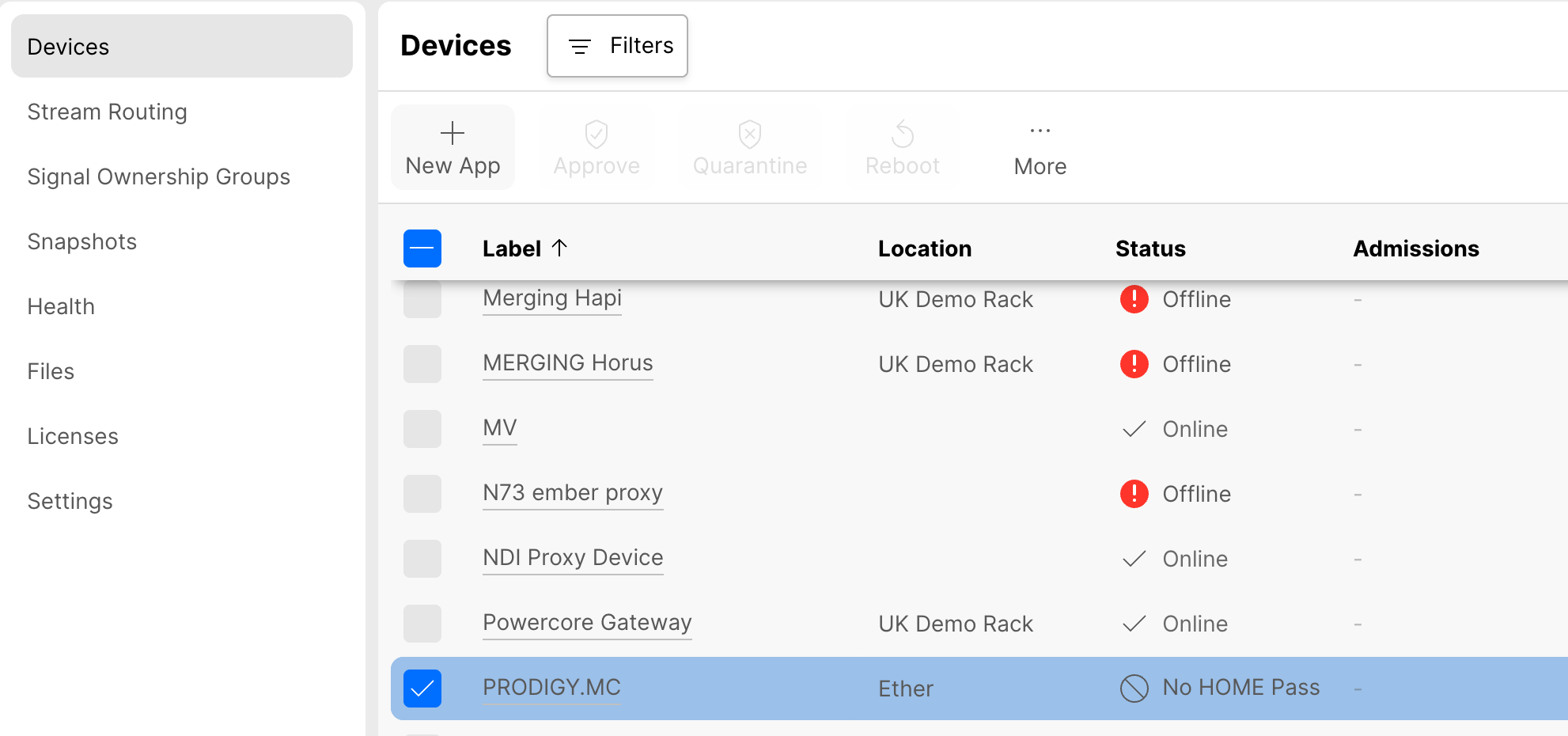
The current status can be checked by opening HOME's 'Devices' page. If a valid HOME Pass is present, then the usual statuses are displayed: Online, Offline, Inactive, etc. If there is no HOME Pass assigned, or the license is not available, then this is indicated by No HOME Pass in the Status column:
If an item has a valid HOME Pass, then it can be:
- configured through the HOME UI,
- controlled through the HOME UI,
- controlled through the HOME API.
- exported via the HOME NMOS Exporter (applies to specific inventory items only).
If an item has No HOME Pass, then it is included in the 'Devices' list (as part of the inventory) but the operations above are NOT possible.
In addition to the No HOME Pass status, red warning messages appear if the user attempts a restricted operation. For example, if you click on the device label, to open the 'General Settings', then a page with minimal information appears.
ADD IMAGE
Using Perpetual Licenses or Credits
HOME Passes are supported by Lawo's Flex licensing model. This means that a valid HOME Pass can be achieved using either a perpetual "HOME Pass" license or an equivalent amount of credits. More information about perpetual licenses and credits can be found here. For now, it is useful to know that, when HOME Passes are assigned, the system will use any available perpetual licences first and then top up with credits.
From HOME v4.0 onwards, all new Lawo gear ships with a perpetual HOME Pass license (included) and so customers will receive a new licensing file with their order. If you wish to manage other gear (such as NMOS-compatible or third-party devices), then this can be achieved either by ordering more perpetual HOME Passes (one per item) or using an amount of Lawo Flex credits.
Installing HOME Passes
Perpetual HOME Passes are received in the form of a new licensing file, which should be uploaded to the system using the 'Files' page.
At the end of the file upload, the system initiates an automated process whereby the newly available HOME Passes are assigned to the inventory items (except for NMOS gear which should be introduced later). The automatic assignment of HOME Passes ensures that the setup of any new Lawo gear is simple. Thereafter, the system switches to a manual assignment process (to avoid any accidental reassignments during operation, and allow users to add or remove HOME Passes manually).
Please note:
- The HOME Passes for imported NMOS devices must be assigned manually (after the automatic assignment process).
- While it is recommended to preserve a HOME Pass for each inventory item, it is also possible to swap HOME Passes between items within the same HOME system. For example, to manage a different subset of NMOS-compatible devices for each production.
- HOME Pass assignments persist when a device is offline or disconnected. If you wish to remove a HOME Pass assignment, then this can be done manually (using the ... More → Remove HOME Pass option).
Once the new licensing file upload is complete, the amount of available HOME Passes, and their usage, is shown in the 'Licenses → Perpetuals' page.
Add or Remove HOME Pass
The manual assignment of HOME Passes can be managed as follows:
- From HOME's 'Devices' list, select one or more items.
- Click on the ... More button.
- Choose Remove HOME Pass or Add HOME Pass (from the drop-down menu).
- Alternatively, if you have opened the 'General Settings' for a specific device, then Add HOME Pass can be selected from the red "No HOME Pass" warning banner.
When Add HOME Pass is selected, the system checks for any available perpetual HOME Passes and presents the following dialog.
ADD IMAGE
- If perpetual HOME Passes have been found, then the number required is shown.
- If there are no perpetual HOME Passes available, then the number of equivalent credits is shown.
In each case, users must confirm by typing in the confirmation text.
Assuming there are enough perpetual licenses or credits, the HOME Passes are assigned, and the items can now be configured and controlled from HOME. If you return to the 'Devices' list, the No HOME Pass status is cleared.
When one or more HOME Passes are removed, their perpetual licenses, or credits, are returned to the HOME system. The status updates to show that there is No HOME Pass available, and configuration and control of the device (from HOME) is no longer possible or permitted.
It is now possible to re-assign the available HOME Passes to other inventory items.
Adding New Gear
The example below demonstrates how to ensure that you have enough HOME Passes for a new system or system expansion.
Lets take an example where you are running some existing legacy Lawo gear, and you want to add some new third-party and new Lawo gear.
- Amount of existing legacy Lawo gear and services: A
- Amount of new third-party gear (NMOS, Lives@HOME, etc.): B
- Amount of new Lawo gear: C
Total HOME Passes = A + B + C
If there are: A (8 HOME Passes) + B (17 HOME Passes) + C (13 HOME Passes) = 38 Total HOME Passes
Two scenarios may apply:
- Scenario 1 - HOME exists. New third-party and new Lawo gear is being added.
- Scenario 2 - HOME does not exist. New third-party and new Lawo gear is being added, and HOME is added to the system.
The table below shows how to calculate what must be purchased for each scenario.
| Devices | 1: HOME system exists | 2: HOME system is installed with system upgrade | ||
|---|---|---|---|---|
| A |
| 8 HOME Passes for upgrade covered by SLA | 8 HOME Passes need to be purchased | |
| B |
| 17 HOME Passes need to be purchased | 17 HOME Passes need to be purchased | |
| C |
| 13 HOME Passes are included with Lawo Gear | 13 HOME Passes are included with Lawo Gear | |
NMOS Importer
The NMOS Importer (pink box in graphic below) is a functionality in HOME, which connects HOME to an NMOS Registration and Discovery Service (RDS). By connecting to an NMOS RDS, the importer can readout this RDS and imports NMOS devices and their RX/TX into HOME's inventory. In doing so, HOME gets access to NMOS devices within the same infrastructure and enables operators to connect streams to and from NMOS gear, using the HOME UI or via connected northbound controllers.
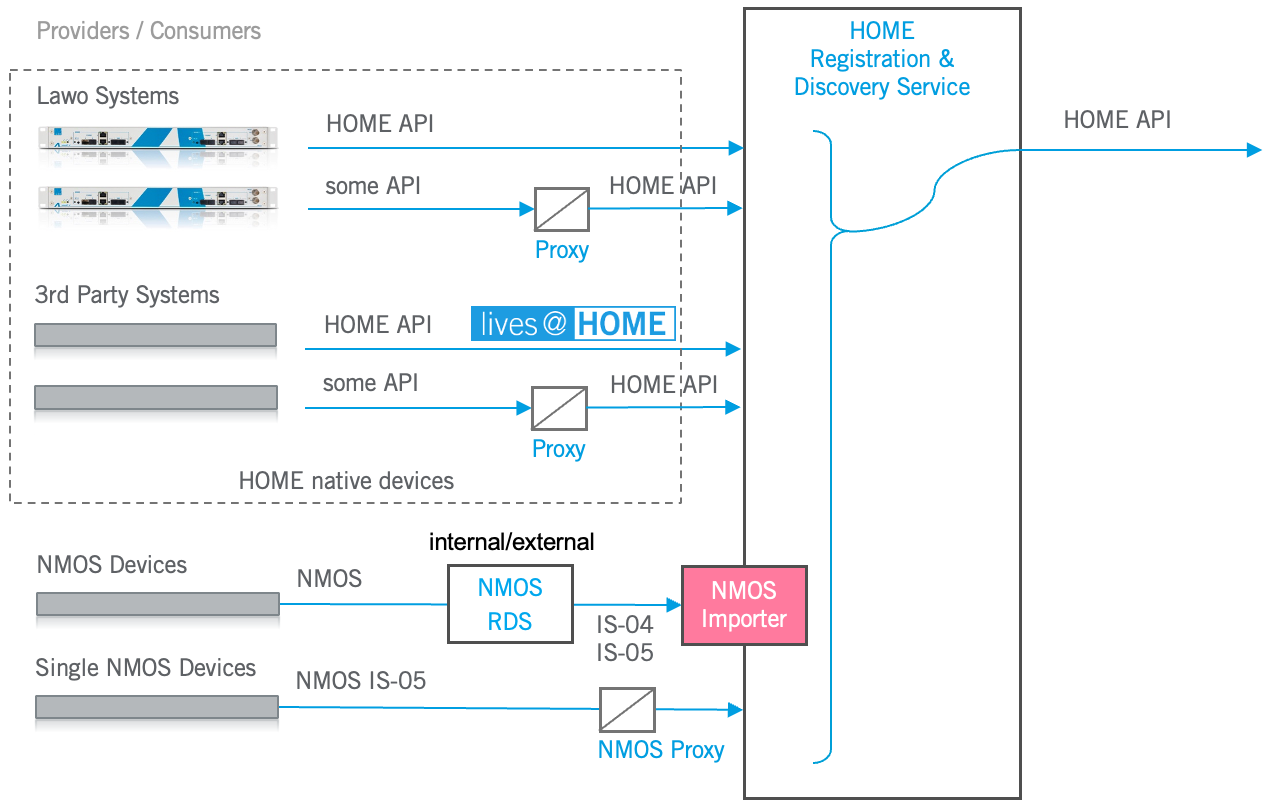
The connection to an NMOS RDS incorporates methods specified via the latest NMOS IS-04 and NMOS IS-05 specifications.
The NMOS Importer requires a license to become active. This license does not include the internal NMOS RDS.
NMOS Exporter
The NMOS Exporter (pink box in graphic below) is a functionality in HOME, which connects HOME to an NMOS Registration and Discovery Service (RDS) on the northbound side, to export HOME native gear into an NMOS controlled environment. In doing so, device managed in HOME not get exposed via NMOS IS-04 and controlled through NMOS IS-05. The NMOS Exporter translates between HOME and NMOS RDS.
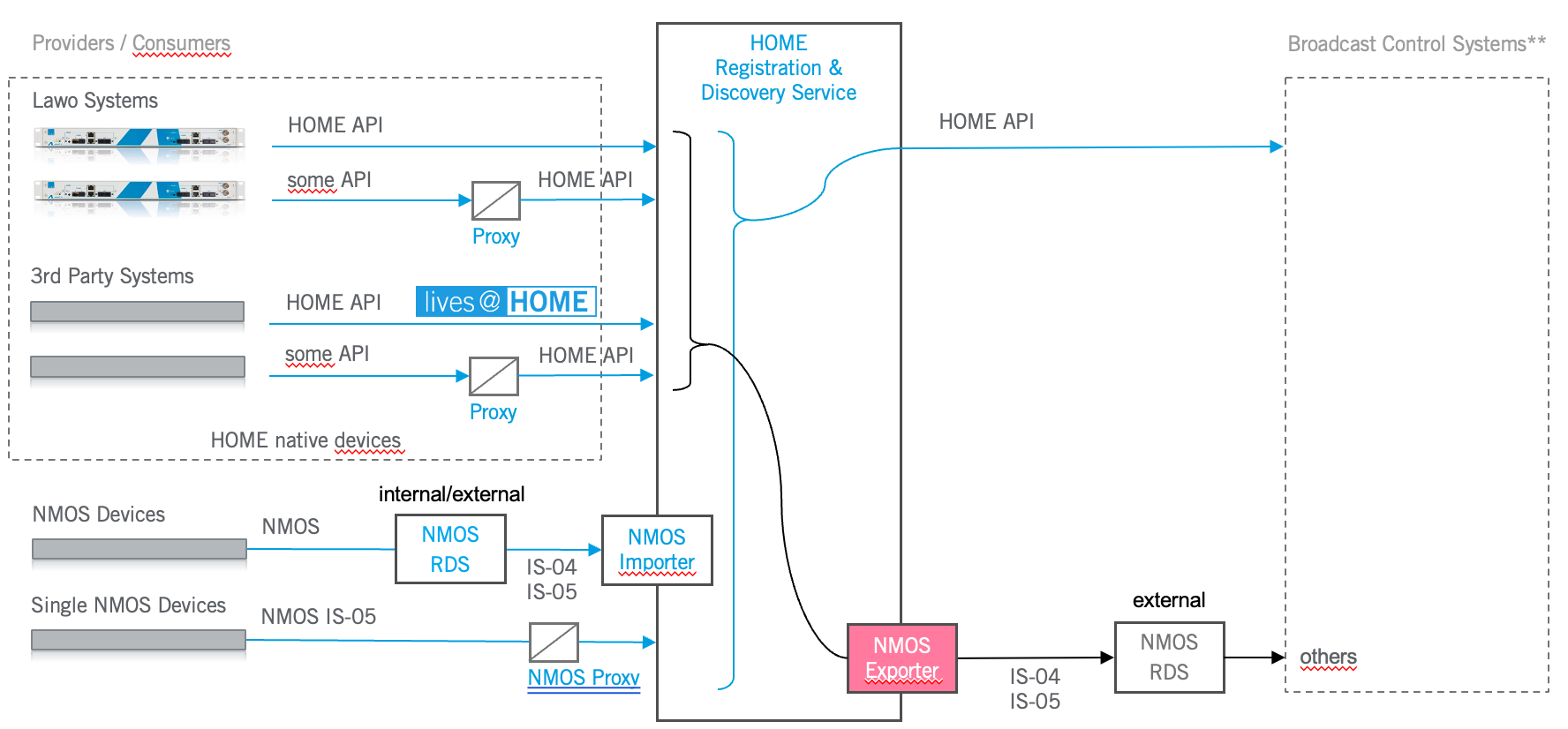
The NMOS Exporter requires a license to become active. This license does not include any NMOS RDS functionality.
NMOS Proxy (HOME on Gateserver only)
The NMOS Proxy (pink box in graphic below) is a functionality in HOME, which connects a single NMOS device to HOME, without the need of passing through an NMOS Registration and Discovery Service (RDS). This way, a single NMOS device can be easily included into a setup and flows can be routed to and from that device using NMOS IS-05 commands. The connection requires the devices IP address to be available.
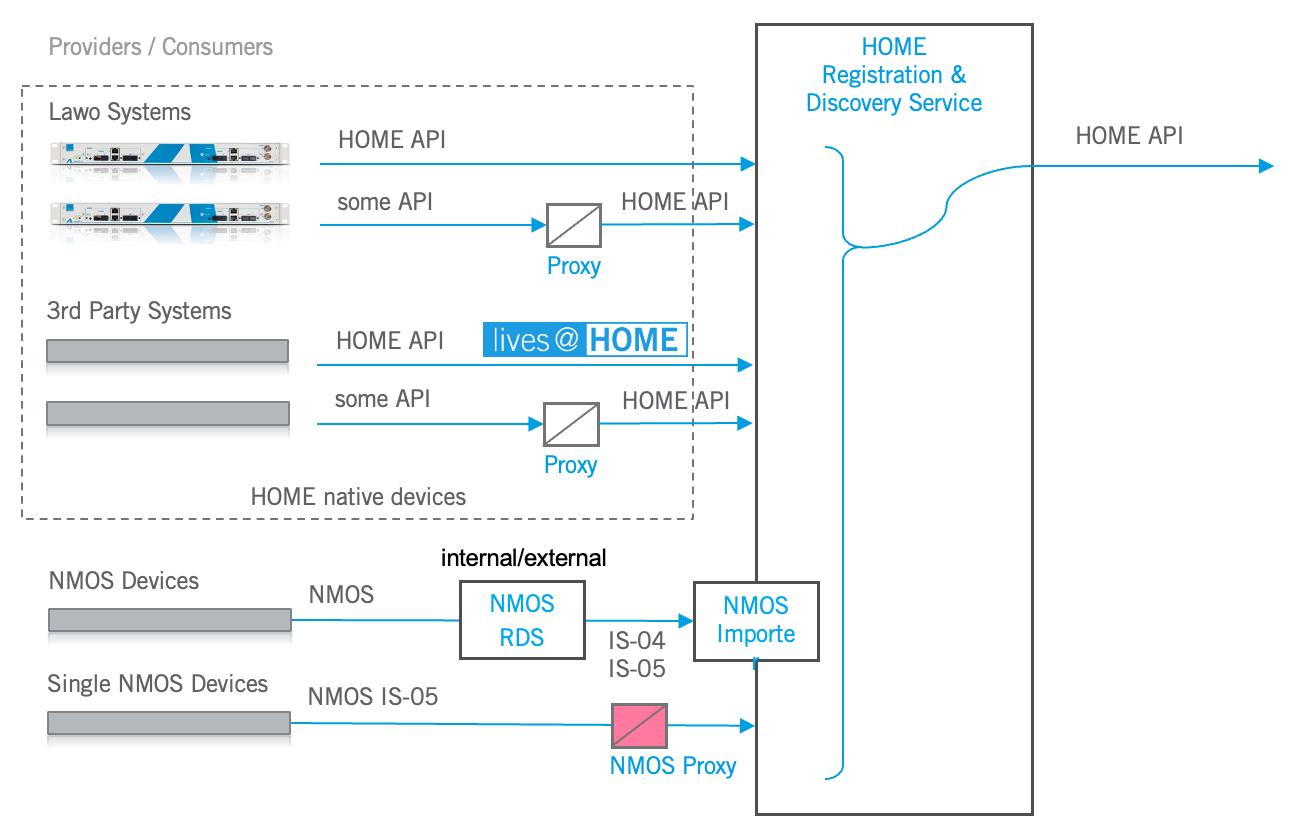
A single license is required per device. From HOME v4.0 on regular HOME systems (ex. HOME Gateserver) the proxy will be replaced by the NMOS Importer in combination with a HOME Pass per device.