HOME - Device Settings Overview
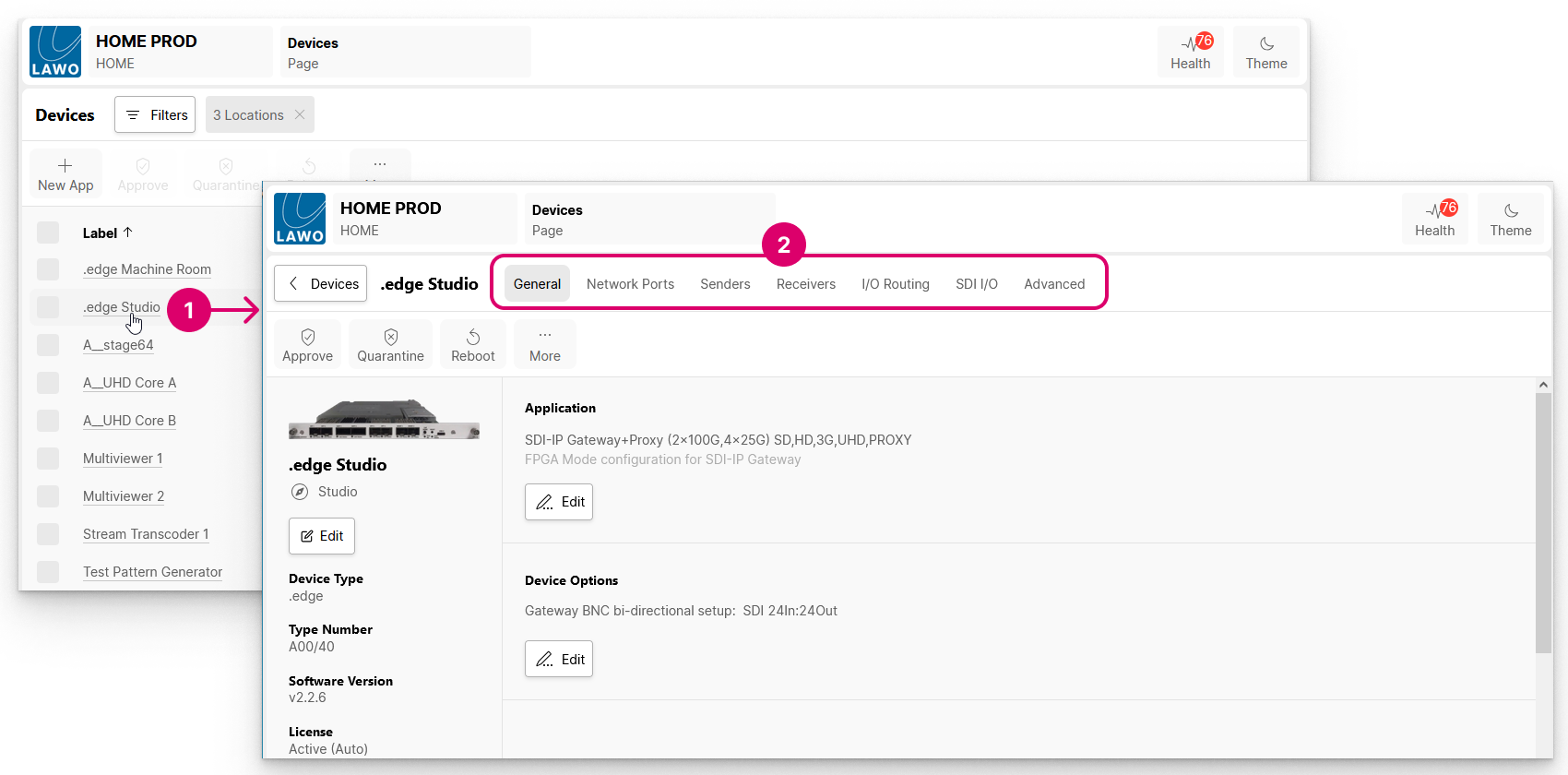
The General settings is the first landing page that appears whenever you click through to an individual device. If there are other pages available, then these appear as additional menu tabs (2).
In the example below, there are seven pages/menu tabs. The first five (General, Network Ports, Senders, Receivers and I/O Routing) are available for most streaming devices. The last two (SDI I/O and Advanced) are specific to .edge.

If a device is Offline or has No HOME Pass, then a page with minimal content opens.
In this instance, check that the device is powered and connected to the network, and that it has a valid HOME Pass (license). How to manually assign a HOME Pass is described in HOME System - HOME Passes.
General settings
The General settings page is divided into three main sections with device management operations (at the top), general information (on the left) and other settings (on the right).
The informational fields (on the left) include the current label and location, plus the Software Version and Serial Number (important for licensing). The Edit button can be used to edit the device label and location. For a physical device, the Identify Hardware function can be used to identify the device by flashing an LED or showing a message on its front panel.
The settings (on the right) vary depending on the device type:
- For .edge, you can edit the Application (operating mode) and Device Options (number of SDI In/Out).
- For an A__stage, you can edit the Wordclock Profile (1fs or 2fs) and Device Options (sample rate).
- For HOME Apps, you can check the Lifecycle and Licensing information; change the License Type or edit the app's initial configuration (under App Options).
Network Ports
The Network Ports page lists all of the device's network ports or, for HOME Apps, the network ports of the app server. From here you can check the status of a port or edit* its network settings.
*Note that, For HOME Apps, it is not possible to edit the network settings (as this must be done during the app server configuration).
Senders and Receivers
The Senders and Receivers pages appear for all devices that support signal streaming. They list all of the device's IP senders and receivers. For some devices, these are pre-defined (according to the configuration of the device). For others, they must be created (in HOME) using New Sender and New Receiver.
Depending on the end device, the sender(s) and receiver(s) can handle up to four essence types: Video, Audio, Metadata and/or GPIO.
If you select a sender or receiver, then it is possible to adjust the I/O Routing (for the audio streams), edit the streaming parameters or access the SDP data. In addition, the "Show Sidebar" button (on the right) reveals the available properties for the selected sender or receiver.
I/O Routing
The I/O Routing page appears if a device handles audio streams. It is used to map the audio channels of the IP senders and receivers to the physical inputs and outputs of the device.
In each case, you can connect (or disconnect) the physical inputs to the IP sender channels, and the IP receiver channels to the physical outputs.
Advanced / Other
If an Advanced tab is visible, then this provides access to the more advanced parameters. This, and any other tabs, are specific to the end device.