HOME DSK - Product Description
The HOME Downstream Keyer (DSK) is a multi-layer video keying and mixing app.
It offers comprehensive video keying and mixing capabilities to enable simple channel branding without the need the for additional equipment. Operators can simultaneously, and independently, transition up to three key layers over an A/B background mix. Graphics can be keyed on using triggers issued from the HOME UI or an external control system. The HOME DSK can also be used as a simple A/B mixer if all three keyers are disabled.
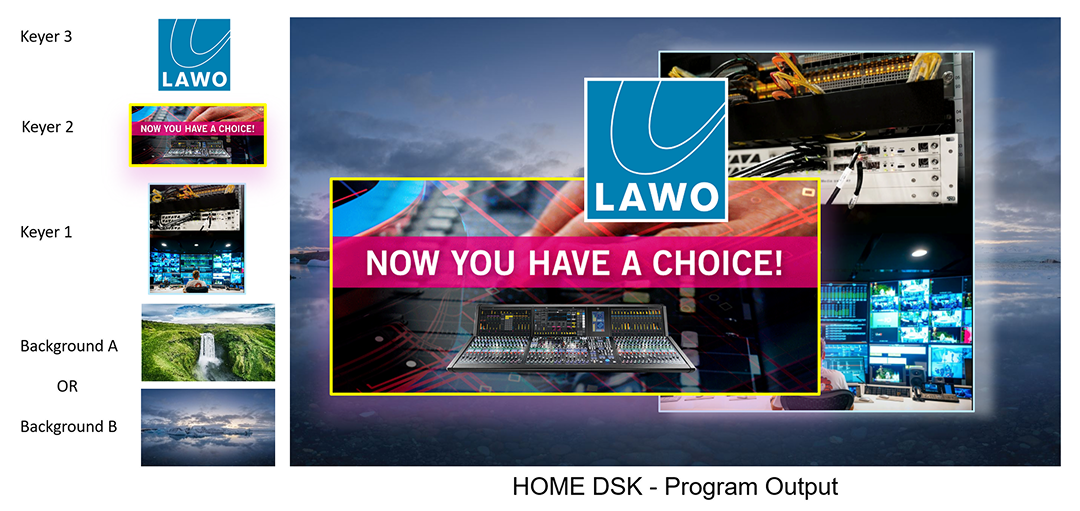
A HOME DSK App supports up to three keyers. Each keyer provides a Key and a Fill input, can be controlled separately and operates in one of three keying modes: Luma, Linear or Self-Key.
Underneath the keyer(s), the app allows for A/B mixing of two video background sources. This can provide 'Make-Before-Break' type switching with a choice of transition types including Cut, Fade and Cross Fade. The user is able to define the duration of the transition in milliseconds. The DSK's Auto Transition feature can be used to start the transition automatically when the user routes a new signal to the inactive background, thereby reducing the number of operational steps if more than two background signals are required.
The HOME DSK can be deployed in both SDR (1080i/1080p) and HDR (UHD) workflows. Its inputs and outputs support high-bandwidth/low-latency ST2110 broadcast environments, SRT stream workflows in the cloud, NDI devices, compressed formats, and so on.

Key Features & Specification
General
- 3x independent keyers over an A/B mixer.
- Each keyer provides:
- A choice of three keying modes: Luma, Linear or Self-Key.
- Controls are provided to adjust the range of values in the Key signal.
- Key Shaping option for finer key edge processing.
- User-defined transitions (Cut or Fade) for key layer on/off.
- Transition time can be set in milliseconds.
- A/B Mixer with:
- Make-before-break type switching between two video backgrounds.
- User-defined transitions (Cut, Fade or Cross Fade).
- Transition time can be set in milliseconds.
- Auto Transition option - to automate the A/B switching when a new background signal is connected.
- Two dedicated outputs:
- Program - carries the composite result of the selected background plus any active keyers.
- Preview - by default, the Preview output carries the non-selected background (without the composite). The Preview output can be configured to carry the same Background as the Program output. For example, to generate a clean feed.
- Both outputs support Video (only); or Video and Audio.
- Up to 8 input receivers:
- 2x receivers for Background A and Background B. Background inputs support Video (only); or Video and Audio.
- Up to 6x receivers for Key 1 + Fill 1, Key 2 + Fill 2, Key 3 + Fill 3. Keyer inputs support Video (only).
- The receivers for the keyers are automatically provisioned to save input resources if not all 3 keyers are required.
- Tally Support
Video
- Video input and output formats: SMPTE ST 2110-20, SMPTE ST 2110-22 (JPEG XS), NDI, SRT
- Resolution*: SD, HD, 3G, UHD (3840x2160)
(*) JPEG-XS only supports the HD, 3G and UHD formats.

Audio
- Audio supported by Background A and B inputs, plus the Program and Preview outputs.
- No audio for the Keyer inputs.
- Audio does NOT transition when Backgrounds transition from A<>B.
- Audio processing: 16 bits, 24 bits at 48kHz
- Audio inputs and outputs: up to 8 x audio streams (send and receive); maximum of 64 channels in total
- Fully flexible audio channel shuffling (via I/O Routing)
Delay
- Delay is applied, automatically, to the Audio streams, to compensate for the processing delay (through the app) of the Video path. This ensures that Video and Audio streams remain in sync with each other.
Control
- Data sources:
- HOME API (NATS)
- NMOS (via HOME's NMOS Exporter)
- Configured and managed by HOME
- All parameters available via HOME API; allows integration with external broadcast control systems.