HOME Apps - I/O Allocation
To start an app successfully, there must be sufficient capacity (on a HOME Apps server) and enough available licenses or credits (on the HOME system).
To ensure that any potential app server has sufficient I/O resources, the app's I/O requirements are calculated as part of the Start App procedure. The system then uses this information, along with other requirements, to determine which app servers have enough spare I/O resources to service the app.
- If a server has enough spare resource, then it is considered as a potential host (and appears in the Target App Server selection menu).
- App servers without sufficient I/O resource are not considered (and are omitted from the Target App Server list).
Note that if the Target App Server is set to Auto, then all potential hosts with enough spare resource are considered.
Once an app is deployed to its app server, the required I/O resources are then reserved for (allocated to) that specific app. When the app is later stopped, the allocated resources are released, becoming available for use by any other HOME App.
This approach prevents over-provisioning of I/O resources on the app server(s) and maximizes the efficiency of the system as, the app server resources are only consumed when an app is running.
I/O Resource Calculations
In HOME Apps, there is no fixed amount of I/O resource for a particular app type, as the I/O requirements are dependent on the user-defined options in the configuration of the app. i.e. the number (and type) of the I/O streams.
This means that the system calculates the requirements dynamically, whenever the user starts an app (as described above).
To make the calculations I/O resources are normalised to an equivalent of 1920x1080i stream, and are then referred to as factors of that 1080i stream.
The table below shows the normalised values in terms of 1080i streams for different resolution flows. 1080i streams have a nominal bandwidth of 1.5G
| stream | nominal bandwidth | HOME Apps normalised 1080i equivalents |
|---|---|---|
SD | 270M | 0.8 |
| 720p | 1.5G | 0.8 |
| 1080i | 1.5G | 1 |
| 1080p | 3G | 2 |
| UHD | 12G | 8 |
Bandwidth Requirements
The amount of bandwidth, Input and Output, currently allocated can be viewed by opening the app server's 'System → I/O' menu in the 'Device → Advanced' parameters page.
From here, you can check how the current I/O resources of the app server are allocated:
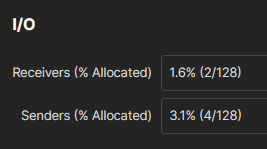
In the example above, you can see:
- There are 128x 1080i bandwidth equivalents in total on both the RX and TX sides of the Media NICs.
This particular server is fitted with a 200G full duplex NIC. 128 x 1.5G = 192G. The 200G quoted by the NIC is a theoretical maximum achievable by the NIC. In practice, around 192G is obtainable while still offering an amount of bandwidth for other network traffic, PTP for example. - Two 1080i equivalents have been allocated on the RX side, four on the TX side.
- The NIC has a total utilisation of 1.6% on the RX side and 3.1% on the TX side.
- From this we can determine that there are either two receivers limited to 1080i or one 1080p receiver, and four 1080i or two 1080p transmitters already allocated.
Troubleshooting the Target App Server(s)
If a particular app server is not listed as a Target App Server, then one possibility is that it does not have enough available I/O resources to run the app.
In this instance, the app server's 'System → I/O' statistics (shown above) is very useful to determine the next steps. For example, how many I/Os may need to be released in order to use the server to start another app.