App Server - Advanced -> NDI
The Advanced → NDI menu provides parameters (in HOME Apps) that are linked to controls available through the current implementation of NDI SDK. HOME Apps has no control over whether these settings operate correctly (as described by the NDI SDK). The information below is an extract from the NDI SDK documentation.
Please note: If changes are made to these settings, then any apps that are running must be stopped and restarted for the changes to take effect.
More information about NDI media sources can be found at: HOME Apps - NDI.
In the Advanced parameters, there is a main page and one sub-page:

NDI
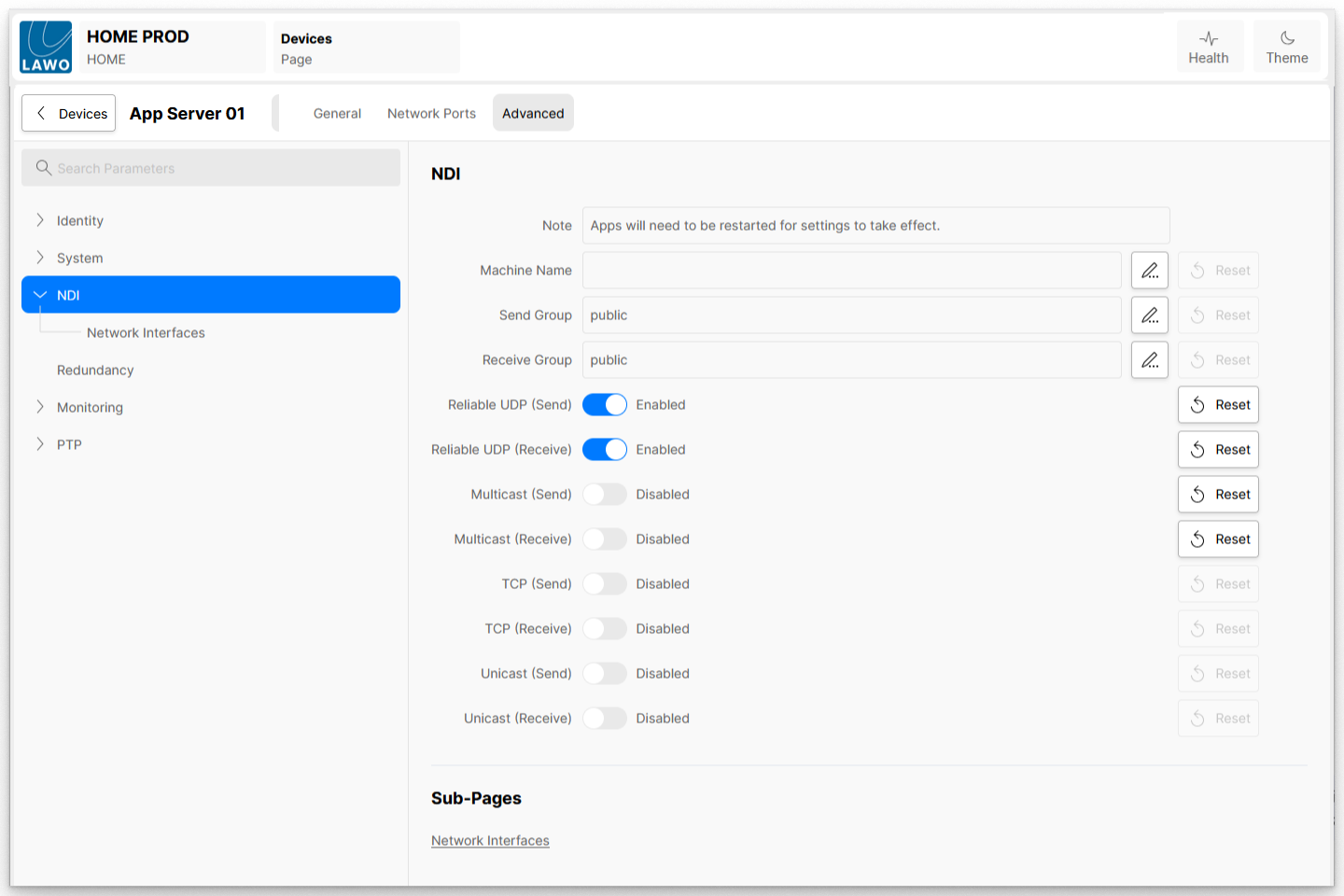
Machine Name
This is an option that allows you to change how your machine is identified on the network using NDI, overriding the local name of the machine. This option should be used with very great care since a clash of machine names on the network is incompatible with mDNS and can cause all other sources to not work correctly. When using this it is essential to ensure that all machine names on the network are unique. We recommend avoiding using this parameter when at all possible.
Send Group
This is the list of groups that the senders on this system are going to be part of by default. If groups are not specified, senders will be part of the public group by default.
Receive Group
This is the list of groups that the senders on this system are going to be part of by default. If groups are not specified, senders will be part of the public group by default.
Reliable UDP (Send)
The following connections are available in NDI version 5 and allow the force enabling and disabling of the reliable UDP mode which is the default connection type on NDI version 5 and later. The full details of this connection type are described in the section for “Performance and Implementations” section of this manual.
There are separate settings for sending and receiving. Both sides need to allow this mode to be applied; sources and receivers have it enabled by default.
This is the default connection type and represents the preferred type for most network configurations and we recommend it’s use where possible.
Reliable UDP (Receive)
The following connections are available in NDI version 5 and allow the force enabling and disabling of the reliable UDP mode which is the default connection type on NDI version 5 and later. The full details of this connection type are described in the section for “Performance and Implementations” section of this manual.
There are separate settings for sending and receiving. Both sides need to allow this mode to be applied; sources and receivers have it enabled by default.
This is the default connection type and represents the preferred type for most network configurations and we recommend it’s use where possible.
Multicast (Send)
These settings enable or disable the use of multicast for receiving. If you explicitly disable it on a machine then, even if the sender is configured for multicast, it will use unicast. When multicast receiving is enabled and a sender is available in the same local network, the receiver can negotiate for a multicast stream to be sent. If the sender is not on the same local network, this negotiation does not occur (since it could lead to a multicast stream being sent but never able to arrive at the receiver). If you have a correctly configured network and can ensure a multicast stream can route reliably from a different network to the receiver’s local network, you can specify the sender’s subnet in the “subnets” setting to allow multicast negotiation to occur.
These settings pertain to multicast NDI setting on this machine. The first setting determines whether multicast sending is enabled or not. By default, multicast sending is disabled. Next is the IP address prefix and mask. In this example, multicast IP addresses will be chosen in the range 239.255.0.0 - 239.255.255.255. NDI will attempt to use different multicast addresses to ensure that the streams can be filtered efficiently by the network adapter. NDI senders need a range of multicast addresses available. The TTL value controls how many “hops” the multicast sending traffic will take, allowing it to move outside of the local network.
There are separate settings for sending and receiving. Both sides need to allow this mode to be applied; sources and receivers have it enabled by default.
We generally discourage the use of Multicast since configuration and ensuring that high performance is achieved is very difficult at a network level in most cases the default protocols (particularly reliable UDP) perform much better.
Multicast (Receive)
These settings enable or disable the use of multicast for receiving. If you explicitly disable it on a machine then, even if the sender is configured for multicast, it will use unicast. When multicast receiving is enabled and a sender is available in the same local network, the receiver can negotiate for a multicast stream to be sent. If the sender is not on the same local network, this negotiation does not occur (since it could lead to a multicast stream being sent but never able to arrive at the receiver). If you have a correctly configured network and can ensure a multicast stream can route reliably from a different network to the receiver’s local network, you can specify the sender’s subnet in the “subnets” setting to allow multicast negotiation to occur.
These settings pertain to multicast NDI setting on this machine. The first setting determines whether multicast sending is enabled or not. By default, multicast sending is disabled. Next is the IP address prefix and mask. In this example, multicast IP addresses will be chosen in the range 239.255.0.0 - 239.255.255.255. NDI will attempt to use different multicast addresses to ensure that the streams can be filtered efficiently by the network adapter. NDI senders need a range of multicast addresses available. The TTL value controls how many “hops” the multicast sending traffic will take, allowing it to move outside of the local network.
There are separate settings for sending and receiving. Both sides need to allow this mode to be applied; sources and receivers have it enabled by default.
We generally discourage the use of Multicast since configuration and ensuring that high performance is achieved is very difficult at a network level in most cases the default protocols (particularly reliable UDP) perform much better.
TCP (Send)
These settings enable or disable multi-TCP sending or receiving. If multi-TCP is disabled, then unicast UDP will be used. If unicast UDP is also disabled, then the base TCP connection will be used.
There are separate settings for sending and receiving. Both sides need to allow this mode to be applied; sources and receivers have it enabled by default.
Multi-TCP is not the default mode in NDI version 5 which sees better performance with Reliable UDP.
TCP (Receive)
These settings enable or disable multi-TCP sending or receiving. If multi-TCP is disabled, then unicast UDP will be used. If unicast UDP is also disabled, then the base TCP connection will be used.
There are separate settings for sending and receiving. Both sides need to allow this mode to be applied; sources and receivers have it enabled by default.
Multi-TCP is not the default mode in NDI version 5 which sees better performance with Reliable UDP.
Unicast (Send)
These settings enable or disable unicast UDP sending or receiving. If unicast UDP is disabled, then the base TCP connection will be used.
Unicast settings determine whether UDP with forwards-error correction is used for sending. While configurable, we recommended that this is enabled by default and not changed. Our experience has been that our UDP implementation handles poor networks and packet loss more robustly than TCP/IP, which can encounter timeout problems when acknowledgment packets are dropped (while rare, over a period of hours this can and does happen).
The UDP implementation also fully implements paced network sending with zero memory copy scatter-gather lists and jittered timing, to reduce the chance of packet loss on networks with many synchronized video streams. By default, 4Kb UDP packets are used, although jumbo packets do not need to be enabled on the network.
All versions of NDI fall to TCP/IP if a particular protocol is not supported by both sides. Again, note that that a sender implementation can simultaneously send internally in multiple modes, based on what receivers require.
There are separate UDP unicast settings for sending and receiving. Both sides need to allow this for UDP mode to be applied; sources and receivers have it enabled by default.
Unicast UDP is not the default mode in NDI version 5 which sees better performance with Reliable UDP.
Unicast (Receive)
These settings enable or disable unicast UDP sending or receiving. If unicast UDP is disabled, then the base TCP connection will be used.
Unicast settings determine whether UDP with forwards-error correction is used for sending. While configurable, we recommended that this is enabled by default and not changed. Our experience has been that our UDP implementation handles poor networks and packet loss more robustly than TCP/IP, which can encounter timeout problems when acknowledgment packets are dropped (while rare, over a period of hours this can and does happen).
The UDP implementation also fully implements paced network sending with zero memory copy scatter-gather lists and jittered timing, to reduce the chance of packet loss on networks with many synchronized video streams. By default, 4Kb UDP packets are used, although jumbo packets do not need to be enabled on the network.
All versions of NDI fall to TCP/IP if a particular protocol is not supported by both sides. Again, note that that a sender implementation can simultaneously send internally in multiple modes, based on what receivers require.
There are separate UDP unicast settings for sending and receiving. Both sides need to allow this for UDP mode to be applied; sources and receivers have it enabled by default.
Unicast UDP is not the default mode in NDI version 5 which sees better performance with Reliable UDP.
NDI → Network Interfaces
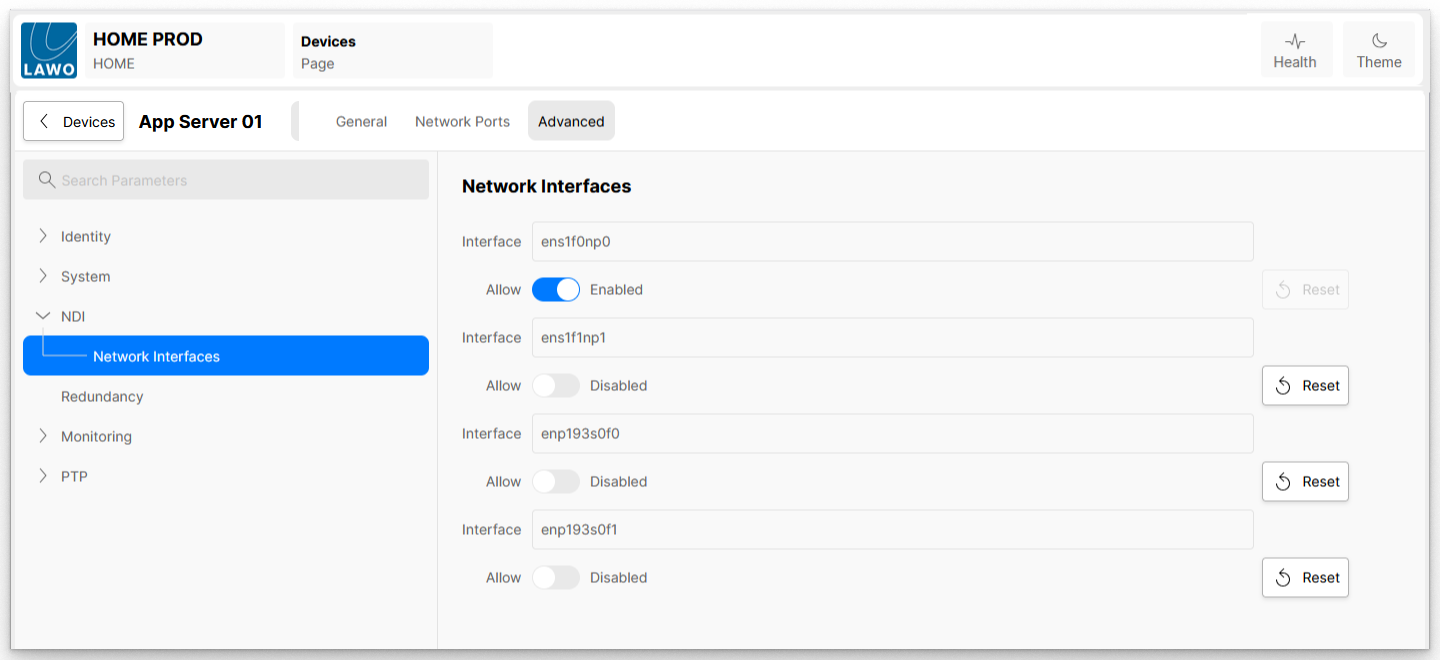
Within the Network Interfaces sub-page is an Allow option for each network interface installed in the App Server.
Network Interfaces – allow
Starting with NDI version 5, this lists all the network adapters that will be used for network transmission. One or more NICs can be used for the transmission and receipt of video and audio data. This capability can be used to ensure that the NDI primary stream data remains on group of network adapters, for instance allowing you to ensure that dedicated audio is on a separate network card from the NDI video.
It is generally preferred that you let NDI select the network adapters automatically which can smartly select which to use and how to choose the ones that result in the best bandwidth. While in some modes NDI can automatically balance bandwidth across multiple NICs it is normally better for you to use NIC teaming at a machine configuration level which can result in much better performance than what is possible in software.
If this setting is configured incorrectly to specify NICs that might not exist, then NDI might fail to function correctly. Also, please note that the operation of computer systems that are separately on entirely different networks with different IP address ranges is often not handled robustly by the operating system and NDI might not fully function in these configurations.