Radio Release Notes - 8.3 and VisTool 9.0
Introduction
Software version 8.3 is a major software release for diamond, new crystal, Power Core and VisTool.
This software release package applies to the following products and applications:
- Power Core Rev1 (710/10)
- Power Core Rev2 (710/11)
- Power Core Rev3 (710/13)
- AIOX (710/12)
- diamond surface
- new crystal surface
- VisTool
- On-Air Designer
- Sop Explorer
Release date: 20th January 2026.
Software repository: Lawo Download Center
Current versions:
- OnAirDesigner: 8.3.0.26
- OnAirDesigner Definition Number: 2.1.119
- Power Core Firmware: 8.3.2259
- VisTool: 9.0.2.12
- Digital Metering System Driver: 5.0.0.0
- WIBU 8.2
- Ruby Migrate 8.3.0.26
- VisTool QT Engine: 6.9.1
- VisTool QT Chromium version: 130.0.6723.192

Before you begin.
Please make sure that you have all necessary applications and tools available before you start the update.
We strongly recommend that the software versions used are from the same release packages.

Please note:
- Please always use the Wizard function in SoP Explorer when updating surface modules.
It is important to follow the correct update sequence provided by the Wizard feature. - In some cases the diamond/crystal does require a restart after the update, that the update takes effect.
- The Dante and MADI SRC I/O Card can show that an Update for XSRC is needed. Performing this update will take approximately 10 minutes and is only required if the core should operate in 96 kHz as Gateway.
- Due to the change to the new definition format, existing VisTool projects will give a warning that definition is not matching. The definition has to be changed to the new format via VisTool Sessions.
- Ruby Migrate is no longer part of an OnAirDesigner Installation and can be downloaded separately, in case ruby configurations, need to be converted to diamond.

Important:
Power Core and ruby configurations
- Currently ruby configurations are not supported with 8.3.
Power Core and diamond /crystal:
- Due to new diamond/crystal surface Firmware, a downgrade is not possible, after updating to 8.3.
- Due to enhanced security features, all individual passwords on the power core are reset to default and must be changed after the update.
VisTool:
- Due to the Switch of the QT Engine, VisTool Projects are converted to the required changes. A "xxx_before_convert" is stored. Once changes are done in the new project, it can´t be opened with an old VisTool Version.
- When Updating from VisTool 8 to 9, all screen assignments need to be updated with the VisTool Session Manager, as there is a new mechanism to detect screens.
- Logic Engine may require a "Rebuild / Repair Logic and Compile" function. This is explained in this Release Notes.
- As part of the update to the QT6 engine for VisTool, the default graphics API has changed from OpenGL 2.0 to Direct3D 11. As a result, graphics drivers must now support one of Direct3D 11, Direct3D 12, Vulkan 1.0 or OpenGL 2.1 (or higher). While Windows 10 and 11 are both generally supported, it may be that some older CPUs do not support the required graphics API and may encounter issues when running VIsTool 9.
- The sapphire overbridges are no longer supported with VisTool 9.
If you are updating from a version older than ON-AIR Designer 8.0 please read the full releasenotes for Version 8. These can be found here.
Enhancements
Power Core
Console
Enable Large User Labels
The size of the User Labels can be increased on diamond consoles.
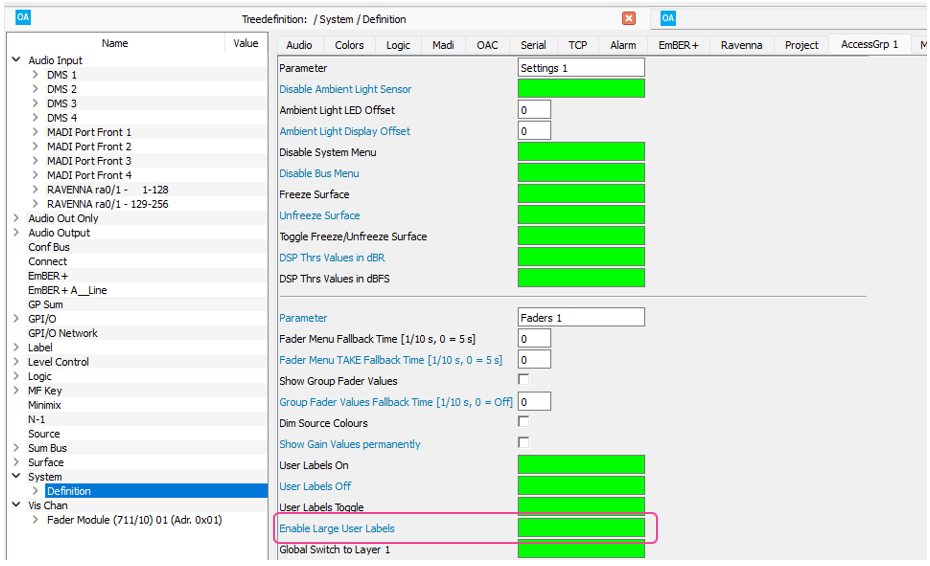
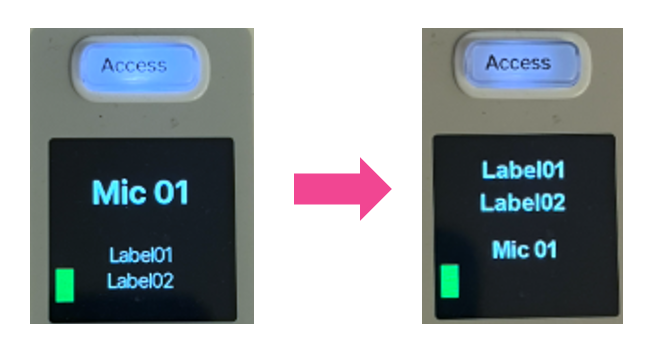
This feature is only available for diamond consoles.
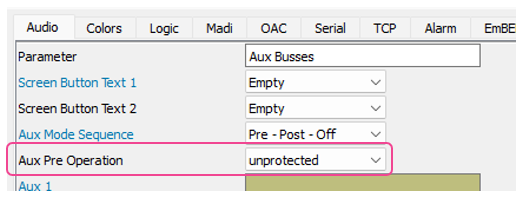
AUX Pre assignment without encoder touch operation
Sources can now be assigned pre-fader to aux buses without needing to first touch the encoder when this option is configured.
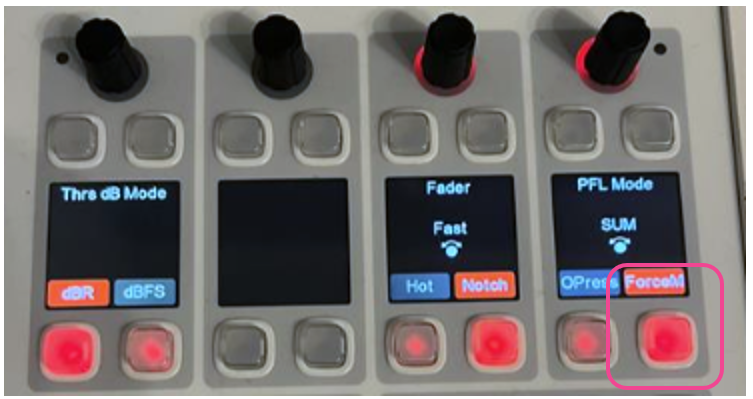
Fader Force Motor
When a fader movement is triggered externally (e.g. by Logic) the fader will move even if a fader touch is recognized.
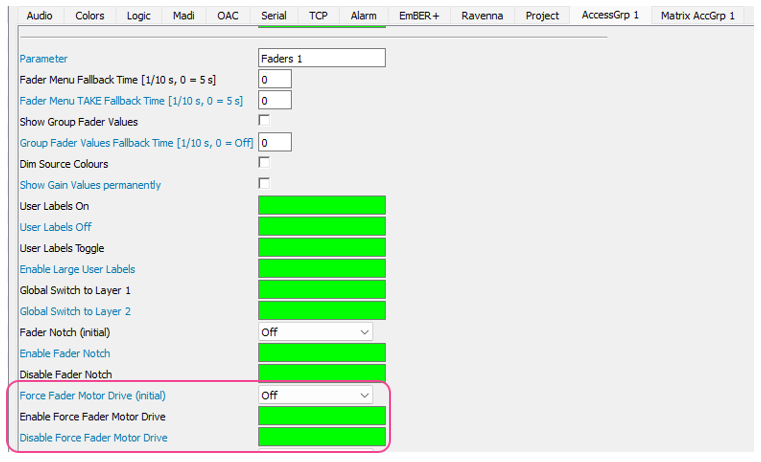
This can also be changed during runtime on the surface from the Settings page:
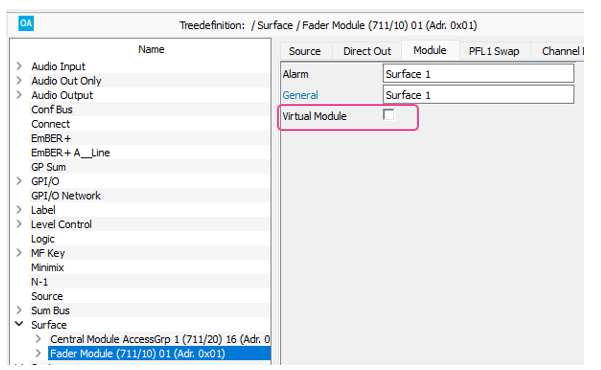
Virtual Module available for all diamond Modules
All Modules can be configured as a “virtual Module”.
Combo VCA Extension Module: Labels for MF33-40 not displayed in VisTool
The labels for MF33 – 40 were not sent to VisTool if a diamond Combo Module was configured as a VCA Extension Module.
DSP
New Module: Snap Iso Filter
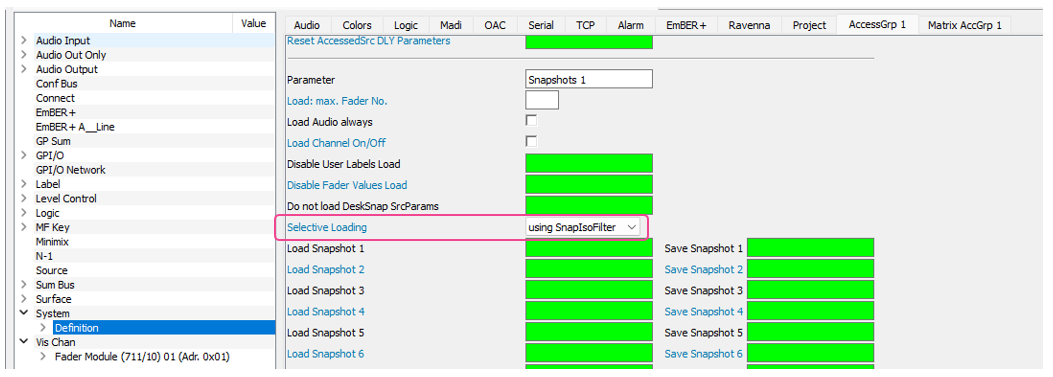
A new screen module can be configured in ON-AIR Designer and operated from VisTool. The Snap Iso Filter module provides controls to select/de-select which parameters will be loaded by a snapshot load or when using the copy & paste functionality. Parameters are organized into groups and sub-groups.
The screen module can be assigned to Slots 01 - 09:

The Snap Iso Filter functionality must also be enabled within System Definition/Access Group:
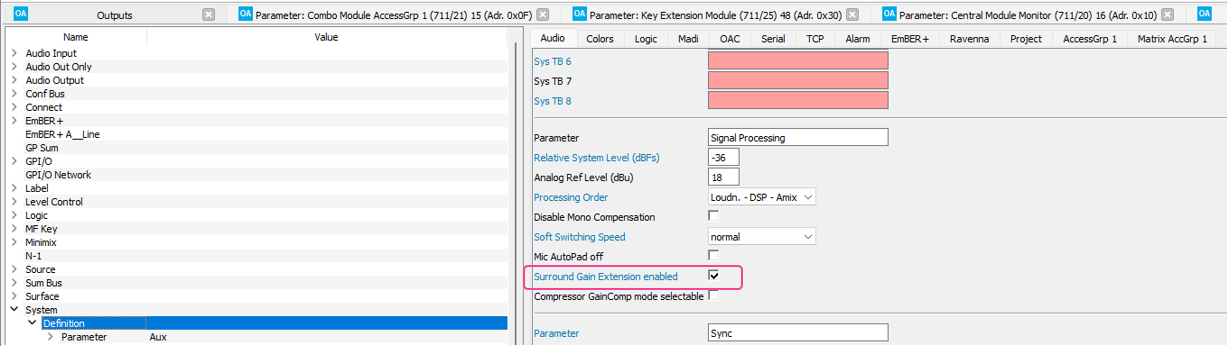
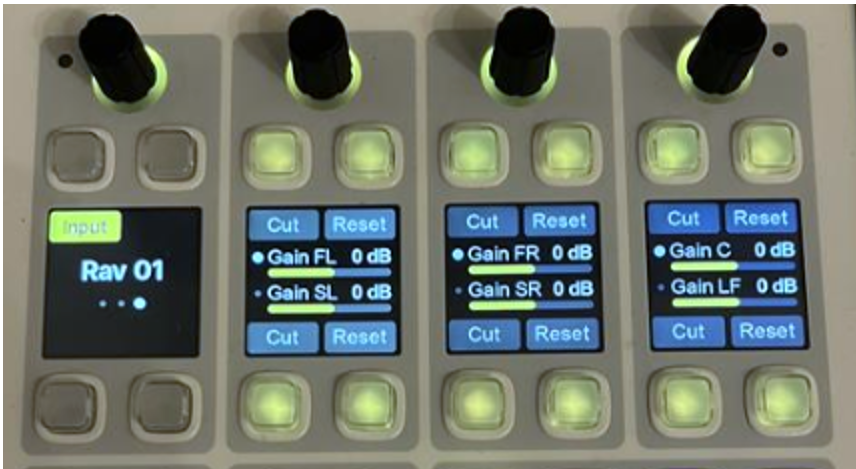
Enhanced Operation for 5.1 and 5.1+2 Sources
While in Access, parameters are available to adjust, cut and reset the levels of each channel within a 5.1 or 5.1+2 source.
EmBER+
TX Copy is active on Both Ports, when TX2=TX1
If the TX2=TX1 property is enabled for a Front Panel or Slot Card MADI port, the TX Copy flag will be set for both MADI ports in the EmBER+ tree.
Replicate Meter Data
Meter Data can now be replicated via the Source Replication Element from a provider to a consumer. Sources now provide an option to toggle the use of remote meter data from the provider source object.
Meter Replication is only supported on EmBER+ Provider 1.
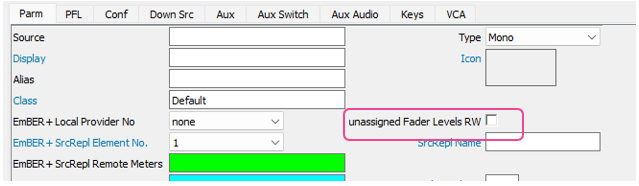
Allow levels to be changed for unassigned Faders
When the checkbox "unassigned Fader Levels RW" is set, Source Replication will control the fader level of a source even if the source is not assigned to a fader. If this checkbox is not set, the source fader level will not be writeable via EmBER+ until the source is assigned to a fader.
I/O
"Mono Alias" Parameter is now available for substitutions
The Mono Alias parameter can now be set within the Tree Definition pages (previously it was only configurable in the Input/Output pages).
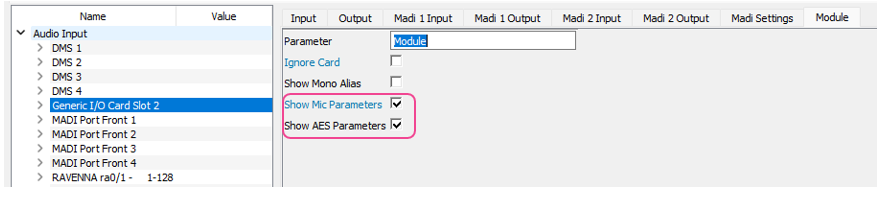
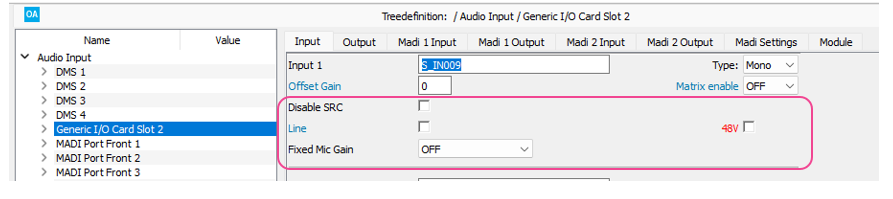
Missing Parameters for Generic I/O available
When enabled Microphone and AES specific parameters can now be set for Generic I/O cards.
Network
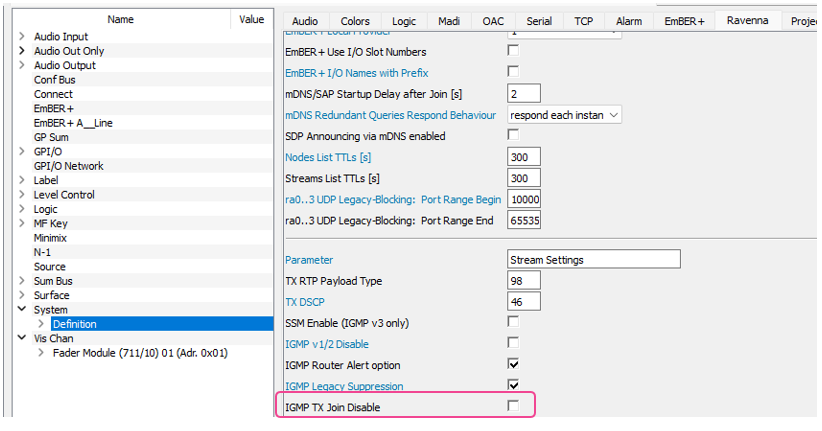
Disable IGMP TX Join
IGMP Joins can be deactivated for stream senders. IGMP Joins will only be sent for received streams.
Syntonized Mode can be activated on a per-receiver basis.
Syntonized mode can now be configured individual stream receivers (if Syntonized mode is not enabled globally):

Fixed Time Offset now available in Syntonized Mode
The fixed Time Offset parameter will now affect syntonized receivers:

LAGG Mode Failover: Configurable Behavior "lagg failover rx all"
When this parameter is enabled the Power Core will accept traffic on both interfaces.
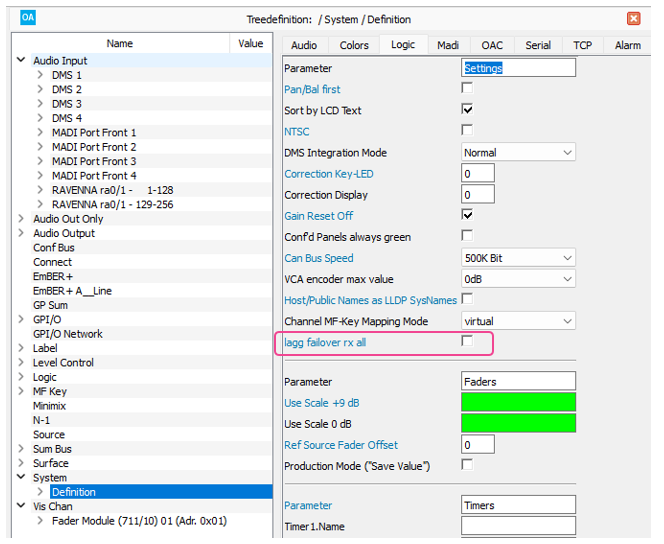
This should only be used in routed networks. If not, there can be wrong communication with consoles, as traffic is received twice.
Expanded Ravenna Node List
The Node list limit is now 800 Devices instead of 250.
License
Sources
System
Security Scans could cause a non-working Ember Provider
Some security scans could trigger a behavior where the EmBER+ provider in the Power Core, as well as the diamond and crystal consoles, would stop working.
Soft Switching Speed Parameter available in ruby configurations
The Soft Switching Speed parameter was not available for ruby configurations.
Web UI
Streams with a stream name of more than 32 Characters could not be connected
When a stream name had more than 32 Characters, it could not be connected via the WebUI.
diamond/crystal
System
diamond Consoles can be switched to Controller Mode (OSC)
This is an experimental feature and is not yet supported for general use.
VisTool
Switch to QT6
VisTool now uses QT6. Please read the information carefully before updating.
Important:
- Due to the Switch of the QT Engine, VisTool Projects must be converted to support the required changes. When a 8.x VisTool file is first opened in VisTool 9.x , a copy of the VisTool project file will be created with "xxx_before_convert" appended to the file name.
- Once a project has been converted to VisTool 9, it will not be possible to open the project file in VisTool 8.x.
- VisTool 9 uses a new mechanism to detect monitor screens, therefore it will be necessary to reset monitor screen assignments for all VisTool sessions after the update.
- After upgrading, it may be necessary to trigger the "Rebuild / Repair Logic and Compile" function in the VisTool Editor Logic Engine. In some cases elements are not highlighted, before this function is done.
- As part of the update to the QT6 engine for VisTool, the default graphics API has changed from OpenGL 2.0 to Direct3D 11. As a result, graphics drivers must now support one of Direct3D 11, Direct3D 12, Vulkan 1.0 or OpenGL 2.1 (or higher). While Windows 10 and 11 are both generally supported, it may be that some older CPUs do not support the required graphics API and may encounter issues when running VIsTool 9.
- The sapphire overbridges are no longer supported with VisTool 9.
Editor
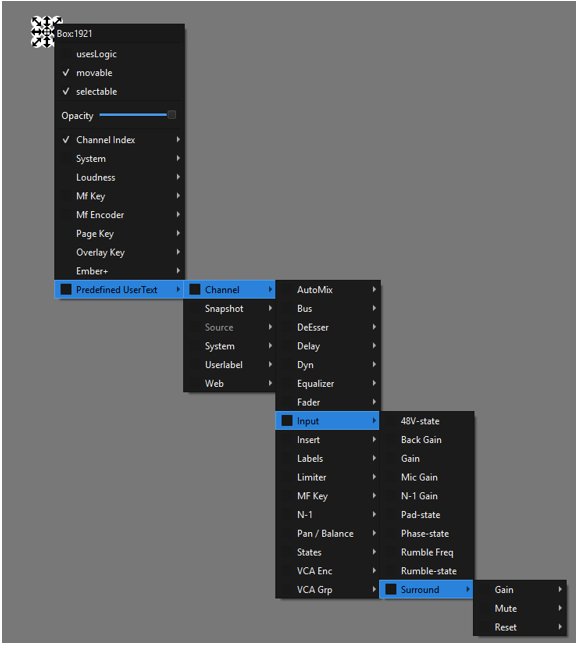
Enhanced Operation for 5.1 and 5.1+2 Sources
The enhanced options (Gain, Mute, Reset) for individual channels of 5.1 and 5.1+2 sources are now available as PreDefined UserTexts:
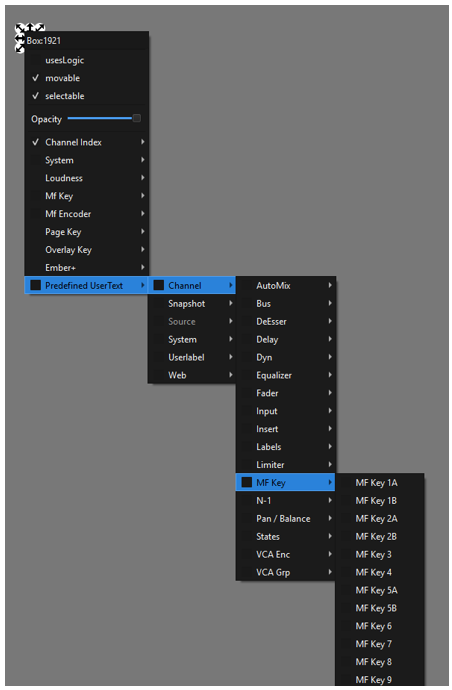
Source Specific MF Keys can be assigned via PreDefined UserTexts
MF Keys 1 - 9 can be assigned via Predefined UserTexts:
Protocol
Runtime
Logic Engine
Rebuild/Repair Logic
To fix occasional problems with caching in the logic engine, a second Compile button in the Logic Editor (Rebuild / Repair Logic and Compile) is available. This function should be used if unexplained errors occur during compilation. This can happen, for example, after updating to VisTool >9.0 / QT6.
Changes
Power Core
Console
Access Key can deactivate Access even when "Access User Key" is off.
When “Access User Key” Off was enabled, the Access key was still functional and could influence a different source in access.
Physical MF Mapping influences Bus-, Insert and VCA Menus
If the Physical MF Key Mapping mode was configured, the menu keys for the Bus, Insert, and VCA menus did not function correctly.
Physical MF Key Mapping could break Ravenna Pool Sources
If the Physical MF Key Mapping mode was configured, it was not possible to select a network source for a Ravenna Pool Source.
Rename of Parameter “Save Channel On/Off” to “Load Channel On/Off”
The parameter was renamed as it was misleading. The Channel On/Off status was always stored but not loaded. The parameter has also been moved to System Definition -> Access Group.
Manual Fader Position was not consistent
When using Hot Fader Mode, the Manual Fader Position could be wrong after Snapshots or Source Assign, which could cause missing Audio.
Aux Send Toggle could sometimes not work
Previously, it was not possible to cycle through the aux send levels on the central/combo module, when the first channel of a module was not assigned.
Enable Large User Labels (ruby consoles only)
Enable Large User Labels was missing in the definition for ruby consoles.
MF Key and Label Color wrong on Central / Combo Module
The MF Key and Label Color could be wrong when leaving a system menu.
Fader Notch and Over press did not work
The Fader Notch and Over press function did not work for Combo Modules in Monitor Mode on Slot 12-15
DSP
EmBER+
Ember+ Parameter Type “Bool” only allowed 0xFF as True
Only 0xFF was accepted as True, while now every value !=0 is accepted.
Fader Manual Position did report consistent values
The behavior of the Ember+ Parameter for the Fader Manual Position of source/sum objects has been improved.
Note
Due to rounding and the Motor Fader Position, there is always a chance that the return value for an input value to the Fader Manual position will be slightly different, however the results should now be closer.
AIOX I/O Card Type will be set to “None” if the AIOX is disconnected
The I/O Card type parameter will be set to “None” if the connection to underlying AIOX is lost.
Note
Only valid for Generic I/O cards.
Invalid Parameter within I/O Slots Numbers
The Identifier "I/O Slot Numbers" has been renamed to "Use IO Slot Numbers", as “/” was not a valid character for Identifiers.
Missing update for XOVER Flag on even MADI Ports
When configured as redundant MADI Link, the XOVER Flag was only active on odd ports.
Mic Parameter on AIOX Ports potentially wrong
After a warm start of the Power Core, some mic parameters for AIOX I/O Cards could be initialized into an incorrect state. Mic Parameters for Power Core and AIOX IO cards are now persisted through warm starts.
External Matrix Connect did not work for Ravenna Receivers on RA2 and RA3
Remote Controlling a Matrix did not work for the Ravenna crosspoints associated with ra2/3 (Matrix IDs 2113 - 2368)
I/O
MADI Gain wrong for 64 Channel cards in Slot 5-8
The MADI Gain controls for IO cards in Slots 5-8 were shifted by 64 and would not affect the correct channels.
Potential wrong initialization of 48 V for Mic/Line and Studio I/O cards
In some cases, phantom power was incorrectly initialized after a cold start.
Sources
Snapshot
Fader Manual dB Value potentially wrong
When loading Snapshots between normal and Hot Fader mode, there was a chance, that the manual dB Value was loaded incorrectly in normal Mode.
System
Logical Element “Delay”: Incorrect limit
The highest value is 99. In previous versions a higher value was possible but was limited internally to 99.
Network
Web UI
VisTool
System
Editor
Special Characters within Filename are no longer allowed.
The special characters: "{}|<>~%*? can no longer allowed be used in file names.
ChannelState Elements did not receive updates
ChannelState Elements did not receive updates, if the associated parameters were changed.
Session Manager
Logic Engine
String Comparator Regex Matches NULL but EMPTY
The String Comparator would match a NULL string, but not an empty string; this could occur if the User Text was set and then erased (for example).
Runtime
Mouse wheel operation sometimes not working on encoders
Mouse Wheel operation would sometimes not work on encoders if the encoder had been placed above Web Elements or if the encoders were assigned to Channel Functions.
VisTool could crash after clicking OK on ClosePWD Dialog
VisTool could crash when no text was entered and ok was pressed.
Predefined UserText #dmstext:channel:onair-status empty after assigning to free fader
The OnAir State did not update when a source was assigned to a previously empty fader.
Known Limitations
Power Core
- Due to the new DSP parameters, Source Replication between diamond and ruby consoles running release 8.2 and ruby consoles running releases prior to 8.2, or crystal consoles will not function.
- Due to the new DSP parameters in the ruby console, snapshots cannot be shared between consoles running release 8.2 and ruby consoles running older software versions.
- Ruby Configurations do not expose all Parameters for Automix (Passive and Floor Reduction are missing)
Vistool
- Web Element store Cache and Cookies in different folders per Web Element instead of one general Folder.
Compatibility
Sapphire Mastercard MK2 and Sapphire Compact Mode require OAD 6.4
For networked systems using a common and centralized VisTool user and snapshot database, please make sure that all Power Core units are running the same firmware version.
- A VisTool version higher than 7.0.0.xx is required for release version 8.0
- VisTool MK1 is compatible with release 4.0 in all products except sapphire master card MKII.
- VisTool MK1 is not compatible with release 4.2 or higher in all products.
- sapphire master card MKII (947/62 and 947/65) will only run with VisTool MK2.
- VisTool MK2 is compatible with all current Lawo Radio OnAir products running release 4.0 and 4.2. This includes Zirkon, which runs releases 4.0 and 4.2, but does not support releases higher than 4.2.
Using a VisTool MK1 configuration with VisTool MK2
VisTool MK2 can open and convert VisTool MK1 configurations. Please note that it will be necessary to make manual corrections to the converted versions. Because VisTool MK2 is a complete rewrite of the application, some parameters cannot be copied 1:1, and must be changed manually.
Please reserve some time to make these alterations and check the resulting configuration properly.