DELL Hardware Support
How to contact Dell Technical Support
The best way to approach the Dell Support team is by using the link that corresponds to your region (as listed below):
By entering the Dell Service Tag of your device, you can review your support status; renew or re-establish Dell ProSupport services; or can request help from Dell experts.
If you need help to find your Service Tag, please use the link below:
What is a Service Tag and why do I need it?
A Dell Service Tag is a 7 digit code which is directly linked to your hardware product and the associated services. This Service Tag corresponds to a so-called Express Service Code, which is a purely numerical version of the same code. Please note that your Dell Service Tag is linked to your account and should never be posted publicly on a website or social media platform.
The Dell Service Tag is essential to identify your hardware and is a central reference for your Dell product.
Go to dell.com/support and enter your Service Tag in the search bar under “Identify your product.” Once you have identified your device, you will have access to system information, warranty status, support history, system, drivers, and manuals.
If you don't know how to find your Service Tag, please use the link above.
The Service Tag also provides information about the location of the hardware as well as the ownership of the device.
In order for Dell to be able to deliver ProSupport it is crucial that the Dell hardware ownership and location is always accurate. Dell has established an ownership transfer process to ensure that this data can be adjusted.
If you have not yet transferred the ownership and warranty of your Lawo supplied DELL server, it's vital you do so to start receiving support from DELL.
Servers purchased via Lawo
Please note that Lawo isn’t able to provide support for Dell server hardware. Dell will be able to assist you directly with any service or warranty needs.
When purchasing your DELL server from Lawo, you will need to update the server ownership with your details to ensure your server is covered under DELL's 'ProSupport' service agreement. This should be done as soon as possible after taking delivery.
Dell requires ownership or warranty transfers when systems change owners or move to new locations, especially across regions or countries. This ensures that Dell’s service records reflect the correct location of systems. Note that:
- Dell stores mission-critical parts in specific locations based on where their records show each system is currently located to allow for 4-hour SLA parts replacement and support.
DELL's Technical Support can determine service entitlement and schedule on-site visits quickly, correctly and efficiently.
Only authorised DELL server owners and registered users can open service calls with DELL.

Important: Please complete the warranty and ownership transfer immediately after taking delivery of your DELL server/s to ensure you receive accurate service and repair entitlements from DELL.
How to Complete a Transfer
To transfer the warranty and ownership details, please follow the instructions below.
For 5 Dell products or less:
Enter the Service Tag for each device.
Follow the steps in the online transfer form.
- If you are transferring more than 5 DELL products at any one time, you will be guided on how to manage bulk transfers.
For more than 5 Dell products:
Please follow the bulk transfer process mentioned here:
https://www.dell.com/support/assets-transfer/en-uk/bulktransfer
Checking the Warranty and Country of Registration
You can check the warranty and location of a device via Dell TechDirect.
Visit the Dell support lookup page at: https://www.dell.com/support/home/us/en/19?app=products&~ck=mn
- Enter your Dell Service Tag number and click Enter.
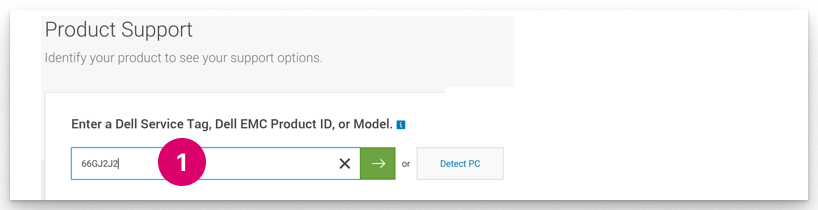
- From the product support page, select Warranty.
Under "Service" you will see the type of support (e.g. ProSupport) and the country of registration (e.g. Argentina).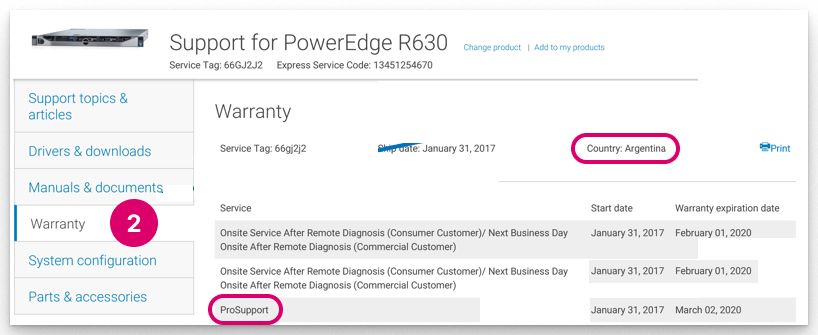
Dell Process Videos
The following links describe the various Dell process videos:
- How to enrol: https://www.youtube.com/watch?v=4_cEDLwBXKg [youtube.com] (5 mins)
- How to add users: https://www.youtube.com/watch?v=4J6P0aKecj0 [youtube.com] (5 mins)
- How to add a group: https://www.youtube.com/watch?v=itzCeLH73FA [youtube.com] (5 mins)
- How to access training: https://www.youtube.com/watch?v=OdqT3RXPops [youtube.com] (5 mins)
- How to raise a dispatch: https://edutube.dell.com/Player.aspx?autoplay=false&vno=T3CS9uEp5xy2h8LEPeXrJg (5 mins)
- What is a Dell Service Tag: https://www.dell.com/support/contents/en-uk/videos/videoplayer/dell-service-tag-explained-what-it-is-and-where-to-find-it/6079809839001
Should you have any questions or concerns regarding the above process, please create a support ticket with the Lawo support team, and we will be happy to assist you.