Lawo Flex - Daily Credits
What are Daily Credits
Daily Credits extend Lawo Flex with a short-term, on-demand licensing option available with HOME 5.2 and later. A Daily Credit provides flexible licensing capacity for one selected calendar day and can be combined seamlessly with Subscription Credits and perpetual licenses.
Daily Credits are particularly suited for Daily Peak Utilization Top-Ups, where additional licensing capacity is required only for individual production days or short periods. Typical examples include daily productions, events, weekend operations, temporary capacity increases, demonstrations, and testing. Instead of adding a longer-running subscription, the required number of credits can be allocated specifically to the days on which the additional capacity is needed.
Daily Credits purchased for an account remain available in the Daily Credits Pool for up to three years and can be allocated to connected HOME systems on demand.

This page provides a preliminary description of the Daily Credits workflow. The complete Lawo Flex User Manual will be updated shortly to incorporate Daily Credits and the related changes to the Lawo Licensing Portal. Until then, this page serves as the dedicated manual for Daily Credits.
Using Daily Credits
Daily Credits provide short-term licensing capacity for a HOME system on selected calendar days. They can be combined with Subscription Credits and perpetual licenses and are assigned through the Lawo Licensing Portal.

A Daily Credit is valid for the selected calendar day, from 00:00 to 23:59 in the time zone configured for the HOME system. If an application is still running when the Daily Credits expire, a grace-period behavior prevents an immediate stop.
Before You Start
Make sure that:
- the required HOME system is connected to the correct Lawo Licensing Portal account;
- the system time zone is configured correctly;
- sufficient credits are available in the account's Daily Credits Pool; and
- the user account has permission to allocate Daily Credits.
Only account administrators and users who have been granted the corresponding permission can allocate Daily Credits.
Connecting a HOME System to the Lawo Licensing Portal Account
If the HOME system, you want to equip with Daily Credits is not yet managed within your Lawo Portal Account, please follow these instructions to get your system connected.
Setting the Systems Time Zone
In the Lawo Portal,
- Choose the system you want to adapt the time zone by clicking the checkbox in front of the name.
- Select Edit from the menu bar
- In the opening dialog, find the time zone selector and choose the zone which applies to the geographical location of the system.
Changing the Time Zone of a system after the allocation of Daily Credits will not have any effect on the allocated Daily Credits.
Time Zone settings do not affect the utilization of credits supplied by subscriptions.
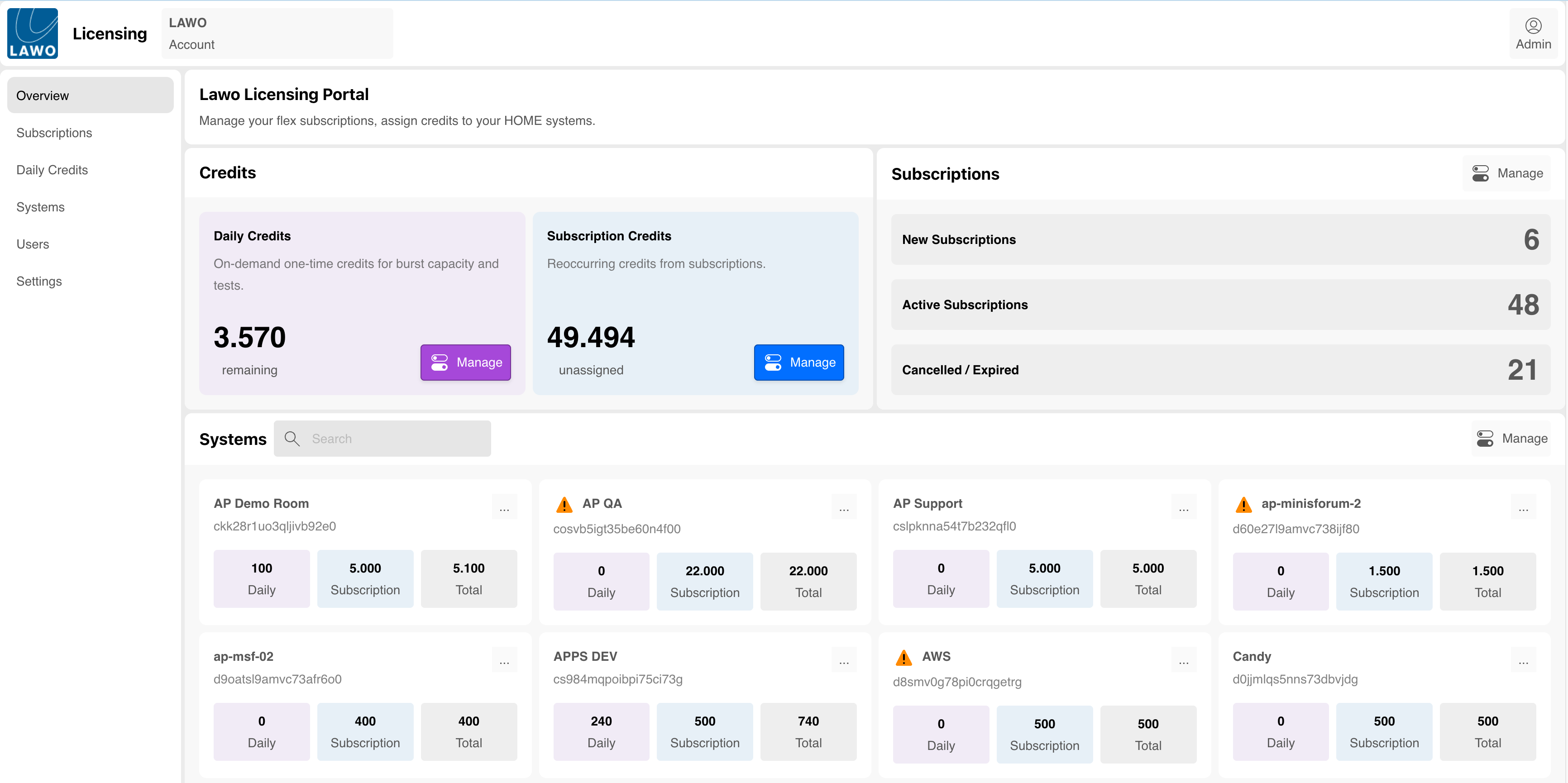
Checking Daily Credit Balance in the Account
Use the new overview page of your Lawo Portal account to learn about the current balance of Daily Credits.
Setting Permissions to Allocate Daily Credits.
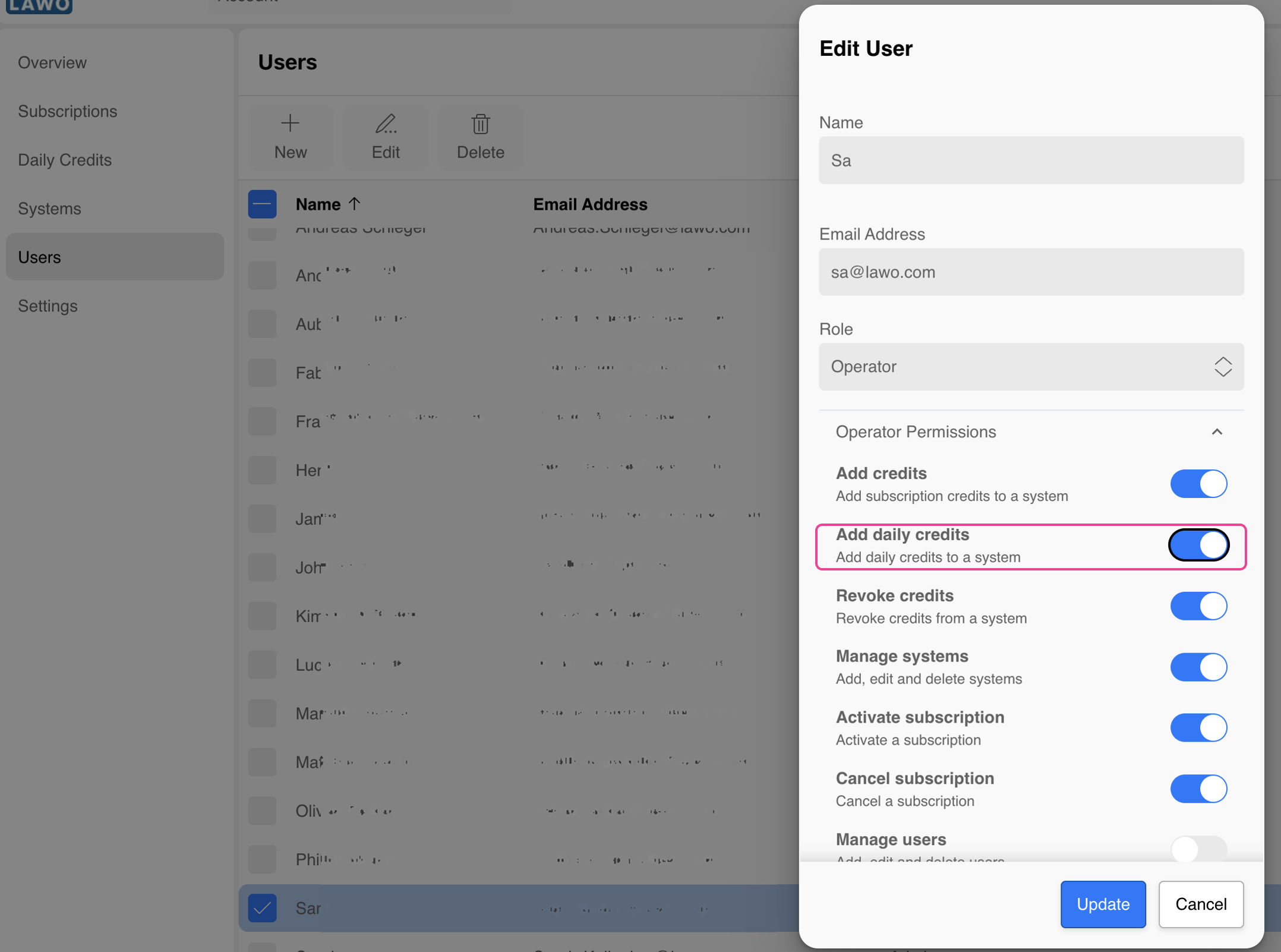
Only permitted users can allocate Daily Credits to HOME Systems. To set the user rights follow the procedure below:
- In the portal account, go to users
- Activate the check box infront of the name of the user you want to grant rights to allocate Daily Credits.
- Select Edit
- In the opening dialog, make sure the option "Add Daily Credits" is activated.
Assign Daily Credits to a HOME System
1. Goto my.lawo.com
- Sign in to the Lawo Licensing Portal.
- Select the correct account from the account menu.
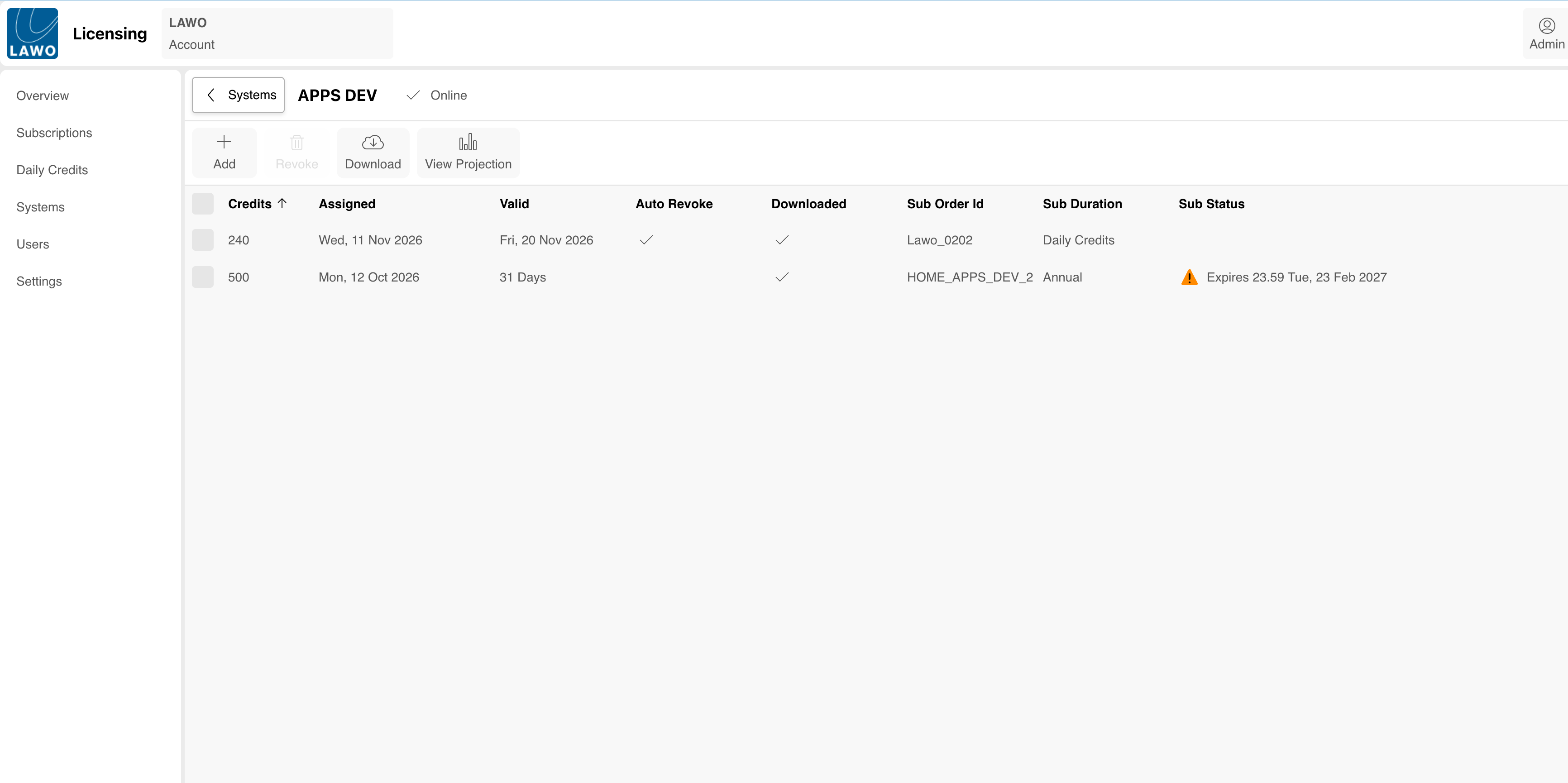
- Open Systems.
- Select the HOME system that requires additional credits.
The system page shows the existing Daily Credit and Subscription Credit assignments.
2. Start a New Credit Assignment
- Select Add.
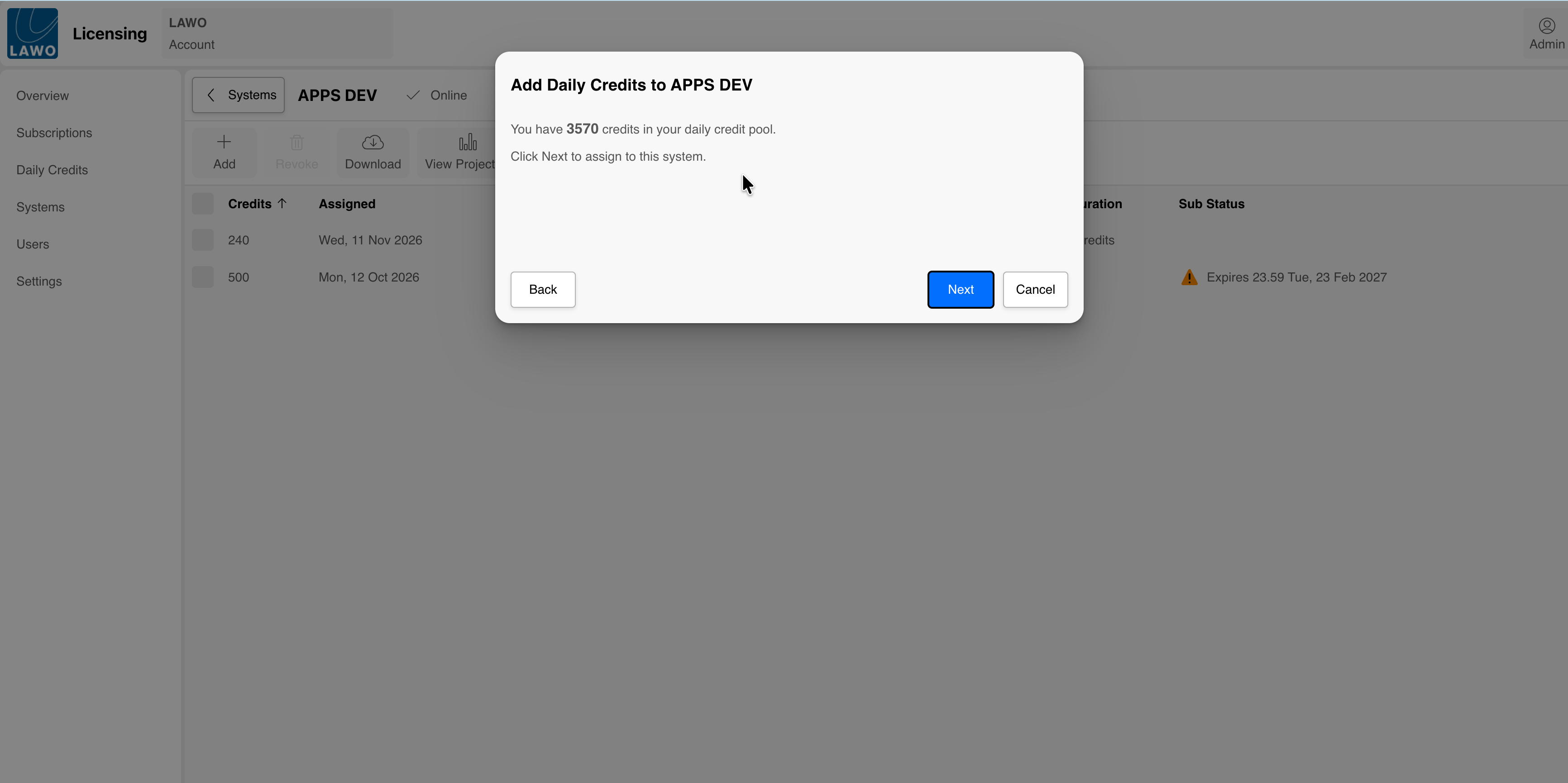
- Select Daily Credits Pool as the credit source.
- Select Next.
The dialog displays the number of Daily Credits currently available in the account.
Select Next.
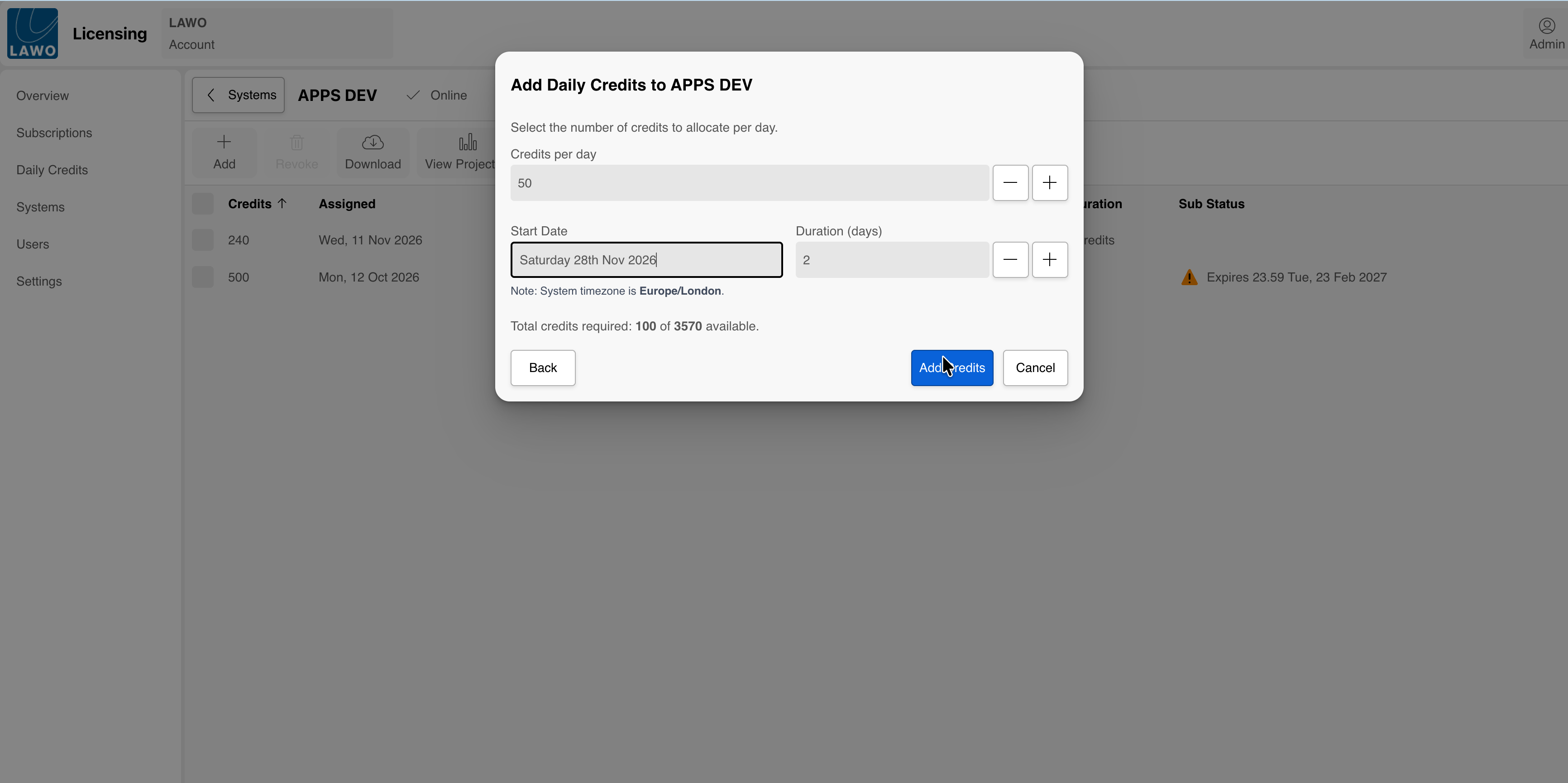
3. Configure the Daily Credit Assignment
Enter the required assignment parameters:
- Credits per day: The number of credits that the system requires on each selected day.
- Start Date: The first calendar day on which the credits must be available.
- Duration (days): The number of consecutive calendar days for which the credits are required.
The portal calculates the total automatically:
Total Daily Credits required = Credits per day × Duration
For example, 50 credits per day for two days require a total of 100 Daily Credits.
Verify the system time zone displayed below the start date. The selected dates are interpreted according to this time zone.
4. Confirm the Assignment
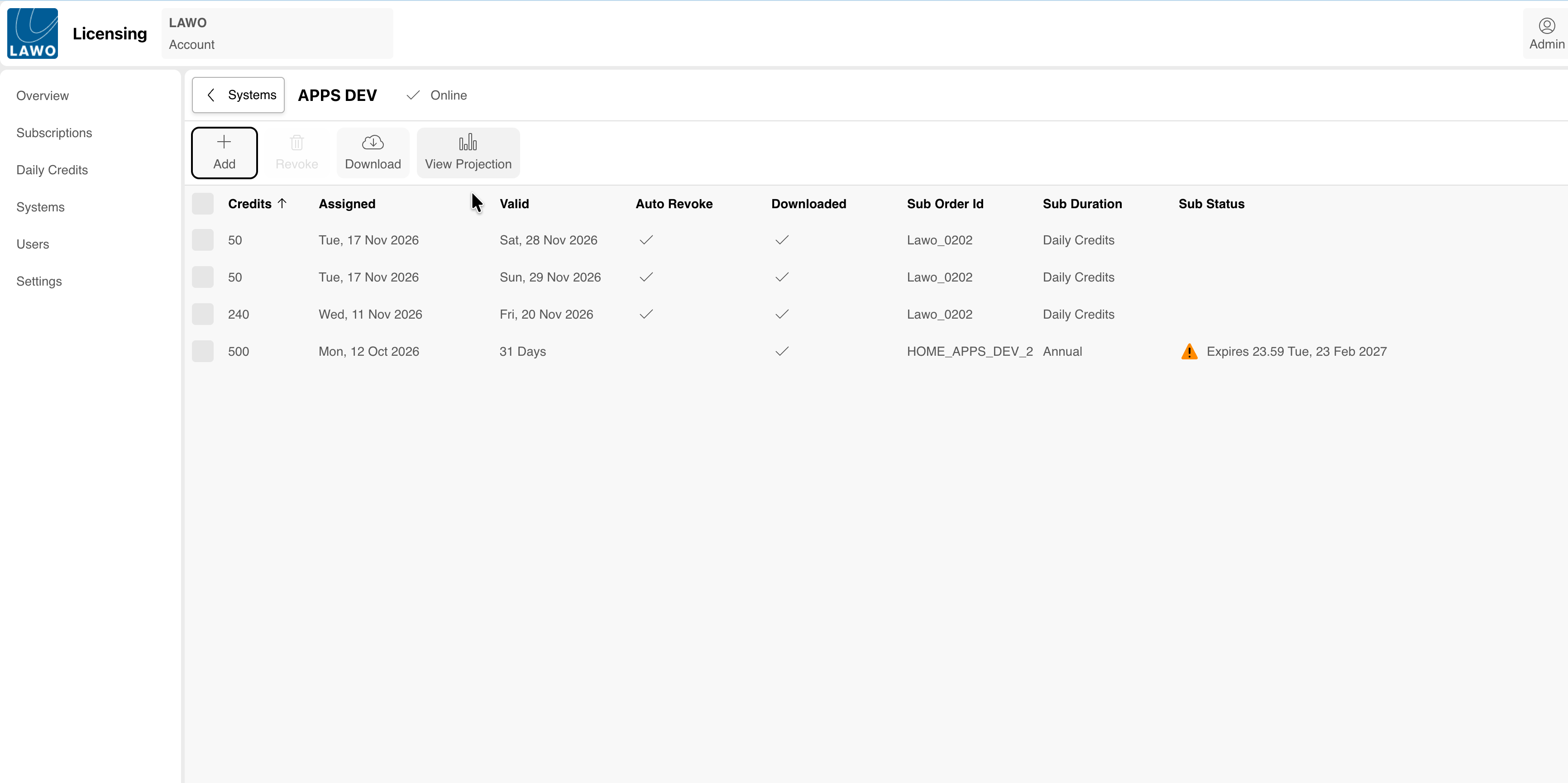
- Check the selected system, credit quantity, start date, duration, system time zone, and calculated total.
- Select Add Credits.
- Verify that the new Daily Credit assignment appears on the system page.
Daily Credits scheduled for a future date can be revoked until the selected day begins at 00:00. Once the validity period has started, the active Daily Credits cannot be reassigned to a different system.
Check Future Credit Availability
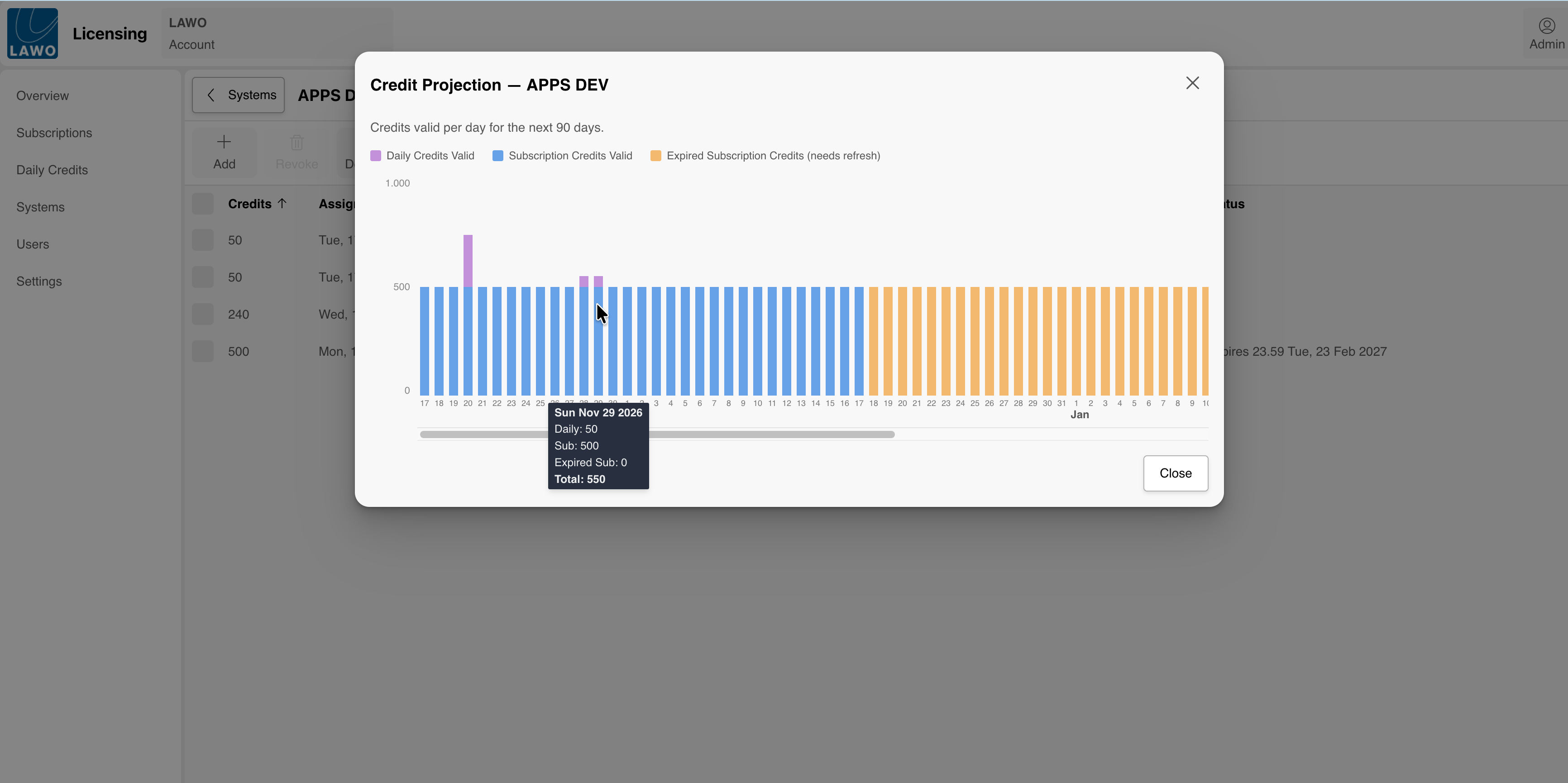
Use the Credit Projection to verify that the HOME system has sufficient credits for the planned production period.
- Open the required system.
- Select View Projection.
- Move the pointer over a date to display the credit values for that day.
The projection covers the next 90 days and distinguishes between:
- Daily Credits Valid
- Subscription Credits Valid
- Expired Subscription Credits (needs refresh)
The date tooltip shows the Daily Credits, Subscription Credits, expired Subscription Credits, and total credits available for the selected day.
Verify the Credits in HOME
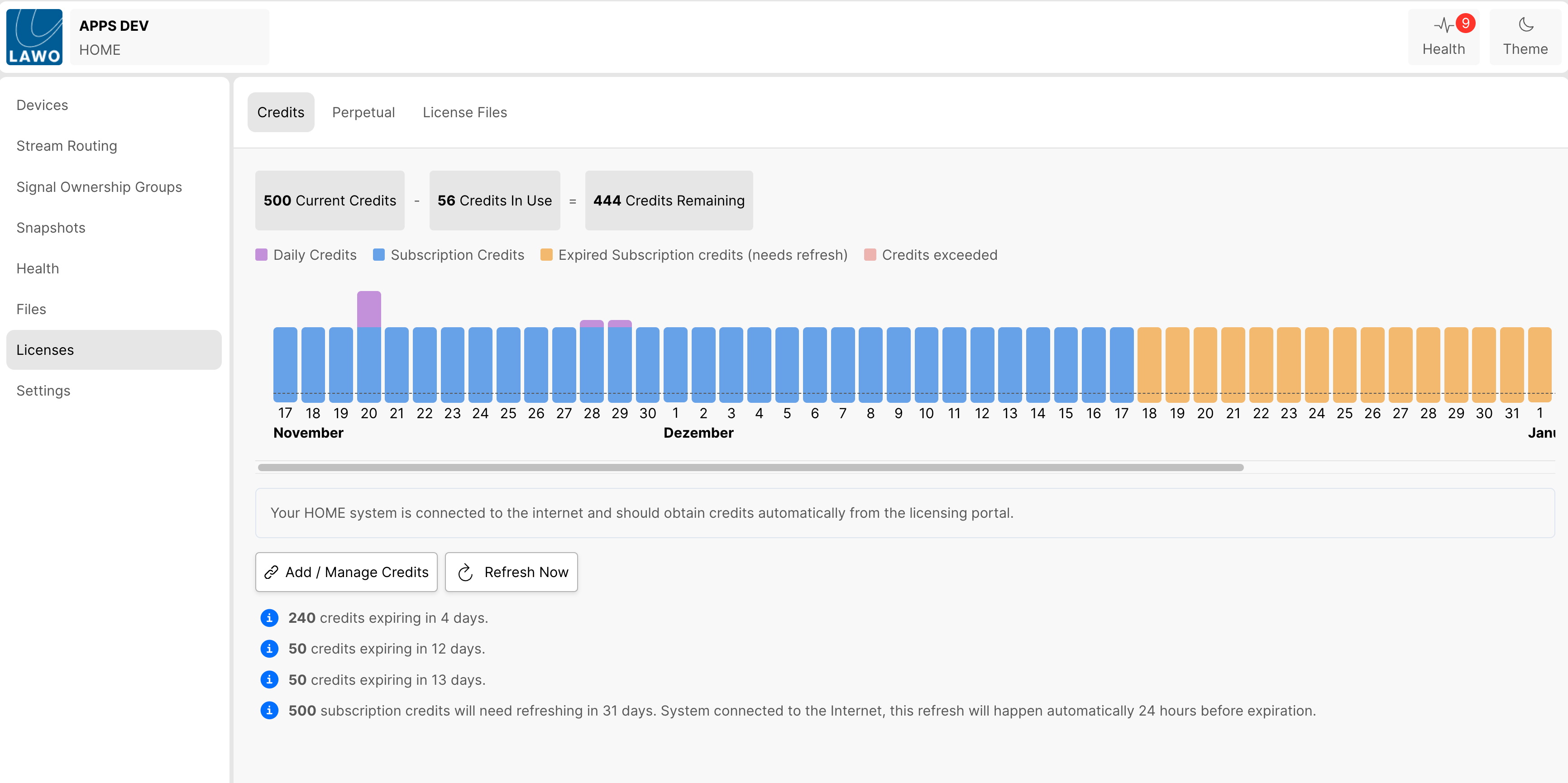
In HOME, open Licenses and select the Credits tab.
The page shows:
- Current Credits
- Credits In Use
- Credits Remaining
- a date-based credit timeline
- upcoming expiration and refresh information
The timeline uses separate colors for Daily Credits, Subscription Credits, expired Subscription Credits requiring refresh, and exceeded credit capacity. Daily Credits appear in addition to any Subscription Credits available on the same day.
Important Behavior
The following points regarding Daily Credits are important!
- A Daily Credit is valid for one selected calendar day, from 00:00 to 23:59 in the HOME system time zone.
- Assigning credits for several consecutive days consumes the daily amount once for each day.
- Daily Credits can be combined with Subscription Credits and perpetual licenses.
- A future Daily Credit assignment can be revoked until the assigned day begins.
- Once active, Daily Credits cannot be reassigned to another system.
- An application does not stop immediately when its Daily Credits expire. Grace-period behavior applies before a forced shutdown.
- Daily Credits remain available in the account's Daily Credits Pool until they are assigned or reach the end of their permitted usage period (3 years from day of provisioning).
Daily Credits FAQ - Frequently Asked Questions
Daily Credits remain available for allocation for three years after they have been added to the customer account. During this period, the credits can be assigned to connected HOME systems as required.
Once the three-year period has expired, unused Daily Credits will expire from the account and are no longer available for allocations.
A scheduled Daily Credit allocation can be revoked until the day of use begins at 00:00, based on the time zone of the HOME system.
This allows a planned allocation to be changed or cancelled before the Daily Credits become active.
Once the selected day has started, the Daily Credits are considered active and can no longer be returned for allocation to another system.
Once active, a Daily Credit behaves like any other Flex Credit within the HOME system. It can be used to license supported functionality as required during its validity period.
Daily Credits can also be combined with Subscription Credits and perpetual licenses, allowing temporary capacity to be added to the system's existing licensing capacity.
The main difference is that an active Daily Credit is bound to the HOME system to which it was allocated and cannot be reassigned to another system.
A Daily Credit is valid for the selected calendar day, from 00:00 to 23:59 in the time zone of the HOME system.
If a HOME App is still running when the Daily Credit expires, the App does not stop immediately. A grace period starts instead, allowing the App to continue running temporarily. When an app running unlicensed during a grace period is stopped, it cannot be restarted, even if the grace period has not ended.
If sufficient valid licensing does not become available during the grace period, eg. by allocating new credits to the HOME system, the App is eventually forced to stop.
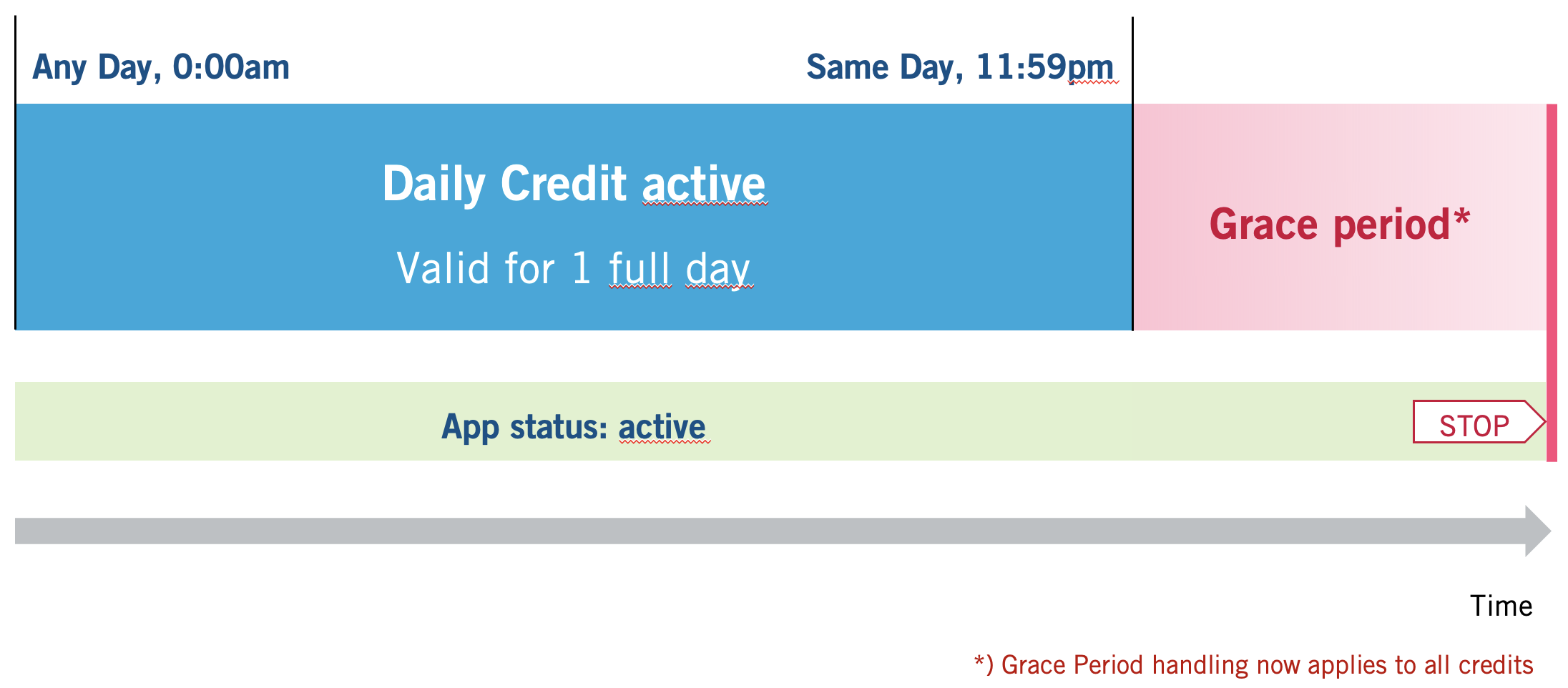
Grace Period handling applies to all credits, not only to Daily Credits.
Yes. Daily Credits from the account's Daily Credits Pool can be allocated to any HOME system connected to that account.
Each allocation defines how many Daily Credits are assigned to a particular system and for which days.
However, once a Daily Credit becomes active on a system, it is bound to that system for its validity period and cannot be reassigned to another system.
No. A Daily Credit represents licensing capacity assigned to a system for a specific calendar day, rather than a license consumed only while a particular App is running.
Stopping an App does not make a Daily Credits expire. Instead, it returns to the HOME Systems local credit pool and remains valid. During its validity period, however, the available credit capacity can be used within the assigned HOME system like other Flex Credits.
The access right to assign Daily Credits to HOME Systems is limited to either administrators of a portal account or to users specifically granted rights to do so.