HOME - Licenses
The functionality of HOME is managed through a series of licenses.
Firstly, there are Core licenses that determine the size and capability of the system. Then, there are the system-specific licenses that unlock functionality within HOME. Lastly, there are the device-specific licenses that unlock functionality within the devices and apps.
Both the HOME system and device-specific licenses are included in the Lawo Flex Licensing model, and can be managed by the user.
This chapter includes descriptions for the available Core licenses and HOME system licenses. For more information about the licenses for an end-product (e.g. HOME Apps), please refer to the documentation for the end product (e.g. HOME Apps - Licensing).
Lawo Flex Licensing
If a license is supported by Lawo Flex, then its licensing requirement can be achieved in one of three ways:
- Perpetual licenses (for permanent availability).
- An equivalent amount of credits (that are subscription-based).
- A mixture of both: perpetual licenses + credits (for baseline functionality + subscription-based top-ups).
By default, HOME allocates all available perpetual licenses first, and then top up with credits. If you wish to use only perpetual licenses, or only credits, then this can be done by changing the license type (of the function or app).
Perpetual Licenses vs Credits
To choose the most appropriate licensing method, it's important to understand the differences between perpetual licenses and credits.
Perpetual licenses:
- are purchased once and are valid for the lifetime of the system.
- are bound to a specific device or function.
- are uploaded and stored on the device or HOME system.
- cannot be moved (to a different device or HOME system).
Lawo Flex credits:
- are purchased on a subscription basis, with a default validity of 30 days*.
- are not bound to any particular device or function. They are valid for any licensed resource in HOME: e.g. any device option or app.
- are assigned to the HOME system from an active subscription in the customer's Lawo Flex account.
- can be moved between HOME systems (when not in use), as long as the HOME systems are linked to the same Lawo Flex account.
*Important: When credits are first assigned to a HOME system, they have a default validity period of 30 days, after which they can be renewed either automatically or manually (if the underlying subscription allows for a renewal). This is explained in more detail later. Please see Credit Validity (and Expiry).
The 'Licenses' page
The 'Licenses' page (in HOME) provides a comprehensive overview of the Flex licenses managed by the HOME system. The overview applies to all license types supported by the Lawo Flex Licensing model. Note that this includes HOME system-specific licenses (such as HOME Passes and NMOS Importer/Exporter/Proxy), plus device-specific licenses (such as the functionality licenses for HOME Apps).
In each case, the licensing can be achieved using perpetual licenses (of a certain type), an equivalent amount of credits (assigned from a Lawo Flex account), or a mixture of both (licenses + credits).
The user can check what is available and what is in use for the entire home system by opening the 'Licenses' page and choosing one of the menu tabs: Perpetual or Credits.
Perpetual (tab)
The Perpetual tab contains an overview of the perpetual licenses that are managed by the HOME system.
Perpetual licenses provide permanent access to specific functionality of HOME or HOME Apps. Once assigned to a specific HOME system, the perpetual license is locked to that system and cannot be moved.
The Perpetual tab shows the Total number of available license types (by Name), the number In Use and the number Remaining.
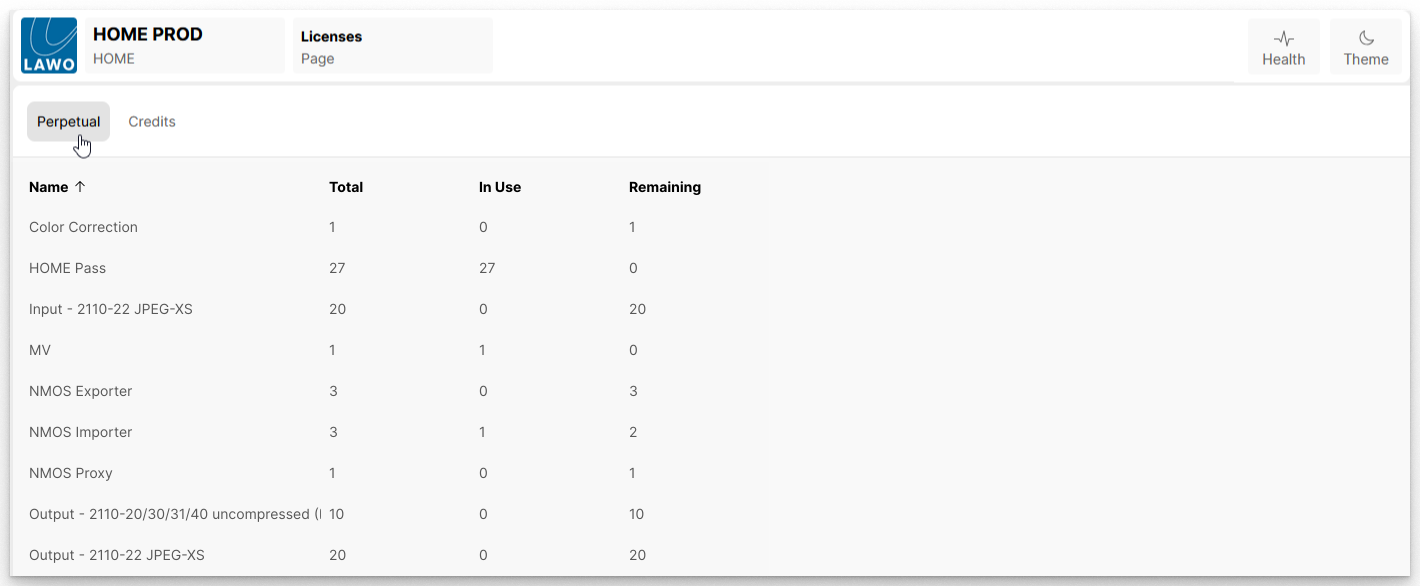
For more information about how to add more perpetual licenses to HOME, please see HOME - Managing Perpetual Licenses.
Credits (tab)
The Credits tab contains an overview of the credits that have been assigned to the HOME system (from a Lawo Flex subscription).
Credits are not bound to any to any particular device or function, and can be assigned to any HOME system that is linked to the customer's Lawo Flex account.
The Credits tab shows the total number of credits assigned to the HOME system (Credit Total), plus how many are In Use and Remaining.
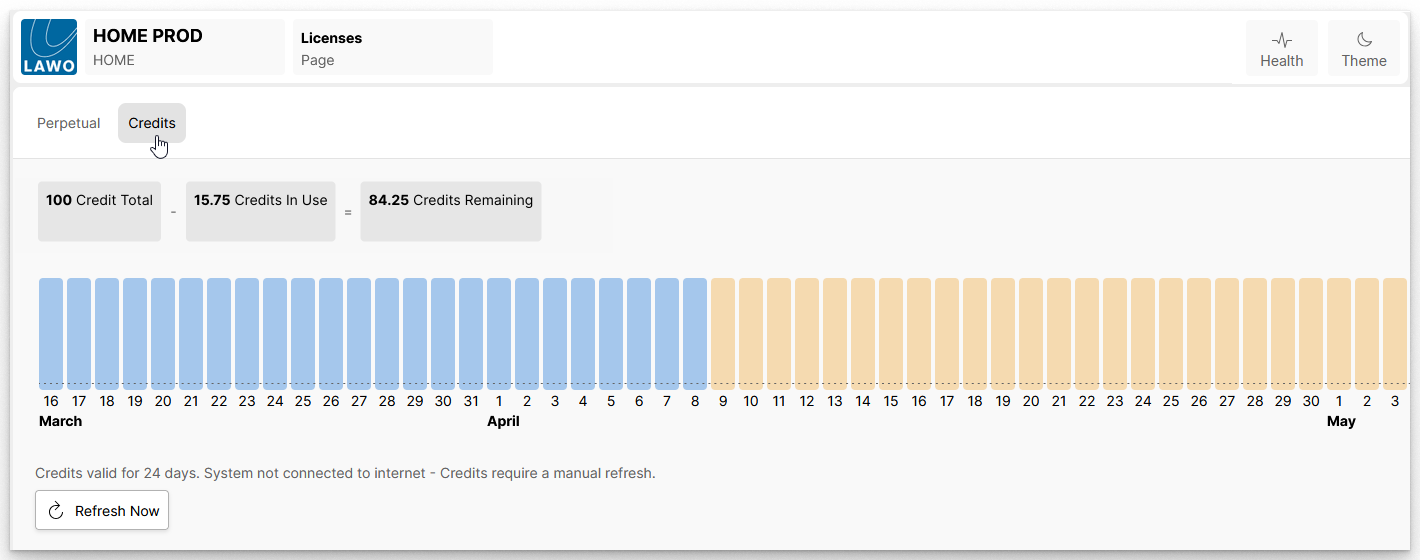
Credits can be assigned to HOME in values following a 0.25 granularity.
The bargraph shows a visualization of the available credits over time, where the day and month are indicated on the X-axis. In the example above:
- Blue bars indicate the overall credit balance until the day of renewal.
- Yellow bars indicate that the underlying subscription allows for a next lifecycle, after the renewal date.
Other bargraph colors are possible, and these are described later in HOME - Managing Credits.