If devices are paired to create a redundancy group, then the redundancy group is added to HOME's inventory (and appears in the 'Devices' list as a separate entry).
The redundancy groups are clearly identified by the group icons in the Device Type column. In the example shown below, there are two redundancy groups: one for each of the mc2 console control systems.
The Hosted By and Redundancy columns provide the following information:
- Hosted By shows where the redundant group or member is hosted. This becomes relevant for virtual devices such as a Virtual Mixer Redundancy Group.
- Redundancy shows the members of the redundancy group. In the example below, each Control System Redundancy Group has two members: the primary and secondary mc2 control systems (mcx "devices").
If you click on a device label in these fields, then this opens the general settings page (for the host device or redundancy group member).
When working with redundancy groups, the View button can be used to change the view:
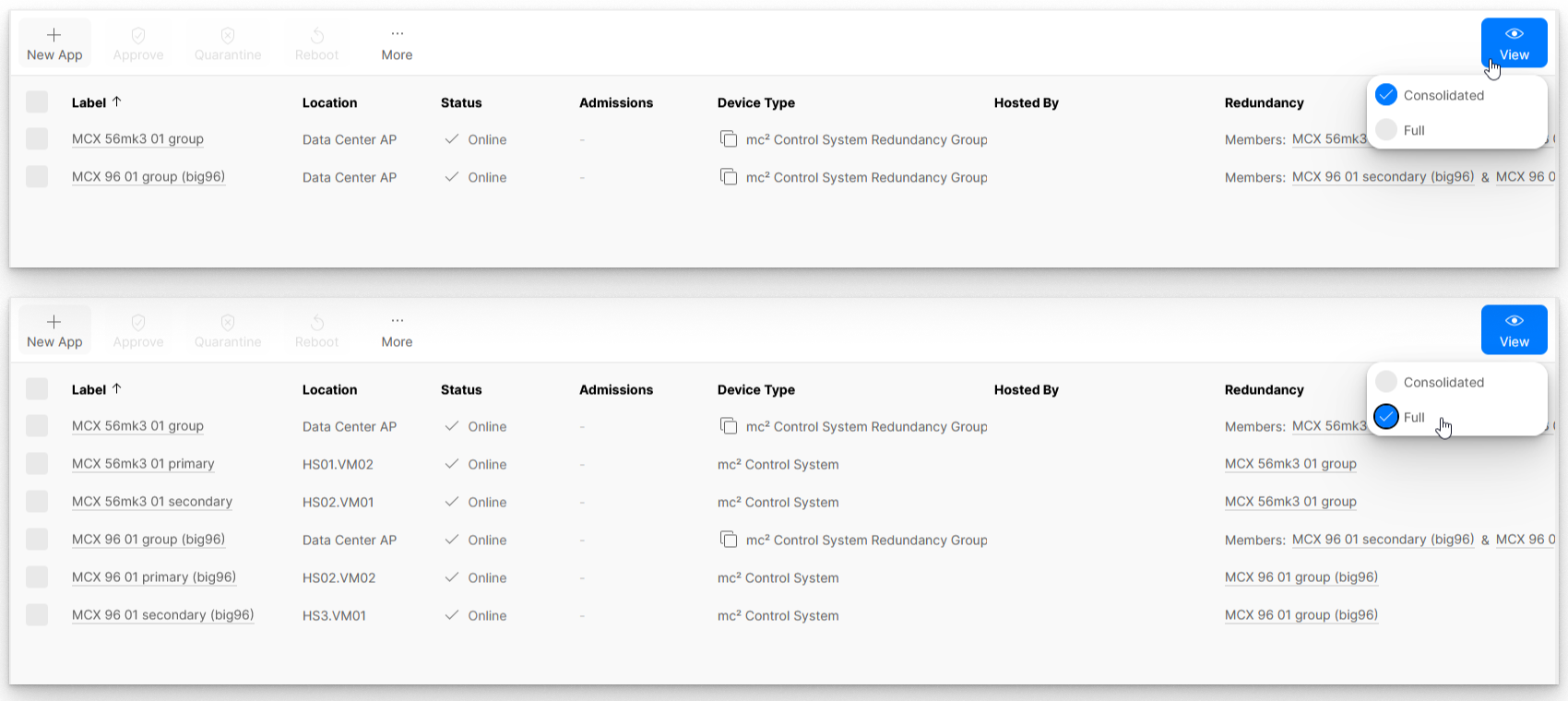
There are two possible options:
- Full - shows all redundant groups and their members.
- Consolidated - collapses the view to show only the redundant groups.
Usually, consolidated view is recommended (to simplify the 'Devices' list). In this view, you can still access settings for an individual redundancy group member (by clicking on the labels in the Redundancy column).