HOME TPG - Advanced -> Redundancy
All controls are provided on a single page; there are no sub-pages.
Redundancy
To support app failover, a logical group of App Server(s) must be configured. Once this is done, the app's Redundancy controls can be used to determine whether the app will failover, or not, and to which Redundancy Group.
This feature is described fully in HOME Apps - Redundancy (App Failover). The table below describes the app's Redundancy controls.
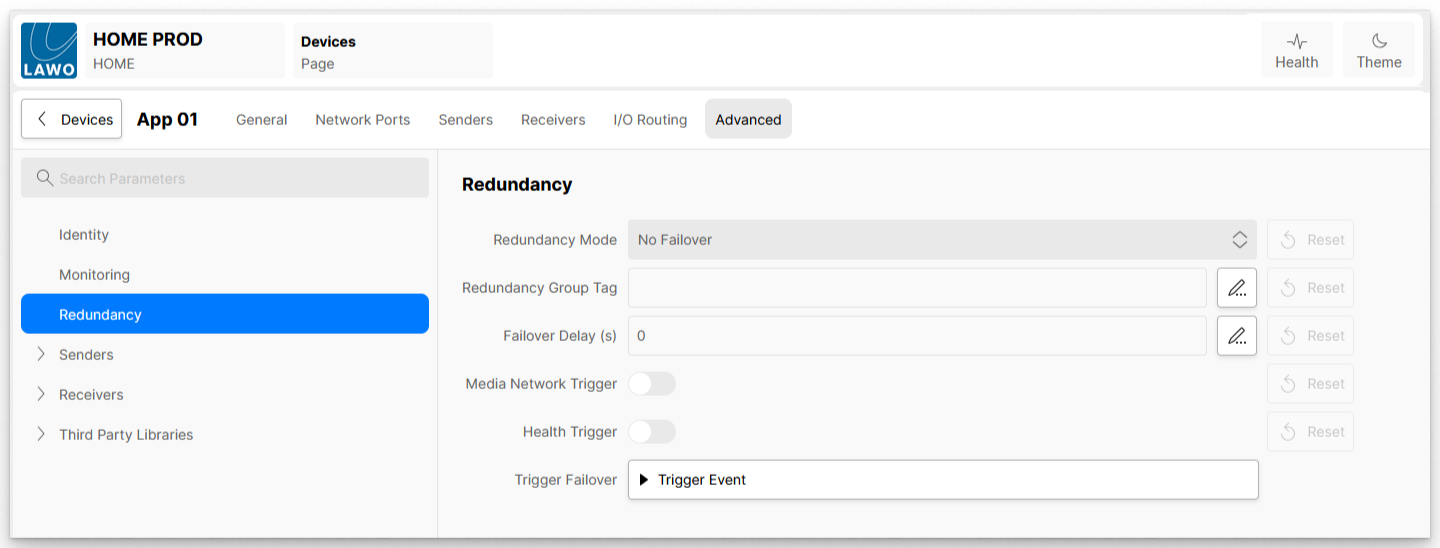
| Redundancy Mode | Determines whether the app will failover or not. It can be set to one of two possible values:
|
|---|---|
| Redundancy Group Tag | Defines the redundancy group to be used by this app if its Redundancy Mode control is set to 'Failover Within App Server Redundancy Group'. Here you should enter the redundancy group you wish to use. Take care to enter the correct syntax as this must match the Redundancy Group Tag entered in the app server configuration. If the app's Redundancy Mode is set to 'No Failover', then this control (and all other controls on this page) are ignored and perform no function. |
| Failover Delay (s) | Defines the period of time, measured in seconds, that an app should wait before failover occurs. This control can be used to add a 'hold-off' period before the app starts the failover process. For example, to give the detected problem time to recover. If the value is set to zero ('0'), then the app failover process begins as soon as a failover event has occurred. The amount of Failover Delay can be set to any value between 0 and 600 seconds. |
| Media Network Trigger | This option can be enabled or disabled:
|
| Health Trigger | This option can be enabled or disabled:
Note that, whenever you start an app, it is normal for the app status to be reported as 'unhealthy', and for this to change to 'healthy' once all the app's containers are successfully deployed. To avoid this initial state of 'unhealthy' triggering a failover, a hold-off period is implemented, whereby the app must have been in a ‘healthy’ state for at least 30 seconds before a transition to ‘unhealthy’ will trigger a failover. |
| Trigger Failover | This control can be used to trigger a manual failover. For example, to test the redundant operation once it is configured, or to force a failover should the need arise. Clicking on Trigger Event starts the app failover to the specified Redundancy Group, bypassing health checks. The usual conditions apply so if, for example, there are no available app servers in the redundancy group, or the available server(s) do not have enough resources, then the app will not failover. |