Radio Release Notes - 10.0
Introduction
Software version 10 is a major software release for diamond, crystal, Power Core, HOME Power Core App and VisTool.
This software release package applies to the following products and applications:
- Power Core Rev1 (710/10)
- Power Core Rev2 (710/11)
- Power Core Rev3 (710/13)
- HOME Power Core App
- AIOX (710/12)
- diamond surface
- crystal surface
- ruby surface
- VisTool
- On-Air Designer
- Sop Explorer
Release date: 2026-07-20
Software repository: Lawo Download Center
Current versions:
- OnAirDesigner: 10.0.0.2
- OnAirDesigner Definition Number: 2.2.22
- Power Core Firmware: 10.0.54
- VisTool: 10.0.0.2
- Digital Metering System Driver: 5.0.0.0
- WIBU 8.2
- Ruby Migrate 10.0.0.2

Before you begin.
Please make sure that you have all necessary applications and tools available before you start the update.
We strongly recommend that the software versions used are from the same release packages.

Please note:
- Please always use the Wizard function in SoP Explorer when updating surface modules.
It is important to follow the correct update sequence provided by the Wizard feature. - The Dante and MADI SRC I/O Card can show that an Update for XSRC is needed. Performing this update will take approximately 10 minutes and is only required if the core should operate in 96 kHz as Gateway.
- Due to the change to the new definition format, existing VisTool projects will give a warning that definition is not matching. The definition has to be changed to the new format via VisTool Sessions.
- Ruby Migrate is no longer part of an OnAirDesigner Installation and can be downloaded separately if it is necessary to convert a ruby configuration to a diamond.
- Existing Projects using A_Line Ember+ Control must be adapted to the new Mic Control Mode.

Important:
If you update from a Version 8.2 please read the following:
Power Core and diamond /crystal:
- Due to new diamond/crystal surface Firmware, a downgrade is not possible, after updating.
- Due to enhanced security features, all individual passwords on the power core are reset to default and must be changed after the update.
VisTool:
- Due to the Switch of the QT Engine, VisTool Projects are converted to the required changes. A "xxx_before_convert" is stored. Once changes are done in the new project, it can´t be opened with an old VisTool Version.
- When Updating from VisTool 8 to 10, all screen assignments need to be updated with the VisTool Session Manager, as there is a new mechanism to detect screens.
- Logic Engine may require a "Rebuild / Repair Logic and Compile" function. This is explained in this Release Notes.
If you are updating from a version older than ON-AIR Designer 8.0 please read the full release notes for Version 8. These can be found here.
Enhancements
Power Core
Console
Labels for Attack and Release of the Expander can be swapped
The labels for the Attack and Release of the Expander can be swapped.
This only affects only the display of the diamond labels and does not make any audio changes. VisTool also does not follow.
DSP
Listen Function for DeEsser
The DeEsser provides a momentary listen function. As long as the Listen Button is pressed, the Sidechain Signal can be monitored.
It is recommended to use the Listen function in PFL Mode. While a Fader is open the Listen Signal would be used OnAir.
Additional Values for Frame Rate
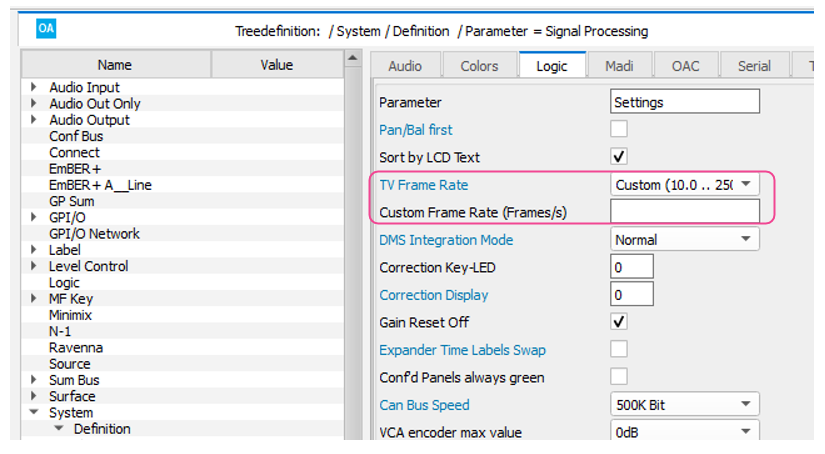
A new custom Frame Rate Parameter allows a custom Frame Rate to be defined, which is then used when adjusting the delay value in frames. A real value between 10.0 and 250.0 can be defined. The Custom Frame Rate parameter can be found in System/Definition/Logic:
New additional EQ Band
The Power Core now offers a additional 4th parametric EQ Band. The Band is called Mid2 and is available on the second EQ Page on the diamond and new crystal surface. In the EmBER+ tree it is called Band 3a. VisTool is also possible; however existing configurations may need to be modified to display controls for the new band.
EmBER+
Fader levels can be set for unassigned sources
Checking the "unassigned Fader Levels RW" enables the fader level of a source to be modified even if the source is not assigned to a channel. This option is set per-source object.
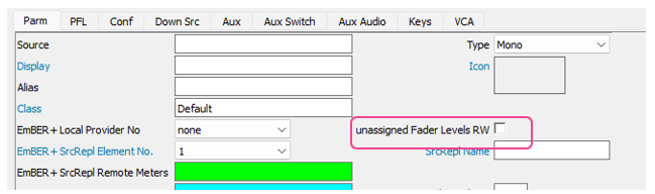
This feature is for configurations using EmBER+ Source Replication.
EmBER+ Providers now support additional consumers
Each EmBER+ provider now supports up to 16 Clients; previously the limit was 8 clients.
I/O
Network
NATS Protocol Support
The Power Core now supports communication between the Power Core and surfaces/VisTool instances using the NATS protocol.
This is currently an experimental feature!
License
Rav+ now available for all Base Licenses
The Ravenna+ AddOn License is now available for all Base Licenses.
Sources
System
New Hardware Type: Power Core App
Configurations can now be created for the HOME Power Core App.
Matrix Snapshot Destinations increased from 128 to 512
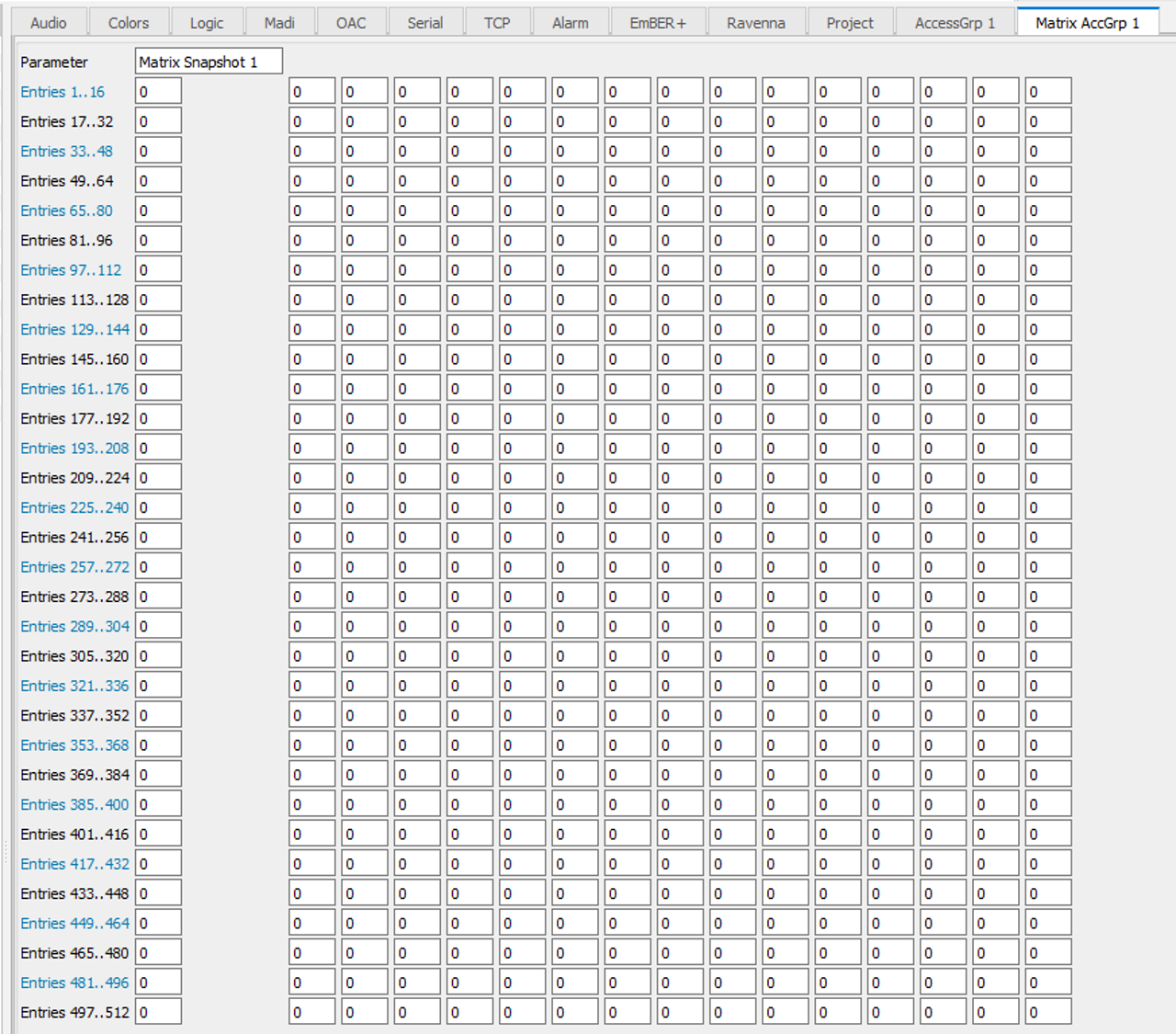
Snapshots can now store routes for up to 512 destinations (per Access Group in MAX configurations). Previously this was limited to 128 destinations.
Web UI
Creation of SSL/TLS Certificates
The WebUI now provides a mechanism to create SSL/TLS Certificates.
This is currently an experimental feature!
diamond/crystal
System
Surface warning for incompatible protocols
Surfaces will now display a warning if there is a protocol version mismatch between the Power Core and surface to prevent issues from incompatible firmware matches.
WebUI
Can Bus Error Counter per connected CAN Module
The WebUI displays now Can Bus Errors for each connected Module. The CAN Bus error counters should always be 0; if not the cabling should checked.
Reboot System affects all Modules
The "Reboot System" button will now restart all modules and not only the IP Connected Module.
VisTool
Editor
Improved Handling for Control Element to adjust Sizes or Positioning
The Control Element was improved, so that small Elements could be adjusted easier.
Scrollbar for Connections Dock
The "Connection" Dock has now a scroll bar, for better navigation in case of larger amount of connections.
Channel MF Keys available for Predefined User Text
Boxes can now be mapped to Channel MF Keys via Pre-Defined User Texts. Available for Channel 1-60, L2 1-60 and Access.
Protocol
Runtime
Logic Engine
Changes
Power Core
Console
ruby Consoles: Central Module Access functionality incorrect
On ruby Consoles the Access functionality on Central Modules did not function correctly.
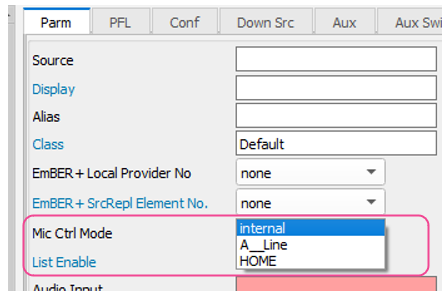
New Parameter for Audio Sources: Mic Ctrl Mode
This defines the protocol which should be used for Microphone Control. This is defined per source object.
| Mic Control Mode | Description |
|---|---|
Internal | Use when the Source Audio Input is a local Microphone Input from a connected IO card, or when using Mic Arbitration logic elements. |
| A_Line | Use when remotely controlling an A__Line device via EmBER+ |
| HOME | (App Only!) Use when the Source Audio Input is a RAVENNA input; HOME will automatically detect if the connected stream contains a microphone input from a HOME-native device and will enable mic preamp control from the Power Core. |
Currently, the HOME Mic control mode will only function with the Power Core App.
Existing Projects using A_Line must adapt the project to the A_Line Parameter.
diamond Surface labels could be truncated
In some instances, characters like q,g,y and p would be truncated on the surface display.
MF Key Color updates improved
MF Key colors would not be correctly updated on Central/Combo Modules after exiting the Access menu.
Assign Key Color improved
Assign Key color did not light up in configured Assign Color on unassigned Faders.
DSP
Unassigned Sources could affect Automix
Sources assigned to an automix group could still affect the automix balancing even after being unassigned from a channel by a snapshot load.
VisTool could not control the Limiter Release parameter
When controlling the Limiter Release parameter with the Channel Function control the resulting value was always set to "0".
EmBER+
GPO Cards eventually did not correctly report Updates
If the "Core Connected" EmBER+ property of a GPO was "TRUE" the GPO would not actively report state change updates to clients.
EQ Band 5 Parameter Mode always sent 0
EQ Band 5 Parameter Mode always sent 0, even if a different Mode was set.
Side Chain Filter Frequency could return wrong Value
Setting a value greater than 256 for the Side Chain Filter Frequency could result in an incorrect value being returned, however the correct frequency would still be set internally.
System Values sent to all Consumers
System Values like Fan Speed have been sent to all Consumers, even not subscribed.
I/O
I/O Card Parameters not set correctly after restarts or installations Wrong initialization of Mic I/O Cards after restarts or replugging
In some instances, I/O card parameters would not be correctly set after a restart of the Power Core or AIOX, or after plugging in the I/O card.
Very rare distorted Audio on AES67 Inputs
In very rare cases, there could be distorted Audio on AES67 inputs. This could happen in a combination of very large Buffers, large Sample per Packet and high Jitter values.
Noise on AES Card 710/42, when no Input connected
In some cases there was noise on unconnected AES Inputs from the AES Card 710/42.
Sources
Snapshot
ON-AIR Designer did not allow support saving ra2/3 Matrix Destinations in Power Core Snapshots
It was not possible to configure Matrix IDs > 2113 in Power Core Matrix Snapshots.
System
Incorrect Pathfinder responses
When using the Pathfinder support tool, some requests were answered incorrectly.
Stack Dumps not written reliably
In some instances, stack dumps were not written correctly.
User labels could impact Control via RAS
Setting a user label could break the Control via RAS. Now the RAS protocol only references the LCD Text.
Changing the Source name via System Name required 6 Characters for RAS to work
Setting the System Name for a source could break RAS control. Now the RAS protocol only references the LCD Text.
Logical Output of "Fader Manual Start" potentially wrong after Coldstart
The logical output of "Fader Manual Start" could potentially be wrong after a cold start.
Network
EmBER+ connections could fail in case of large amount of connection interruptions
When a large amount of connection interrupts happened, there was a chance that EmBER+ connections would stop working.
Netcom connection could fail in case of large amount of connection interruptions
When a large amount of connection interrupts happened, there was a chance that Netcom connections would stop working..
Potential incorrect PTP master state after reboot
In rare cases the Power Core did not act as a PTP Master after reboots.
diamond/crystal
System
Modules sometimes did not restart after updates
In some cases, connected modules did not restart after an update.
Assign Color was incorrect on unassigned Faders
On diamond modules the Assign Key Color was incorrect if the Fader was unassigned.
Web UI
VisTool
System
Editor
Matrix Buttons lost "Type" Attribute
When converting a VisTool 8 to VisTool 9 Project, Matrix Buttons lost their "Type" Attribute
Elements did not show "Not Found"
In case of a missing mapping or a different ON-AIR Designer project, VisTool elements did not show "Not Found" if the mapping was not available in the definition.
Rotary elements did not take min and max values into account
Rotary elements mapped to a Channel Function did not take Min and Max Value into account when configured.
"Remove GNET UDP" was not saved
When a GNET UDP was removed, it was not stored and came back after reload.
Property size could be missing for User Graphics
User Graphics (SVGs) with no Width and Height Attribute within the SVG did not show the Property "Size"
VisTool could crash when using "," for "Valid If" property within overlay
When using a "," for the "Valid If" Property, VisTool could crash.
VisTool could crash due to Right Mouse Click on an "Indicator"
VisTool could crash when a right-clicking on a SVG used as an "Indicator" for fader elements.
Potential Crash when Deleting Graphics
Adding new elements with graphics after deleting elements could potentially lead to a crash.
Incorrect display of "Rights" within User Group Properties
"User Rights" defined in ON-AIR Designer configurations were not displayed correctly in the VisTool User Group Properties window.
Matrix Buttons Font size took Windows Scaling into account
Matrix button labels were affected by Windows Scaling and were displayed incorrectly.
Logic Engine
No Changes.
Runtime
DYN Graphic did not update on Gain Compensation Value changes
The DYN Graphic did not update when the value of the Gain Compensation changed.
Negative timer values for Integrated Loudness Measurement
The timer could show a negative Result when started twice within a short period.
Horizontal Loudness Meter had wrong visualization
Horizontal Loudness Meter had corrupted visualization.
#dmstext:channel:nm1:state:n operated on the Source in Access if no Channel was assigned
If a box had a UserText of #dmstext:channel:nm1:state:n, but no channel was assigned, the box would operate on the source in access.
Rotary Encoder displayed incorrect value for N-1 Gain Channel Functions
The Rotary encoder would display incorrect values while being operated by a mouse. After releasing the encoder, the value would be updated with the correct display.
Predefined User Text was not overwritten for Elements, if given
When using "#dmstext:channel:nm1:state:1;True;False" only the normal value "On/Off" was displayed. Other affected PreDefined User Texts included:
#dmstext:channel:nm1:state:n
#dmstext:automix:on
#dmstext:channel:automix-passive
#dmstext:channel:input:surround:mute:n
#dmstext:channel:input:surround:reset:n
#dmstext:channel:aux pan:state:n
Predefined User Texts for Aux and Surround Gain did not display values
Instead of the correct Value, they displayed "On".
ChanStateElement did not receive Updates
The ChanStateElement did not receive updates, when it was not drawn.
EQ Element kept last state
The equalizer element kept the last information even if no source was in access.
Webengine did not use one folder for Cookies
The web element did use one folder per Webengine. This is changed back to the default behavior from Version 8 with one folder being used for all WebEngines.
Session
"Auto Size Adjust" in Vis Sessions could lead to wrong Monitor assignment
When the "Auto Size Adjust" setting was enabled, the session was always shown on the "Main Screen" instead of the selected screen.
Known Limitations
Power Core
- Due to the new DSP parameters, Source Replication between diamond and ruby consoles running release 10 and consoles running releases prior to 8.2, or crystal consoles will not function.
- Due to the new DSP parameters in the ruby console, snapshots cannot be shared between consoles running release 8.2 and ruby consoles running older software versions.
- Ruby Configurations do not expose all Parameters for Automix (Passive and Floor Reduction are missing)
Compatibility
Sapphire Mastercard MK2 and Sapphire Compact Mode require OAD 6.4
For networked systems using a common and centralized VisTool user and snapshot database, please make sure that all Power Core units are running the same firmware version.
- A VisTool version higher than 7.0.0.xx is required for release version 8.0
- VisTool MK1 is compatible with release 4.0 in all products except sapphire master card MKII.
- VisTool MK1 is not compatible with release 4.2 or higher in all products.
- sapphire master card MKII (947/62 and 947/65) will only run with VisTool MK2.
- VisTool MK2 is compatible with all current Lawo Radio OnAir products running release 4.0 and 4.2. This includes Zirkon, which runs releases 4.0 and 4.2, but does not support releases higher than 4.2.
Using a VisTool MK1 configuration with VisTool MK2
VisTool MK2 can open and convert VisTool MK1 configurations. Please note that it will be necessary to make manual corrections to the converted versions. Because VisTool MK2 is a complete rewrite of the application, some parameters cannot be copied 1:1, and must be changed manually.
Please reserve some time to make these alterations and check the resulting configuration properly.