HOME Delay - Advanced -> Source ID Inserter
Source ID Data
Metadata (ANC) senders and receivers support the passing of / inserting of / overwriting of customisable Source ID data.
This can be used to track signals through a complex signal chain. This is similar to ‘IDENT’ overlays in devices such as .edge, but instead of the data being burnt into the picture, the data is instead carried in a metadata stream (ST 2110-40).
A complementary feature is also available in the HOME Multiviewer, to allow this Source ID information to be displayed (as an overlay) on its video PiPs. See HOME Multiviewer - Advanced -> Anc Data Overlay.
Source ID Inserter (Controls)
The following controls are provided for each Meta sender (TX n):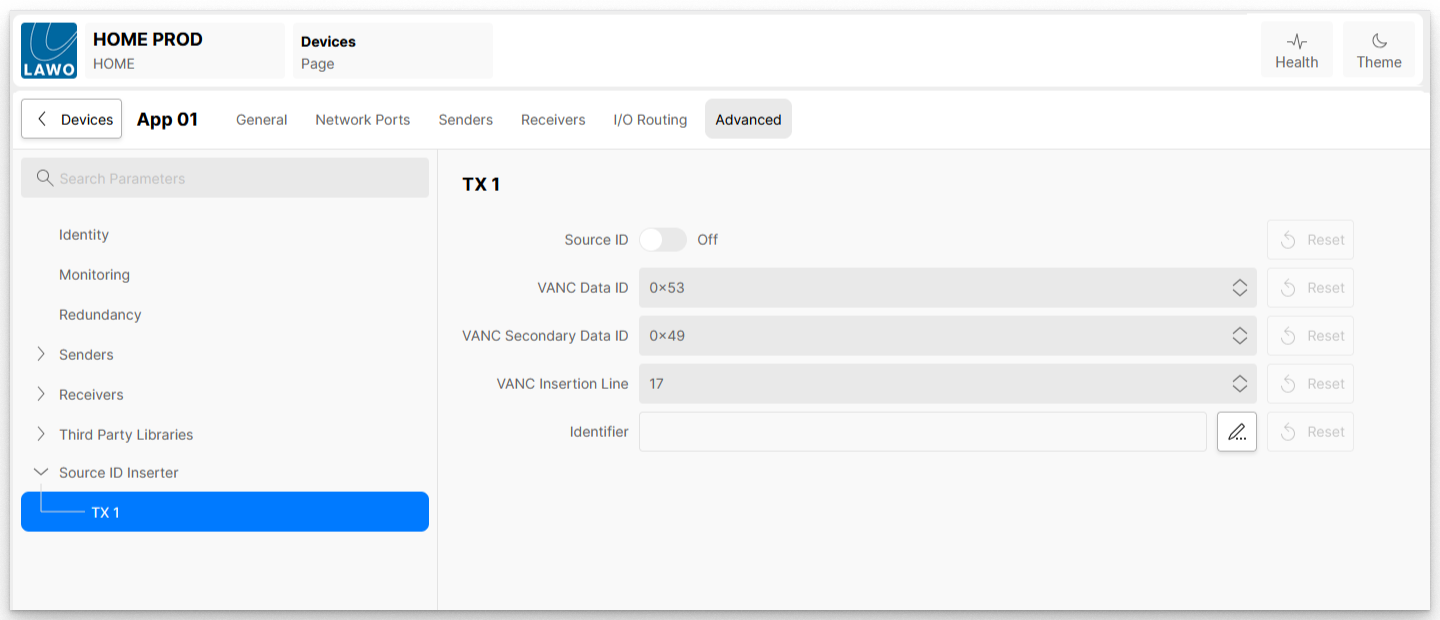
| Control | Range | Default | |
| Source ID | on / off | off | Turns the Source ID inject/override function on or off. When switched off, the Source ID is in Passthrough mode (described below). |
| VANC Data ID (DID) | 0x50 - 0x5F | 0x53 | Defines the DID where the datagram will be inserted. |
| VANC Secondary Data ID (SDID) | 0x01 - 0xFF | 0x49 | Defines the SDID where the datagram will be inserted. |
| VANC Insertion Line | 11 - 19 | 17 | VANC Insertion Line is information passed to, and used by, an IP to SDI Gateway, such as .edge, and will define the video line number that the Source ID data is to be inserted onto. The data will be inserted into the Vertical Ancillary data area, outside of the active picture. |
| Identifier | empty | A textbox type control where the user enters the Source ID data to be carried. |
Passthrough / Insert / Override
If Source ID data is already present on a metadata stream routed to the metadata receiver, this will be transparently passed from the receiver to the sender when the Source ID control is switched off. The Metadata flow will be delayed through the app to compensate for any video processing delay, keeping the metadata and video flows aligned.
If Source ID data is already present on a metadata stream routed to the metadata receiver and that data is present in the configured DIDs and SDIDs, and the Source ID control is switched on, the Source ID data in the Metadata flow will be overwritten with the new value configured in the ‘Identifier’ control.
If Source ID data is not present in a metadata stream routed to the metadata receiver and the Source ID control is switched on, the value configured in the ‘Identifier’ control will be inserted into the metadata flow, into the DID/SDID configured.