HOME Apps - SRT
All video apps, which provide video inputs can receive SRT streams. Streams can be H.264 or HEVC video, with AAC, AC3, MP2 or Opus audio.
Please note: Connections via HOME’s 'Stream Routing' page are not currently supported.
Instead, connections are made by entering a URL for the stream to be received via the 'Receiver → RX n → SRT' menu in the app's Advanced parameters page.
Key Features
The SRT receivers:
- can receive encrypted streams.
- support Caller and Listener modes.
Configuration
Start by selecting SRT as the Input Video Transport in the app's initial configuration:
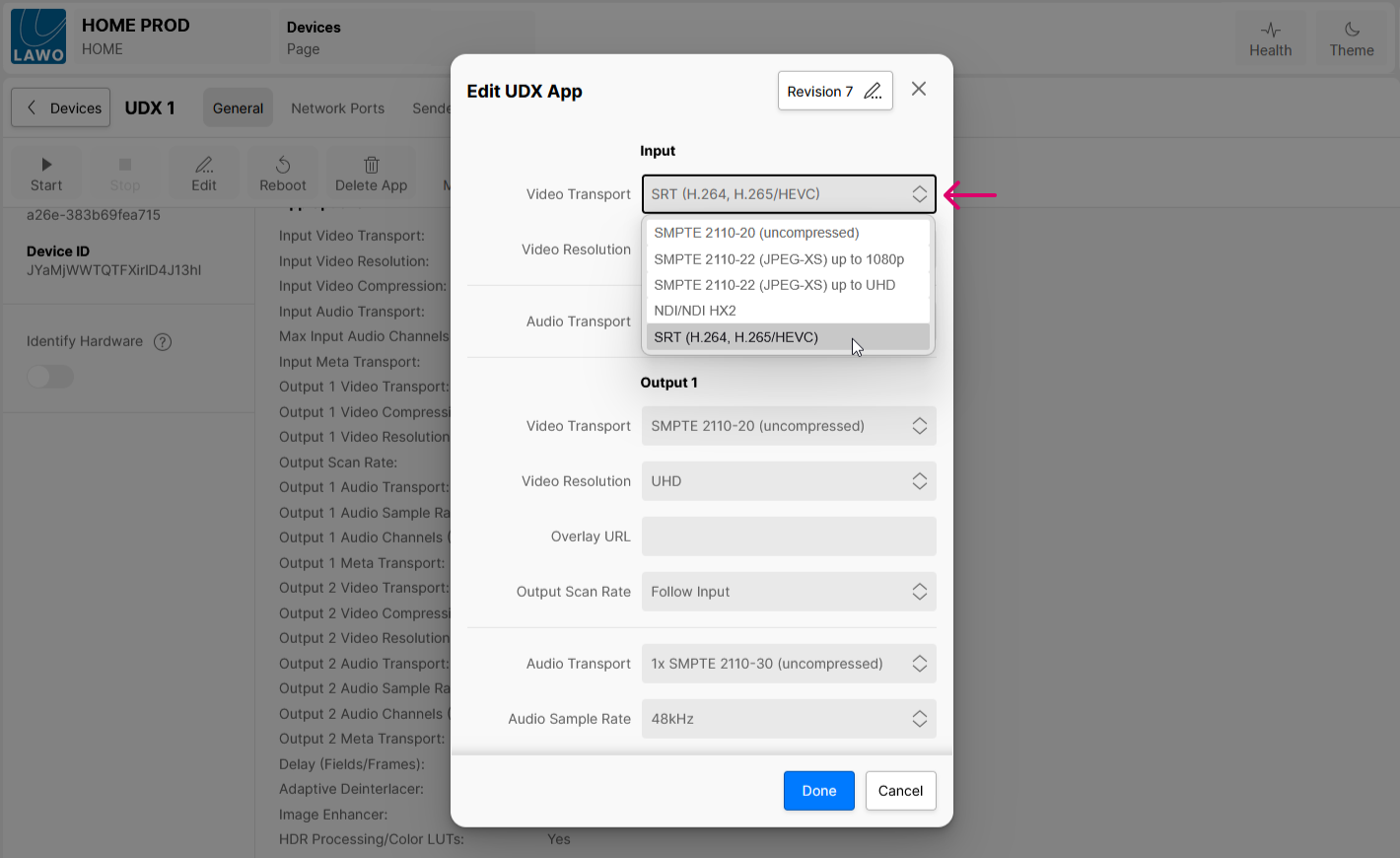
Then start the app in the usual manner.
Once the app is configured and running, open the app's Advanced parameters page and select the 'Receivers → RX n → SRT' menu:
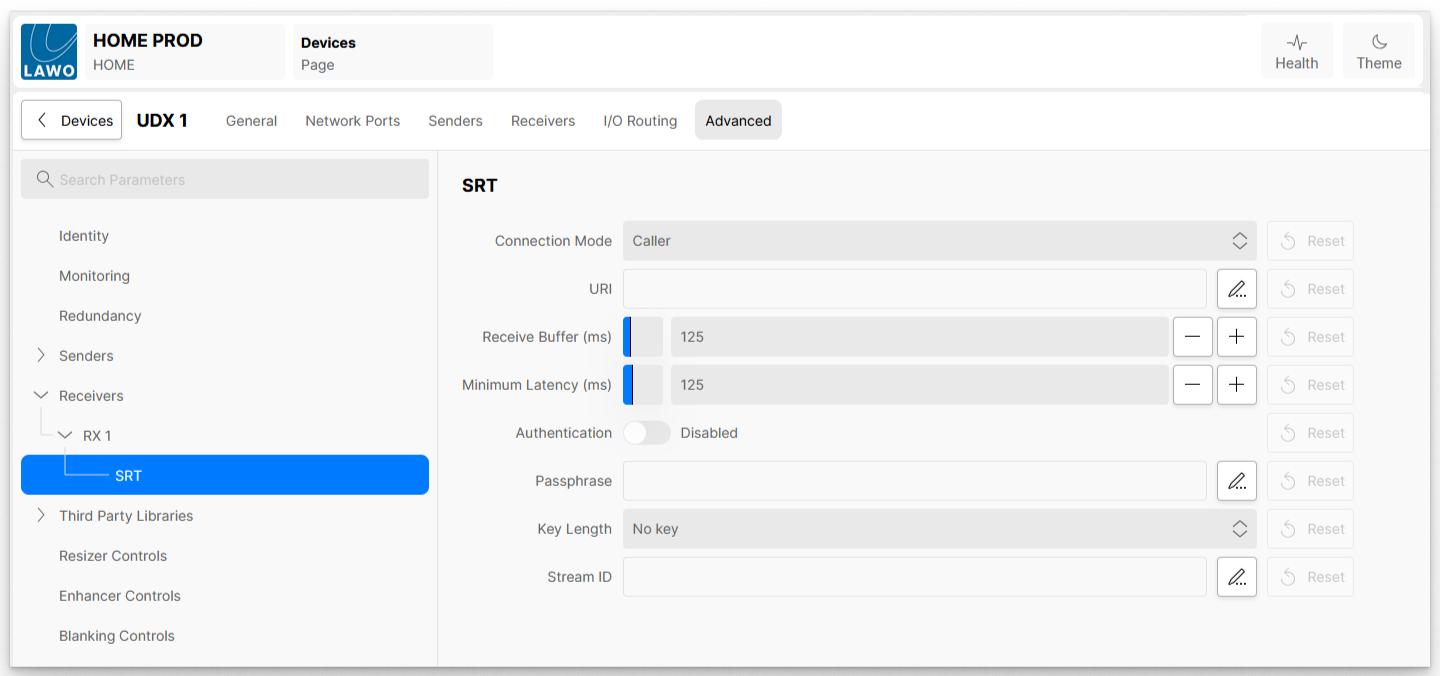
These controls are used to configure the SRT receiver as follows.
Control | Range | Description |
Connection Mode | Caller / Listener | Selects whether the receiver is working in Caller or Listener mode. See Caller / Listener below. |
URI | Enter the URL of the stream to be received. | |
Receive Buffer (ms) | 0 < 125 < 700 | In the case of high bandwidth, high latency streams, video dropouts may be experienced, increasing the size of the Receive Buffer may help prevent this. |
Minimum Latency (ms) | 0 < 125 < 500 | This specifies the SRT receiver buffer that is used to recover lost packets. The size of this buffer will affect the total end-to-end latency. It is recommended to use a value that is at least 3 times the round-trip-time (RTT). Range = 0–500 ms. Note: Latency is for the SRT protocol only and does not include the capture, encoding, decoding etc of the endpoint devices. |
Authentication | Disabled / Enabled | Enables / Disables stream encryption/decryption. |
Passphrase | Text string 10 – 79 characters | Enter the passphrase required to decrypt the SRT stream. Not required when Authentication is disabled. |
Key Length | No key / 16 / 24 / 32 | Must match the AES encryption strength of the SRT stream being received. (16 = 128-bit, 24 = 192-bit, 32 = 256-bit). |
Stream ID | Text string | An optional field which can be used to help identify the stream. |
Caller / Listener
When talking about SRT streams, the phrases ‘Caller’, ‘Listener’, ‘Sender’, ‘Receiver’ are often used, it is important to understand the difference between them.
When an SRT stream is flowing between two devices a connection is made between the devices.
- Sender – the device which is producing the stream
- Receiver – the device which is consuming the stream
- Caller – The device which initiates the connection between the two devices – can be either the sender or the receiver
- Listener – The device which is waiting for incoming connection requests (from a caller) – can be either the sender or the receiver.
The caller device must know the IP address of the listener and the port number of its listener.
The listener device just needs to know that it should listen to the SRT stream on a specific port.
In previous releases the HOME App sender would be in ‘Listener’ mode, 3rd party receivers, such as VLC would be the ‘Caller’. The user would enter into VLC the IP Address and Port of the SRT sender, VLC would then initiate the connection (Call) with the HOME Apps sender, which was sat listening for incoming connection requests.
SRT Encryption
SRT (Secure Reliable Transport) streams can be encrypted to prevent unauthorised use when ‘Authentication’ is enabled a passphrase is required to access the stream. NOTE: The passphrase is not the encryption key itself.
SRT Passphrases:
- Encrypt the payload using AES (128, 192, or 256-bit) to secure the stream against unauthorized viewing.
- Must be 10–79 characters long.
- Both sender and receiver must use the exact same passphrase.
Key Length:
- Defines the AES encryption strength (16 = 128-bit, 24 = 192-bit, 32 = 256-bit).