.edge - Advanced -> Synchronization
The Synchronization parameters define the sync reference options for the processing blade.
Operation (using HOME)
From the main page you can set the sync reference (via Mode Select) and video format for the reference output (connected to REF OUT on the rear I/O plate).
- The PTP sub-pages become relevant if Mode Select is set to PTP.
- The Output Reference H/V Offset sub-page can be used to prepare offsets for the reference output (as described below).
Synchronization
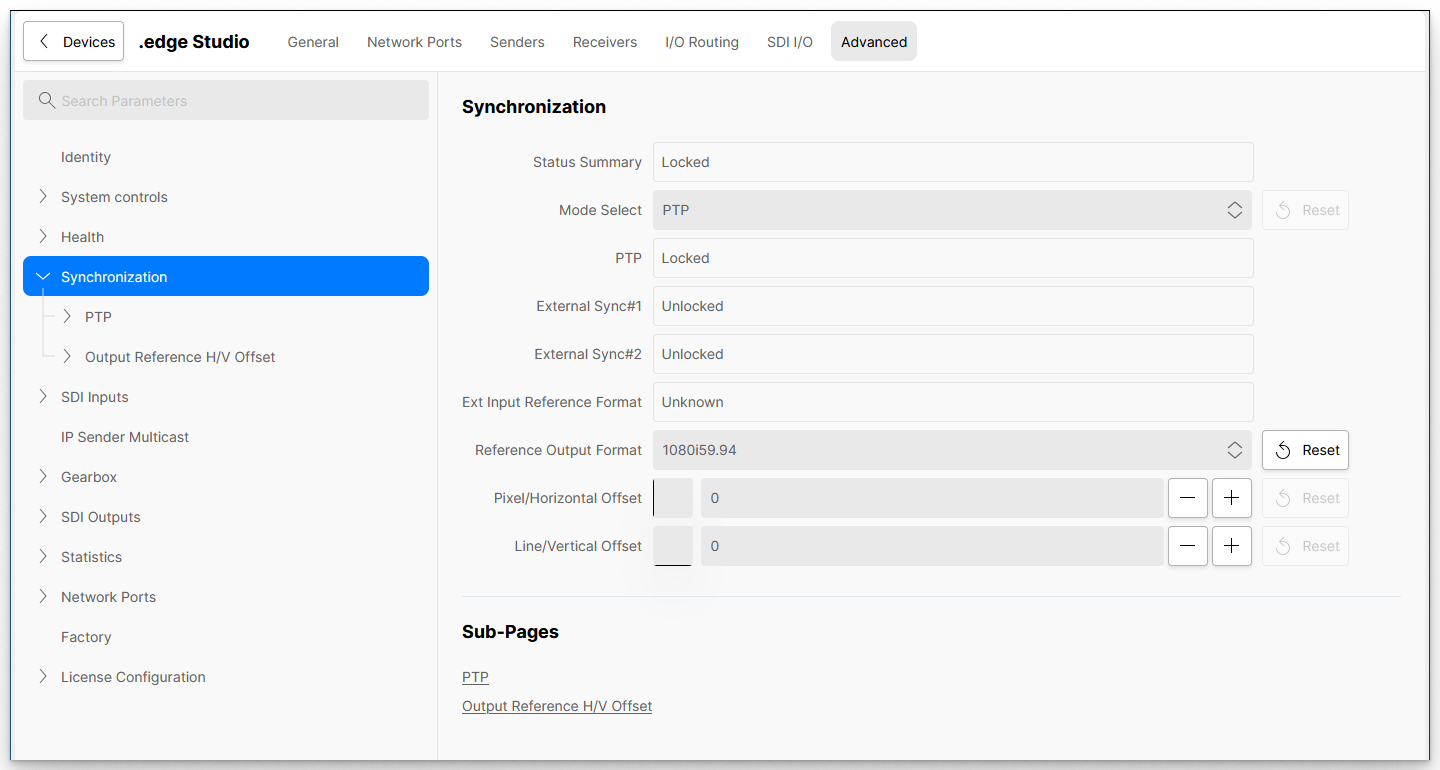
The table below describes all available parameters on the main page.
| Advanced (tree path) | Parameter | Possible Values | Description |
|---|---|---|---|
| Synchronization | Status Summary | Read-only | Shows Locked when the processing blade is locked to the selected timing source. |
| Mode Select | - External Ref#1 | Defines the sync reference for the processing blade. For more information about each option, see .edge - Synchronization. | |
| PTP | Read-only | Shows Locked if the blade is receiving a valid PTP signal from the network. | |
| External Sync#1 | Read-only | Shows Locked if there is a valid sync signal connected to the REF 1 IN (on the rear I/O plate). | |
| External Sync#2 | Read-only | Shows Locked if there is a valid sync signal connected to the REF 2 IN (on the rear I/O plate). | |
| Ext Reference Format | Read-only | If the Mode Select field is set to one of the external Sync inputs, then this field shows the format of the incoming signal. | |
| Reference Output Format | Various | Defines the video format used for the Reference Output signal (REF OUT on the rear I/O plate). | |
| Pixel/Horizontal Offset | Numerical entry | Adds a horizontal offset (in pixels) to the Reference Output signal (REF OUT on the rear I/O plate). The offset is applied to the video format selected in the Reference Output Format field. | |
| Line/Vertical Offset | Numerical entry | Adds a vertical offset (in lines) to the Reference Output signal (REF OUT on the rear I/O plate). The offset is applied to the video format selected in the Reference Output Format field. |
PTP
The PTP sub-pages define the PTP parameters for the processing blade. They become relevant if the sync reference (Mode Select option) is set to PTP.
For more information, please see .edge - PTP Configuration.
Output Reference H/V Offset
This sub-page lists all of the available reference formats that can be generated by the .edge blade. You can use it to add offsets to each individual video format.
Please note: The quickest way to offset the current Reference Output signal is to use the Offset fields on the main Synchronization page. The Output Reference H/V Offset sub pages can be used if you wish to prepare different offsets for different formats.
| Advanced (tree path) | Parameter | Possible Values | Description |
|---|---|---|---|
| Synchronization → Output Reference H/V Offset → video format | Pixel/Horizontal Offset | Numerical entry | Adds a horizontal offset (in pixels) to the video format. The offset is applied to the Reference Output signal (REF OUT on the rear I/O plate) once the format is selected as the Reference Output Format (on the main Synchronization page). |
| Line/Vertical Offset | Numerical entry | Adds a vertical offset (in lines) to the video format. The offset is applied to the Reference Output signal (REF OUT on the rear I/O plate) once the format is selected as the Reference Output Format (on the main Synchronization page). |